3
Names and Functions of the Camera Parts
This device is an intra-oral camera system that provides the dentist
and the patient with intra-oral and extra-oral images. This assists
the dentist in describing the dental procedure being performed, as
well as allowing the dentist to show the results to the patient.
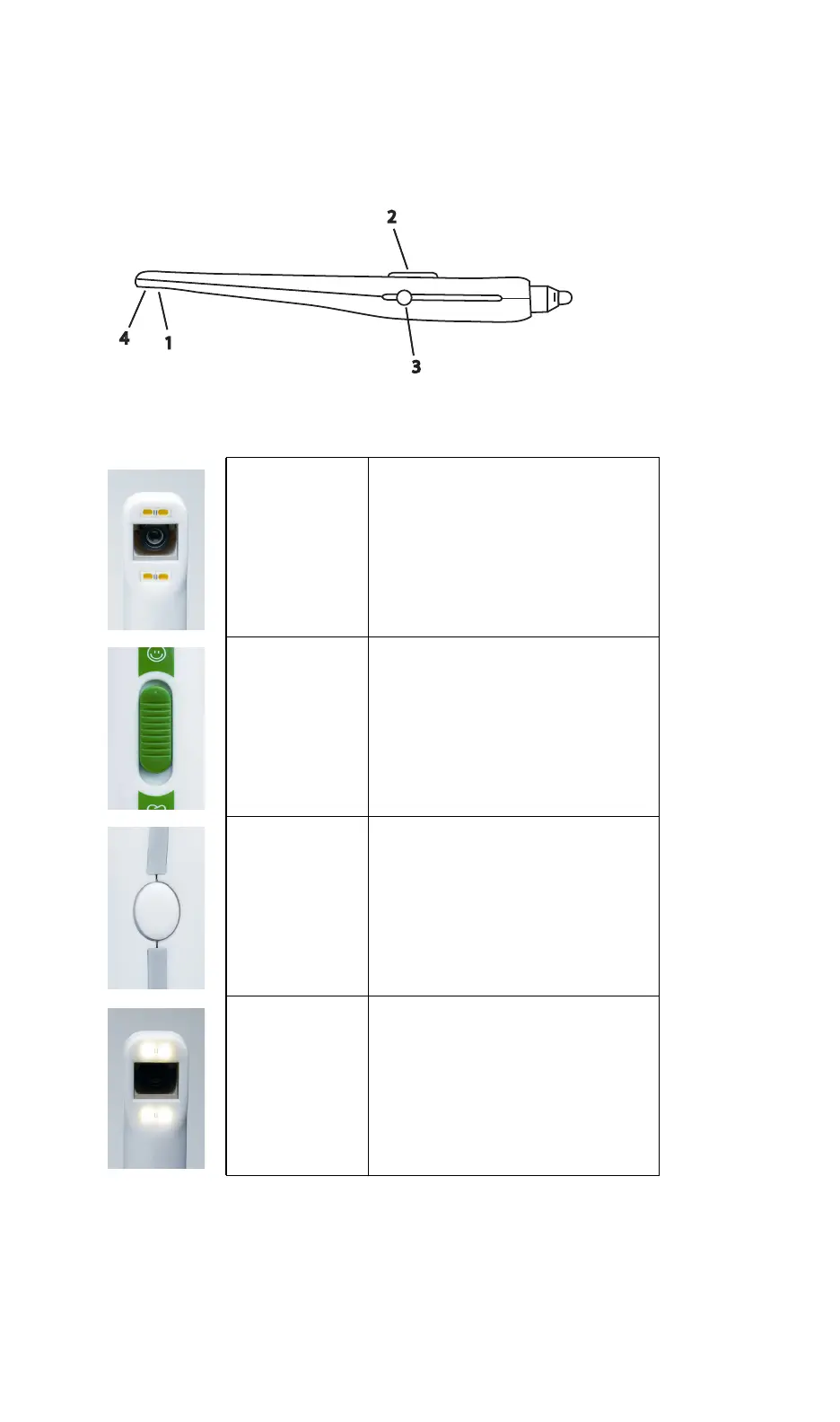
1-Viewing Head Seven-element glass optical lenses
2-Slide Switch
Slide switch offers a sliding continuous
focus mechanism to view intra-oral and
extra-oral images without a lens
change. Slide to the tooth icon to
capture up to three teeth. Slide to the
face icon to capture all other images,
including smile, arch, and portrait.
3-Capture Button
Freeze live images with a click of the
Capture button.
- Single-touch: Freeze image
- Press and hold for 2 seconds or more:
Freeze image and transfer it into the
DEXimage imaging software
4-Light Source Four bright white LEDs
DEXcam
™
3
3
1
2
4
DEXcam3-EN.book Page 3 Monday, January 23, 2017 9:27 AM


 To Next Page