BLE Usage
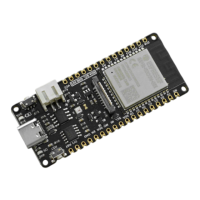
In this demo, the module FireBeetle ESP32-E acts as the BLE server, and the client could be a mobile phone. Install a BLE helper on the phone to
establish BLE connection with the ESP32 module. Here we use the Light Blue on iPhone to show you how to do that, such kind of Bluetooth
pCharacteristic->notify();
}
}
};
void setupBLE()
{
BLEDevice::init("DFRobot_ESP32"); //Create BLE device
pServer = BLEDevice::createServer(); //Create BLE server
pServer->setCallbacks(new MyServerCallbacks()); //Set the callback function of the server
pService = pServer->createService(SERVICE_UUID); //Create BLE service
pCharacteristic = pService->createCharacteristic(
CHARACTERISTIC1_UUID,
BLECharacteristic::PROPERTY_READ|
BLECharacteristic::PROPERTY_NOTIFY|
BLECharacteristic::PROPERTY_WRITE); //Create the characteristic value of the servic
pCharacteristic->setCallbacks(new MyCallbacks()); //Set the callback function of the chracteristic value
pCharacteristic->addDescriptor(new BLE2902());
pCharacteristic->setValue("Hello DFRobot");
pService->start();
BLEAdvertising *pAdvertising = pServer->getAdvertising();
pAdvertising->start();
}
void setup() {
Serial.begin(115200);
setupBLE();
}
void loop() {
delay(3000);
}


 To Next Page
 Loading...