6
10. Broadcasting your games online
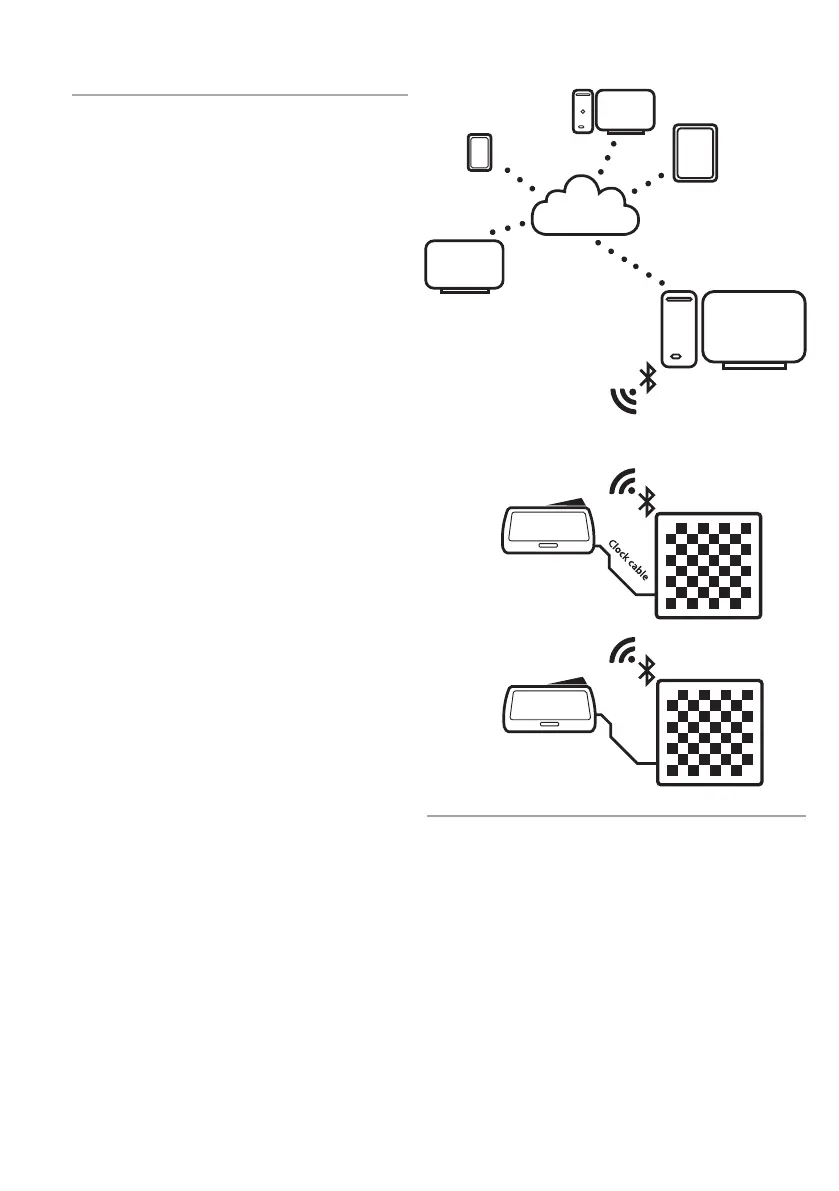
For broadcasting single matches or entire
tournaments the online broadcasting option can
be used. This set-up is achieved by connecting
your boards in a USB star network as shown in
Figure 4.
When all Bluetooth e-Boards are connected to
your admin PC, the boards can be monitored
using DGT LiveChess. In LiveChess the tournament
can be set up and boards can be linked to player
pairings.
In order to broadcast the matches, go to the
“Rounds” tab in LiveChess. Select the boards
of which you wish to broadcast the match and
start the recording. Then go to the “Output” tab
and select “Export to LiveChess Cloud”. This will
automatically create a link you can share with your
viewers. Viewers will be able to follow the matches
on their own devices, such as phones or tablets.
To show the games on local screens at your venue,
open the previously mentioned link in a browser
on a computer or Smart TV.
Figure 4. Online broadcast set-up.
Personal Computer
Livechess Cloud
Tablet
PC
Phone
Smart TV
DGT e- Board
DGT Chess Clock


 To Next Page