
 Need help?
Do you have a question about the Diamond Multimedia AMD HD 5450 and is the answer not in the manual?
Turn off your PC, PSU switch, and unplug the AC power cord before proceeding with installation.
Open your PC case, referring to your PC manufacturer's guide for detailed instructions.
Remove PCIe slot covers or the existing Graphics Card, noting low profile bracket options.
Insert the Diamond Graphics Card, ensuring it is seated and locked securely into the PCIe slot.
Confirm that the PCIe locking mechanism is engaged to secure the graphics card.
Secure the graphics card to the PC case using the bracket thumb screws.
Put your PC case cover back into its closed position.
Plug the AC power cord back in, turn the PSU switch ON, and power up your PC.
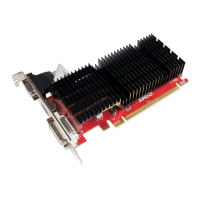
The AMD HD 5450 Graphics Card is a component designed to enhance the visual output and processing capabilities of a personal computer. This installation manual guides users through the process of integrating the graphics card into their existing PC system, ensuring proper setup and functionality. The card is intended for users looking to upgrade their system's graphics performance, enabling better display quality and potentially smoother operation for various applications.
The primary function of the AMD HD 5450 Graphics Card is to process and render visual data, offloading this task from the computer's central processing unit (CPU). By doing so, it allows the CPU to focus on other computational tasks, leading to overall improved system performance. This graphics card is designed to output video signals to a display, supporting various connection types such as HDMI, DVI, and VGA. It is particularly beneficial for tasks that demand significant graphical horsepower, such as multimedia consumption, basic photo and video editing, and casual gaming. While it enhances visual output, it's important to note that this specific model is not designed for high-end gaming or professional-grade graphic design, but rather for general computing and multimedia applications where an upgrade over integrated graphics is desired. The card leverages a PCIe expansion slot on the motherboard to establish a high-speed connection for data transfer, ensuring efficient communication between the graphics card and the rest of the system. Its architecture is built to handle the rendering of 2D and 3D graphics, providing a more vibrant and detailed visual experience compared to standard integrated graphics solutions.
The AMD HD 5450 Graphics Card offers several usage features that make it a practical upgrade for many PC users. One of its key features is its compatibility with a range of operating systems, including Windows 7, 8, 8.1, and 10, ensuring broad applicability across different PC setups. The card supports multiple display outputs, specifically HDMI, DVI, and VGA, allowing users to connect to a variety of monitors, projectors, or televisions. However, it's crucial to understand that while it offers these different output options, it does not support three displays simultaneously. Users can configure it to output to either HDMI/DVI, DVI/VGA, or HDMI/VGA, providing flexibility in display setup for dual-monitor configurations. This multi-output capability is beneficial for users who require more screen real estate for productivity or a more immersive viewing experience.
Installation of the graphics card is designed to be straightforward, guided by the manual's step-by-step instructions. Users are required to open their PC case, remove existing slot covers or graphics cards, and then securely insert the AMD HD 5450 into an available PCIe expansion slot. The card is designed to lock into place, and users are instructed to confirm this locking mechanism for stability. Once seated, the card is secured with bracket thumb screws, ensuring it remains firmly in position within the PC case. The manual also highlights the importance of connecting the appropriate video display cable (HDMI, DVI, or VGA) from the graphics card to the monitor.
A significant aspect of its usage involves the power supply. The manual recommends a 400W power supply for optimal operation, though it notes that a 250W power supply might suffice. It strongly advises users to manually calculate their PC's total power requirements by multiplying the total amps of all components by their total volts. This proactive approach helps ensure that the system has adequate power to run the graphics card and all other components without issues, preventing potential instability or damage. This emphasis on power calculation underscores the importance of system compatibility beyond just physical installation.
The card also comes with low profile brackets, one for HDMI and DVI, and a second for VGA. This feature is particularly useful for users with smaller form factor PCs, allowing the card to fit into more compact cases. For VGA support, both low profile brackets and a second slot cover are needed, indicating a thoughtful design for various PC configurations.
While graphics cards generally require minimal direct maintenance from the user, the AMD HD 5450's maintenance aspects primarily revolve around software updates and ensuring proper physical installation. The most critical maintenance feature is the regular updating of its drivers. The manual provides clear instructions and links to the AMD support site, where users can download the latest drivers specifically for the AMD Radeon HD 5000 series, including the HD 5450. Driver updates are essential for maintaining optimal performance, ensuring compatibility with new software and games, and addressing any potential bugs or security vulnerabilities. AMD frequently releases updated drivers that can improve stability, enhance features, and boost overall graphics performance. The availability of an "Auto Detect" version of the driver installer simplifies this process, allowing users to easily find and install the correct drivers for their system.
Beyond software, physical maintenance involves ensuring the card remains securely seated within its PCIe slot and that all connections are firm. Over time, vibrations or movement of the PC can potentially loosen components. The installation steps, which include confirming the PCIe locking mechanism and securing the card with thumb screws, are preventative measures against such issues. Periodically checking these physical connections can help maintain consistent performance and prevent intermittent display problems.
Another aspect of maintenance, though not explicitly detailed as a user task, relates to the card's cooling system. Graphics cards generate heat during operation, and the AMD HD 5450, like most graphics cards, incorporates a fan to dissipate this heat. While users are not typically expected to perform internal cleaning of the card's fan or heatsink, ensuring good airflow within the PC case is a general maintenance practice that benefits all internal components, including the graphics card. Keeping the PC case free of dust and ensuring that the case fans are functioning correctly helps the graphics card's cooling system operate efficiently, prolonging its lifespan and preventing performance degradation due due to overheating.
In summary, the maintenance of the AMD HD 5450 Graphics Card is largely centered on proactive software management through driver updates and ensuring the physical integrity of its installation within the PC. These practices, combined with general PC upkeep, contribute to the longevity and consistent performance of the graphics card.
 General
| GPU | AMD Radeon HD 5450 |
|---|---|
| GPU Architecture | Terascale 2 |
| Stream Processors | 80 |
| Core Clock | 650 MHz |
| Memory Size | 1 GB |
| Memory Type | DDR3 |
| Memory Interface | 64-bit |
| Memory Clock | 800 MHz |
| DirectX Support | DirectX 11 |
| Outputs | DVI, HDMI, VGA |
| Interface | PCIe 2.1 x16 |
| Max Resolution | 2560 x 1600 |
| Power Consumption | 19 W |
| OpenGL Support | OpenGL 3.2 |
| Cooling | Passive |

 To Next Page
