QUICK SETUP INSTRUCTIONS - MEMORY LANE TO TWO AMPLIFIERS
If you’re using the ST-MIX to interface a Memory Lane to two guitar amplifiers, follow
these basic instructions:
POWERING
Take the power adapter plug normally connected directly to the Memory Lane (whether
using the Memory Lane’s provided 24VDC adapter, or a custom cable used with pedal
power supplies providing between 18 and 24VDC), and connect it instead to any one of
the two power jacks on the ST-MIX. Then, using the provided patch cable, connect the
remaining power jack on the ST-MIX to the DC input on the Memory Lane.
SIGNAL CONNECTIONS
1. Connect the MIX/DIRECT output of the Memory Lane to the L IN input of the ST-
MIX.
2. Connect the DELAY ONLY output of the Memory Lane to the PAN IN input of the ST-
MIX.
3. Connect the L OUT and R OUT outputs to the inputs of the two guitar amplifiers.
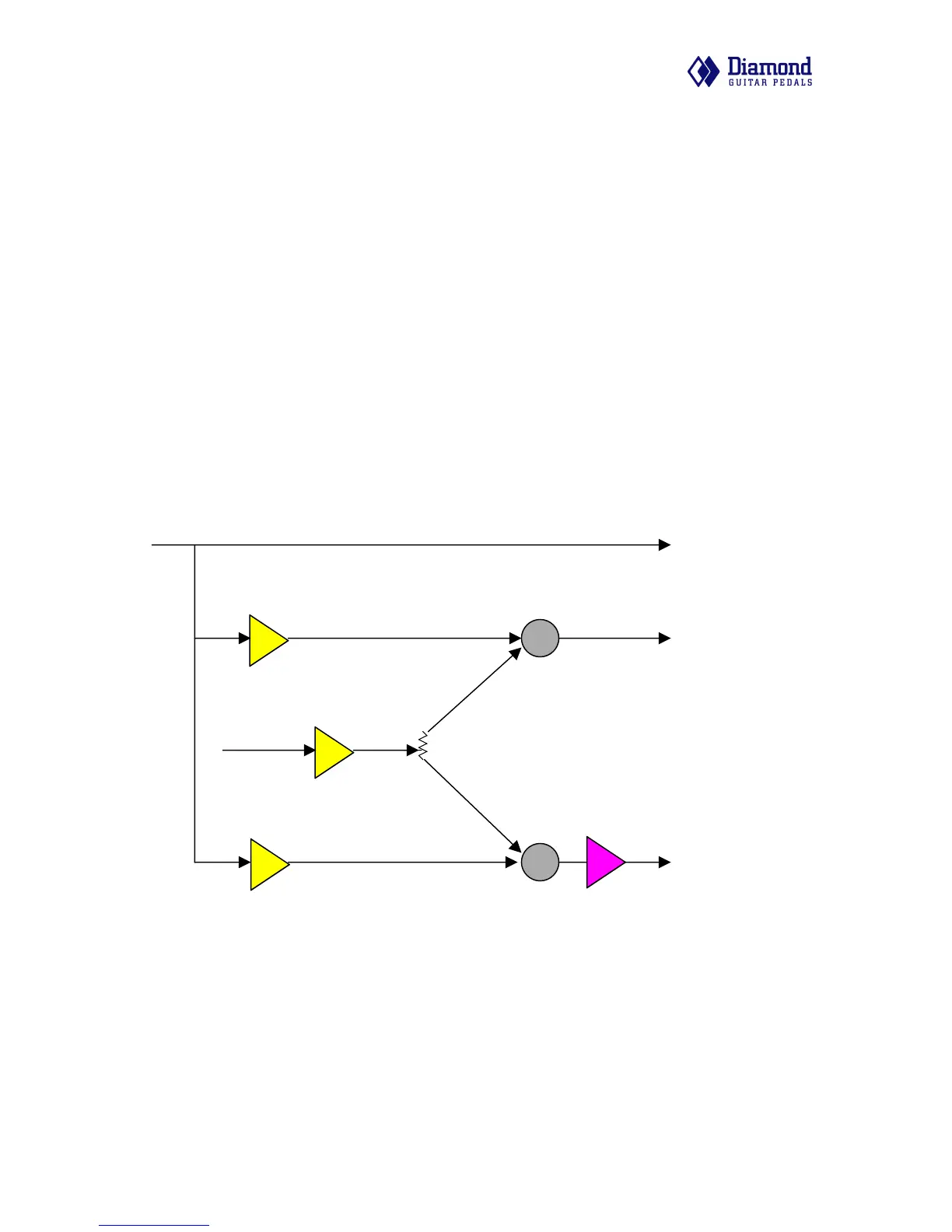
Σ
L IN
L OUT
Direct Signal
PAN
Σ
+/- 1
R OUT
180 deg
Switch /
Isolation
Xformer
BUF
BUF
BUF
L BYP
PAN IN
ST-MIX mono input / stereo output
OTHER APPLICATIONS
The unique collection of inputs and outputs on the ST-MIX allows for many other appli-
cations and setup topologies.
!
ST-MIX user manual v1.00! 3



 To Next Page