Product Diagram
Charging the light
Using the light
WARRANTY INFORMATION FOR DIGIPOWER
PRODUCTS, A DIVISION OF MIZCO INTERNATIONAL, INC.
We warrant all Digipower branded products against defects in
material and workmanship for two years from the original date
of purchase. At our option, we shall repair or replace the
defective unit covered by this warranty. Please retain the
dated sales receipt as evidence of the date of purchase in order
to obtain any warranty service. This warranty is void if the
product has been handled or used in any manner which is
inconsistent with the instructions accompanying the product
or the intended use of the product. This warranty does not
cover any damage due to accident, misuse, abuse, or
negligence. This warranty does not extend to equipment used
with the product. This warranty is valid only if the product is
used on a compatible device as specied on or attached to the
product package. To verify compatibility, please check the
product package for details or visit:
www.DigiPowerSolutions.com.
Repair or replacement, as provided under this warranty, is your
exclusive remedy. We shall not be liable for any incidental or
consequential damages. DigiPower hereby expressly disclaims
any and all implied warranties of merchantability and tness
for a particular purpose.
Some states/countries do not allow the exclusion or limitation
of incidental or consequential damages, so the above
limitation or exclusion may not apply to you.
Some states/countries do not allow limitations on implied
warranties, so the above limitation may not apply to you.
This warranty gives you specic legal rights, and you may also
have other rights that vary from state to state and country to
country.
FCC STATEMENT:
This equipment has been tested and found to comply
with the limits for a Class B digital device, pursuant to
Part 15 of the FCC Rules. These limits are designed to
provide reasonable protection against harmful
interference in a residential installation. This equipment
generates uses and can radiate radio frequency energy
and, if not installed and used in accordance with the
instructions, may cause harmful interference to radio
communications. However, there is no guarantee that
interference will not occur in a particular installation. If
this equipment does cause harmful interference to radio
or television reception, which can be determined by
turning the equipment o and on, the user is encouraged
to try to correct the interference by one or more of the
following measures:
Reorient or relocate the receiving antenna. Increase the
separation between the equipment and receiver.
Connect the equipment into an outlet on a circuit
dierent from that to which the receiver is connected.
Consult the dealer or an experienced radio/ TV technician
for help. This device complies with part 15 of the FCC
rules. Operation is subject to the following two conditions
1. this device may not cause harmful interference, and
2. this device must accept any interference received,
including interference that may cause undesired
operation.
ICES
This Class B digital apparatus complies with
Canadian ICES-003.
English English English English English
English English
For disposal in countries outside of the European
Union This symbol is only valid in the European
Union (EU). If you wish to discard this product
please contact your local authorities or dealer and ask
for the correct method of disposal.
This symbol means that the product cannot be disposed
of with normal household waste (2012/19/EU).
1. old devices can be returned free of charge to suitable
collection points.
2. these are collected there professionally or prepared
for reuse. Old appliances may contain harmful
substances that can harm the environment and
human health. The raw materials contained can
contribute to environmental protection through their
recycling.
3. the deletion of personal data on the waste
equipment to be disposed of must be carried out by
the end user on his own responsibility.
Questions? Problems? Picked up the wrong item?
Before returning to the Store, please give our
customer service team a chance to help.
email us at TechSupport@Mizco.com
for a seamless and speedy resolution.
Mizco International, Inc.
Cranford, New Jersey
All rights reserved.
DIGIPOWER is a registered trademark
of Mizco International Inc.
• Fully charge the light before rst use
• Connect the included micro USB cable from the
light to a USB charger (not included)
• When all 4 white LEDs remain on the light is fully
charged, charge time approximately 3 hours
with a 2amp USB charger
• Short press the Power button to turn the light on
• Short press the rotary knob to change between
color temperature and brightness adjustment
• When the mode indicator is blinking blue, color
temperature is adjusted by turning the dial left
or right
• When the mode indicator is blue, brightness is
adjusted by turning the dial left or right
• To quickly go to full brightness/highest color
temperature, press and hold the Power button
for two seconds
• When Battery level indicator shows one LED left,
the power level is low and the light should be
recharged soon
Attaching the light to a camera shoe
• Thread the camera shoe adapter onto the
bottom of the light
• Slide the shoe adapter into the shoe of a DSLR or
Mirrorless camera, turn the thumbwheel
clockwise to secure it
1. Battery level indicator
2. Mode indicator
3. Powerbutton
4. Rotary knob adjusts color
temperature and
brightness
5. Micro USB charge port
6. ¼” thread mount
120 LED VIDEO LIGHT
Quick Guide
3
2
4
6
5
1
1
2
Item No. DP-VL120
GO VIRAL
Front

 Need help?
 General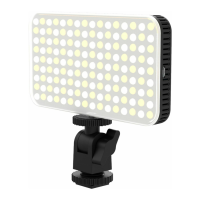

 To Next Page