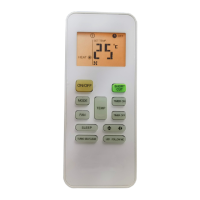
This document describes the Direct Air Remote Controller (Model CR103-RG57A3), designed for controlling air conditioning units. It provides an overview of its functions, technical specifications, usage features, and maintenance instructions.
Function Description
The remote controller is used to select and adjust various functions of an air conditioning unit. It allows users to:
- Turn the unit on/off: A dedicated ON/OFF button controls the power state.
- Modify selected functions: The MODE button is central to entering parameter setting interfaces.
- Adjust parameters and choose functions: TEMP ▲ and ▼ buttons are used for fine-tuning parameters or selecting specific functions (F1-F9 and E1-E9) on unadjustable interfaces.
- Confirm settings: The TIMER ON button confirms the set parameters and transmits the signal to the air conditioner.
- Select parameters for FAN & TIMER OFF: The FAN & TIMER OFF button allows selection of parameters within the setting interface.
- Lock settings: Holding both the FAN and TIMER OFF buttons for 2 seconds locks all current indoor unit settings, preventing further operation except for unlocking.
The remote controller supports a range of advanced functions, including:
- Auto-start function: Allows setting the air conditioner to automatically start or not.
- Heating temperature compensation: Adjusts the heating temperature within a range of -6°C to 6°C.
- Anti-cold air function: An intelligent feature that adjusts the anti-cold air temperature based on room temperature to enhance comfort and heating efficiency. A general anti-cold air setting is also available, fixed regardless of room temperature.
- Speed control of indoor fan motor: After the set temperature is reached, the fan motor speed can be controlled, with options for stopping, lowest speed, setting speed, or thermal function.
- Louver angle memory function: Remembers the louver angle settings, even after switching off or power failure. Options include canceling memory, enabling memory on switch-off/power failure, or enabling memory on switch-off/disabling on power failure.
- Heating only or Cooling & heating setting: Configures the unit for heating only (HH) or both cooling and heating (CH).
- Cooling temperature compensation: Adjusts the cooling temperature within a range of -2°C to 2°C.
- Refrigerant leakage detection: Allows enabling or disabling the refrigerant leakage detection function.
- Cleaning filter reminder: Sets an "on" or "off" reminder for filter cleaning.
- High temperature setting: Sets a high temperature limit for operation, ranging from 25°C to 30°C.
- Filter replacement reminder: Sets an "on" or "off" reminder for filter replacement.
- Lowest temperature setting: Sets a lowest temperature limit for operation, ranging from 17°C to 24°C.
- Special Anti-cold air function setting: Enables or disables a specific anti-cold air function.
- Priority setting of heating or cooling (for multi-models): Designates whether heating (H) or cooling (C) mode takes priority.
- Network Address setting: Configures the network address of the unit (0-63) or cancels the address modification.
- Twins setting: Sets the unit as a main unit (1), subsidiary unit (2), or no twins (0).
- Capacity code selection: Selects the capacity code corresponding to different models (e.g., 18K, 24K, 30K, 35K, 48K, 54K, 60K).
- Static pressure setting: Adjusts the static pressure value (0-4).
- Point check function: A diagnostic feature activated by pressing specific button sequences, which displays various information about the air conditioner's operational status, including temperatures (T1, T2, T3, T4, T2B, TP, TH), frequencies (Targeted and Actual), fan speeds (Indoor and Outdoor), EXV opening angle, compressor continuous running time, and causes of compressor stop.
Important Technical Specifications
- Model: RG57A3/BGEF
- Rated Voltage: 3.0V (uses two R03/LR03 dry batteries)
- Signal Receiving Range: 8m (maximum distance for effective signal transmission)
- Environment: -5°C to 60°C (operating temperature range)
Usage Features
- Battery Installation: The remote controller uses two alkaline dry batteries (R03/LR03X2). Batteries are inserted by sliding off the cover, ensuring correct polarity (+ and -), and then reattaching the cover.
- Initial Setup/Reset: After battery installation, within the first 30 seconds, holding down the MODE, FAN, and TIMER ON buttons together for 5 seconds will enter a function reset state, indicated by "F1" on the LCD.
- Signal Transmission: For proper operation, the remote controller's signals must reach the indoor unit's receiver. Obstructions like curtains or doors can block signals. Direct sunlight on the indoor unit's infrared receiver can also interfere with operation.
- Interference: Other electrical appliances might react to the remote controller's signals; repositioning these appliances or consulting a dealer is advised.
- Liquid and Heat Protection: The remote controller should be protected from liquid spills, direct sunlight, and excessive heat.
- Limited Activation Time: The remote controller is only enabled within 10 minutes after the indoor unit is powered on and must be switched off.
- Function Availability: Some functions of the remote controller may not be available if the air conditioning unit does not support them.
Maintenance Features
- Battery Replacement: When replacing batteries, do not mix old and new batteries or different types.
- Battery Storage: If the remote controller will not be used for 2 or 3 months, it is recommended to remove the batteries to prevent leakage.
- Battery Disposal: Batteries should not be disposed of as unsorted municipal waste. Separate collection and special treatment are necessary for environmental reasons.

 Need help?
 General

 To Next Page