7
Screen
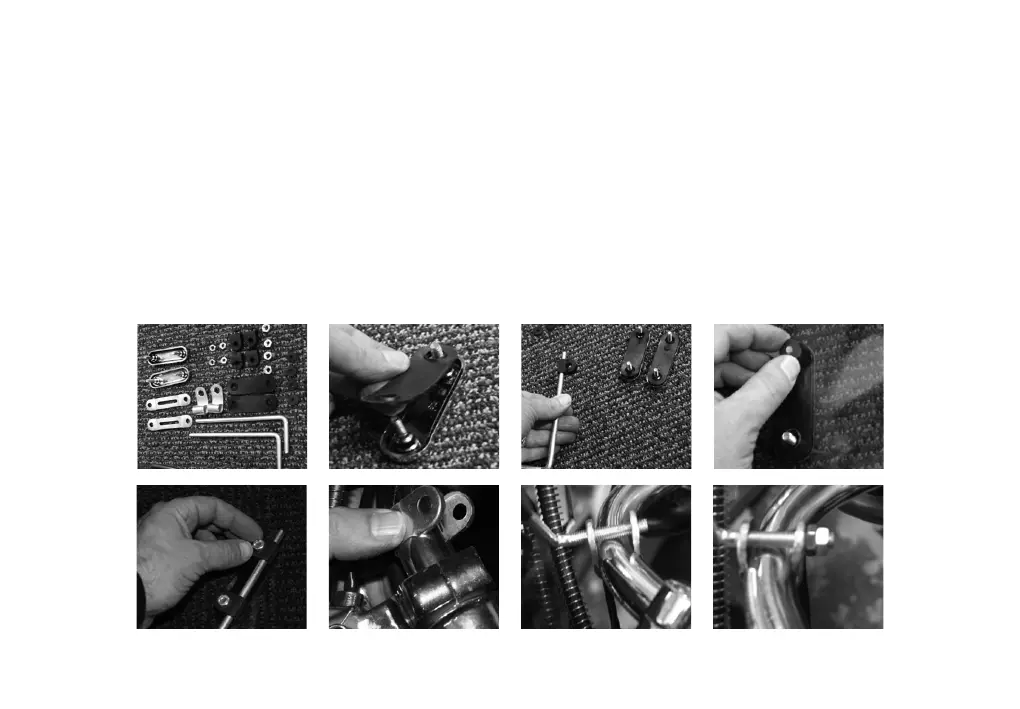
Start by adding the backing rubber to the chrome screen bracket with the 2 lugs.
Add the 2 ‘U’ shaped rubber mounts to each mounting rod. Push the chrome lugs
through the holes in the screen and secure with rubber washer. Attach the bar to the
lugs with the nuts provided. Attach the thin metal bracket around the handle bars.
Place the threaded end of the bar through the bracket either side of the handlebars.
Secure with 2 nuts and adjust screen into required position before tightening the 4
nuts on the mounting bar.


 To Next Page