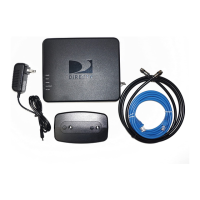
†
DIRECTV recommends using an electrical wall outlet to ensure uninterrupted access to Internet-based services. The
services that require an Internet connection will not be accessible if your power strip or surge protector is turned off.
Get ConneCted
•
Get instant access to over 6,000 shows and movies
*
at no extra charge
1
•
Stream YouTube
™
videos on your TV using SMART SEARCH
™
2
•
Easily access TV Apps on your HD DVR at any time
3
•
Turn your iPad
®
into the ultimate DIRECTV
®
Remote with the
DIRECTV
™
iPad
®
App
4
Your DIRECTV is active; now take it to the next level
with your DIRECTV CINEMA
™
Connection Kit
QUICK START GUIDE:
Getting connected takes just a few easy steps
*6,000 titles available with CHOICE XTRA™ package and above. Options are lower in other packages.
1
Unplug the Cinema Connection Kit power plug from the electrical
wall outlet.
2
Connect one end of the blue Ethernet cable to the Cinema Connection
Kit and the other to an open port on your router.
3
Plug the Cinema Connection Kit directly into a wall outlet or power strip
†
if necessary. In about one minute, three lights on the Cinema Connection
Kit should turn green.

 Need help?
 General

 To Next Page