dIXEL
Operating instruction manual
1592025920
1592025920 XEV22D GB r1.0 2008.09.05.doc XEV22D 2/4
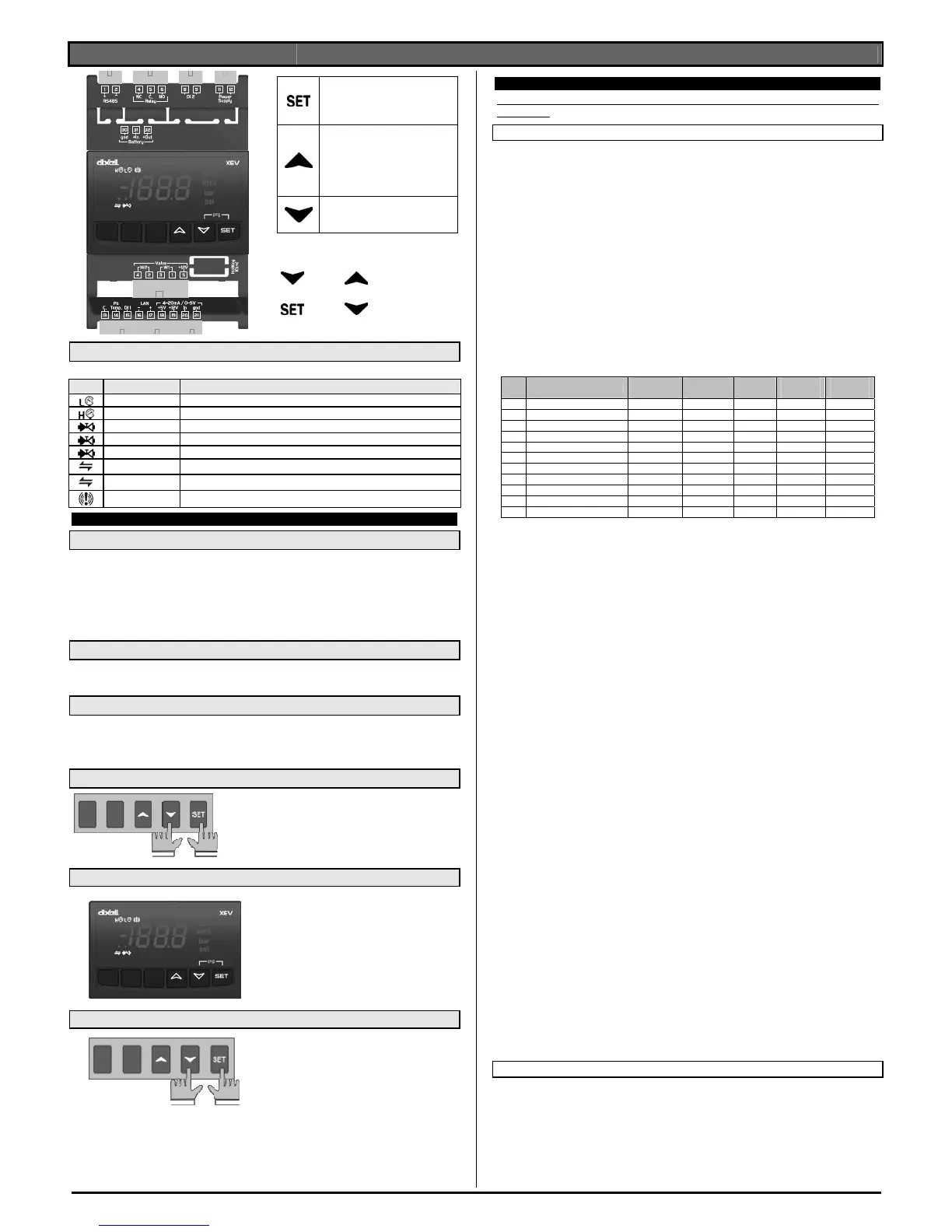
To display and to modify the set
point. In programming mode it
selects a parameter or it
confirms a value.
By pressing and releasing this
key, it’s possible to see the
values of the probes.
In programming mode it slides
the codes of the parameters or it
increases their values.
In programming mode it slides
the codes of parameters or it
decreases their values.
KEYS COMBINATIONS
+
To lock or to unlock the
keyboard
+
To enter programming
mode.
6.1 XEV22D LEDS
On display there are some luminous dots. Their meaning is described in the following table:
LED MODE Function
ON Low pressure alarm
ON Maximum Operating Pressure alarm
OFF Valve is completely closed
BLINKING Valve is moving
ON Valve is completely opened
BLINKING Serial communication present
OFF Serial communication absent
ON Superheat alarm
7. USER INTERFACE
7.1 TO SEE THE READ-ONLY VALUES
1) Press and release o key;
2) First read-only label is showed;
3) Slide labels with o or n narrows;
4) Press SET to see read-only value. To change parameter you want to see,
press SET
5) To leave the fast access menu, press and release SET+o or wait time-out of
about 3 minutes.
7.2 TO SEE THE SET POINT
1) Press the SET key until the set point will be showed;
2) To come back to see temperature, wait about 5s or press newly SET key.
7.3 TO MODIFY THE SET POINT
To change the set point value operate as follows:
1) Press the SET key until the set point will be showed;
2) Use o or n to change its value.
3) Press “SET” to store the new value.
7.4 TO GO TO “PR1” PARAMETERS
To enter in “Pr1” level menu:
1) Pressing SET+ n keys for about 3 seconds.
2) Instruments shows first parameter in Pr1
menu
7.5 TO GO TO “PR2” PARAMETERS
To enter to “Pr2” parameters list:
1. Enter to “Pr1”
2. Select “Pr2” parameter and press
SET
3. The “PAS” label will be shown, then
“0 - - “ with 0 blinking.
4. Insert “321” password through o
and n keys, then press SET to
confirm.
7.6 TO MODIFY THE PARAMETERS VALUE
To change the parameter’s value
operate as follows:
1. Enter the Programming mode by
pressing the Set and n key for
about 3s.
2. Select the required parameter.
3. Press the “SET” key to display its value
4. Use o or n to change its value.
5. Press “SET” to store the new value and move to the following parameter.
To exit: Press SET + o or wait 30s without pressing a key.
NOTE: the set value is stored even when the procedure is exited by waiting the
time-out to expire.
8. PARAMETER LIST
NOTE: All pressure parameters are relatives or absolutes depending on PrM
parameter.
REGULATION
FtY Kind of gas (R22, 134, 404, 407, 410, 507,CO2): Type of gas used by
plant. Fundamental parameter for correct functioning of all system.
PEO Probe Error opening percentage: (0÷100%) if a temporary probe error
occurs, valve opening percentage is PEo until PEd time is elapsed. If PEO
is different from 0 it assures cooling also with probe error, because even if
the device cannot calculate superheat the valve can work at PEO
percentage.
PEd Probe Error delay before stopping regulation: (0÷239 sec. –
240=On=unlimited) if probe error duration is bigger than PEd valve closes
completely. Pf message is showed. If PEd=On valve opening is PEo until
probe error finishes;
tEU Type of Stepper motor: (uP- bP) it permits to select the kind of valve.
uP= 5-6 wires unipolar valves; bP= 4 wires bipolar valves; !!!!! WARNING
!!!!! by changing this parameter the valve has to be reinitialized.
tEP Predefined valve selection: (0÷10) if tEP=0 the user has to modify all the
parameters of configuration in order to use the valve. If tEP is different
from 0 the device performs a fast configuration of the following
parameters: LSt, uSt, Sr, CPP, CHd. To select the right number please
read the following table:
tEP Model
LSt
(steps*10)
uSt
(steps*10)
CPP
(mA*10)
CHd
(mA*10)
Sr
(step/s)
0
Manual settings
Par Par Par
Par
Par
1 Sporlan SEI 0.5-20 10 159 20 5 200
2 Sporlan SEI 30 20 319 20 5 200
3 Sporlan SEH 50-250 40 638 20 5 200
4 Alco EX5-EX6 10 75 40 10 450
5 Alco EX7 25 160 75 25 330
6 Alco EX8 330 step/s 25 260 80 50 330
7 Alco EX8 500 step/s 25 260 80 50 500
8 Danfoss ETS-25/50 20 262 14 8 120
9 Danfoss ETS-100 30 353 14 8 120
10 Danfoss ETS-250/400 35 381 14 8 120
If tEP is different from 0 previous configuration of LSt,uSt,Sr,CPP and
CHd are overwritten.
LSt Minimum number of steps: (0 ÷ USt) It permits to select the minimum
number of steps. At this number of steps the valve should be closed. So
it’s necessary the reading of manufacturer datasheet to set correctly this
parameter. It’s the minimum number of steps to stay in advised range of
functioning; !!!!! WARNING !!!!! by changing this parameter the valve
has to be reinitialized. The device perform this procedure
automatically and restart its normal functioning when the
programming mode ends;
USt Maximum number of steps: (LSt÷800*10) It permits to select the
maximum number of steps. At this number of steps the valve should be
completely opened. Read the datasheet provided by manufacturer of the
valve to set correctly this parameter. It’s the maximum number of steps to
stay in advised range of functioning; !!!!! WARNING !!!!! by changing this
parameter the valve has to be reinitialized. The device perform this
procedure automatically and restart its normal functioning when the
programming mode ends;
Sr Step rate (10÷600 step/sec) it’s the maximum speed to change step
without losing precision (=losing steps). It’s advised to stay under the
maximum speed;
CPP Current per phase (only bipolar valves): (0÷100*10mA) it’s the
maximum current per phase used to drive valve. It’s used only with
bipolar valves
CHd Holding current per phase (only bipolar valves): (0÷100*10mA) it’s the
current per phase when the valve is stopped for more than 4 minutes. It’s
used only with bipolar valves
OPE Start opening Percentage: (0÷100%) Opening valve percentage when
start function is active and during post defrost phase. This phase duration
is SFd time;
SFd Start Function duration: (0.0÷42.0 min: tens of seconds) It sets start
function duration and post-defrost duration. During this phase the
alarms are neglected
Sti Stop regulation interval: (0.0÷24.0 hours: tens of minutes) after
regulating continuously for Sti time, the valve closes for Std time in order
to prevent ice creation.
Std Stop duration: (0÷60 min.) it defines stop regulation time after Sti. During
this stop display shows StP message
MnF Maximum opening percentage at normal Functioning: (0÷100%)
during regulation it sets the maximum valve opening percentage.
FoP Forced Opening percentage: (0÷100 - nu) if FoP=nu valve works with
regulation algorithm. If Fop is different from nu the valve stays at Fop
opening percentage. This function could be useful during plant starting or
during service operations.
PI PARAMETERS (trained staff)


 To Next Page
 Loading...