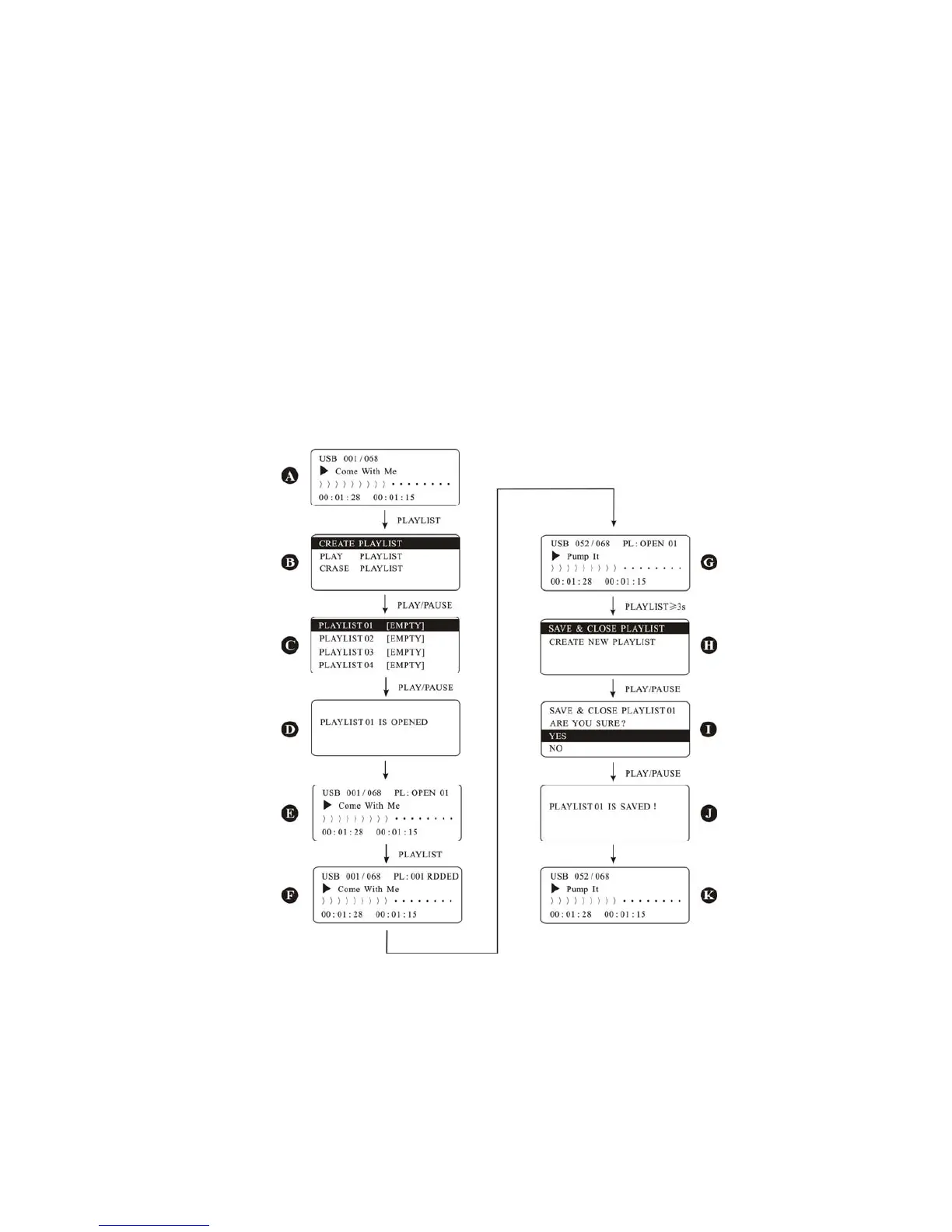
refer to fig 3.3.2-2 below:
After finish loading, press PLAY/PAUSE or PUSH/ENTER to go into the playback, like Fig A, and also you
can go into pause as you wish. When press PLAYLIST, the Fig B will appear, from the top to the
bottom, there are 3 playlist: CREATE PLAYLIST, PLAY PLAYLIST and ERASE PLAYLIST.
Select the CREATE PLAYLIST, and press the PAUSE/TNTER or PLAY/PAUSE key, the display shows 10
playlist like fig C and all of them are empty.
Select each of them and set up your playlist, like the first list PLAYLIST 01 [EMPTY], press PUSH/ENTER or
PLAY/PAUSE, Fig D will appear, and then Fig E, on the left top of Fig E, there is a clue on playlist 1, you
can put your songs inside the list.
Use NEXT or PREVIOUS to select the songs, then press PLAYLIST, the Fig F will appear, it means the first
song has been added to the playlist, so use the same method to put other songs to the playlist 1, like
the Fig G which means 52 songs have been added to the playlist1.
When songs are added to the playlist, you can store them. just press PLAYLIST for 3 seconds till the Fig
H appear, and select SAVE & CLOSE PLAYLIST 01, press PUSH/ENTER or PLAY/PAUSE, Fig I will appear,
then press YES, and PUSH/ENTER or PLAY/PAUSE, fig J will appear, then Fig K. then playlist 1 is done.
Use the same methods to set up the playlist 2 to 10, during the set up, if you want to cancel, please
press MENU/NO to cancel.
Fig 3.3.2-2 set up the playlist
If you want to exchange the SD/USB, please press USB/SD, and then press PLAY/PAUSE or
PUSH/ENTER to confirm. After loading, it is ok to play.
3 PLAY PLAYLIST
After setting up the playlist, you can play each of them, please refer to the Fig 3.3.2-3 for operation.
During playback of a song, press PLAYLIST, Fig B appears, select the PLAY LIST and press PLAY/PAUSE,
Fig C appears, and you may found the PLAYLIST is not empty anymore.
Select PLAYLIST01, and press PLAY/PAUSE, Fig D appears, on the top right of fig D, it shows the current
6


 To Next Page