©
2019 DJI All Rights Reserved.
39
ROBOMASTER S1
User Manual
Start
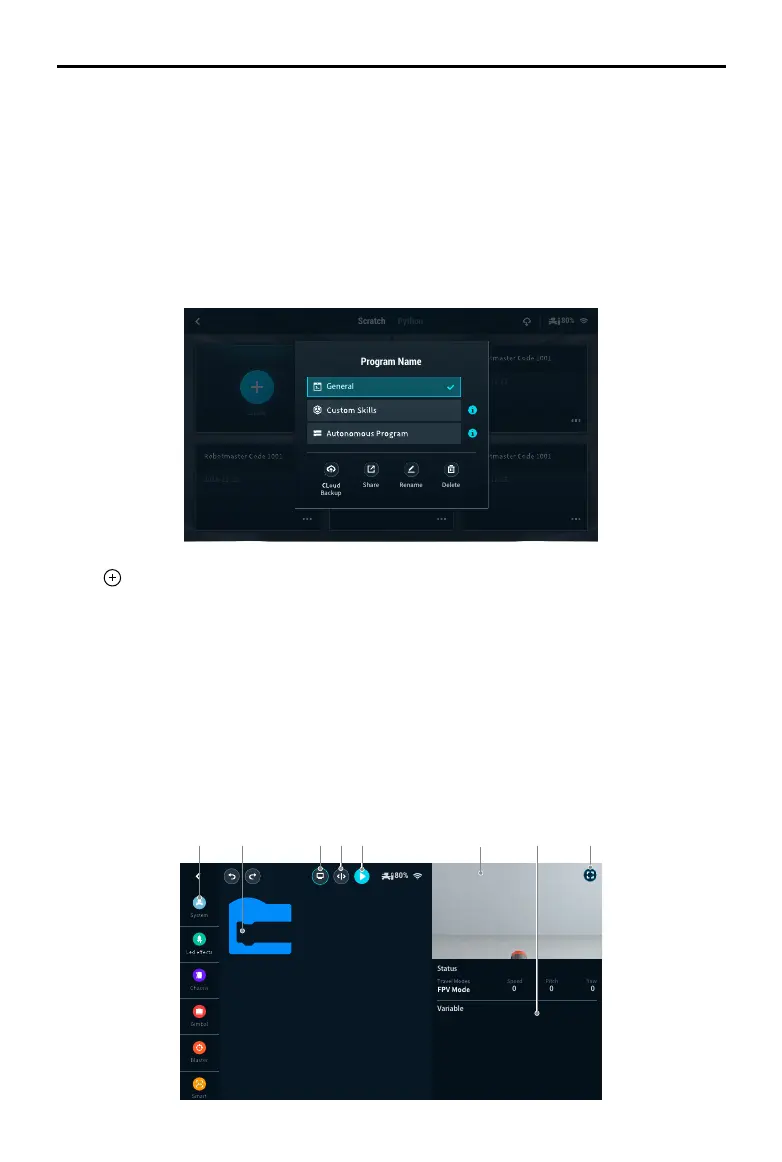
1. Scratch page: Tap to view Scratch programs.
2. Python page: Tap to view Python programs.
3. Cloud space: Tap to view programs in the cloud space.
4. Program name: Displays the name of the program.
5. If the program is set as a general program, the program type is not displayed. The program type
is only displayed if it is set as a custom skill or autonomous program.
6. Program settings: Tap to select the program type, set the program as a custom skill, set the
program as an autonomous program, backup on the cloud space, share with other users, and
rename or delete the program.
A B C D E F HG
7. Tap to create a new program.
A. Programming modules button: Tap the corresponding icon to program System, LED Effects,
Chassis, Gimbal, Blaster, Smart, Armor, Mobile Device, Media, Commands, Operators, and
Data Objects.
B. Programming window button: Drag programming blocks into the window to create a program.
C. Display button: Tap to turn the FPV on or off.
D. Switch button: Tap to switch to view the programming block as Python code.
E. Run button: Tap to run the program.
F. FPV window: See the current FPV.
G. Status information: View the current status information of the S1.
H. FPV button: Tap to enter the FPV in full screen
Scratch Python
Program Name
Delete
Backup
Share Rename



 To Next Page