©
2017 DJI All Rights Reserved.
3
EN
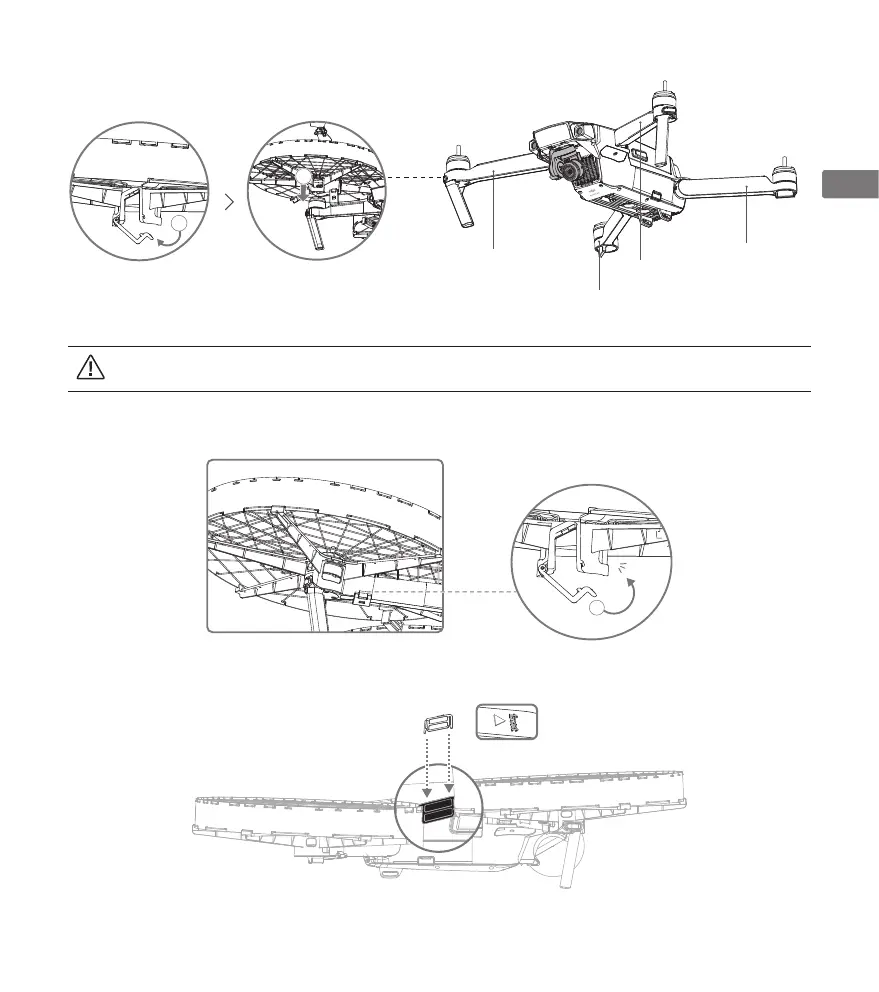
Right Front Frame Arm
(1)
Left Front Frame Arm
(2)
Left Rear Frame Arm
(3)
Right Rear Frame Arm
(4)
Each propeller cage is marked with a number underneath. 1 refers to right front frame arm, 2 to left front frame arm, 3 to left rear
frame arm and 4 to right rear frame arm. DO NOT mix them.
2. Snap the lock shut. When you hear the click, it is tightly secured. Repeat steps 1 to 2 for the propeller cage marked 4 on the right rear
frame arm.
3
Click
1
2
3. Use the securing lock to link two cages by connecting the underneath of the propeller cage marked 1 and the top of the propeller cage
marked 4, as shown below.
4. Repeat steps 1 to 3 to install the propeller cages on the left side.


 To Next Page