2 Chapter 1
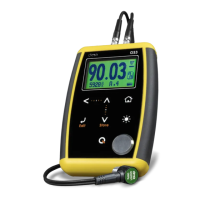
7. Change backlight illumination key (On, Off, Auto)
8. The key: Power On and Shutdown (touch and hold for 2
seconds) / Make quick and short touches to activate special
functions and features
9. Calibration disk
10. Horizontal scrolling center point (lock and unlock keypad on
measure screen)
11. Vertical scrolling center point (adjust LCD contrast)
Figure 1.2: Unit connectors
1. Receiving transducer connector (Type Lemo 00)
2. Emitting transducer connector (Type Lemo 00)
3. USB mini connector to connect to PC using a USB cable (QS3
DL only)


 To Next Page
 Loading...