- 32 -
English
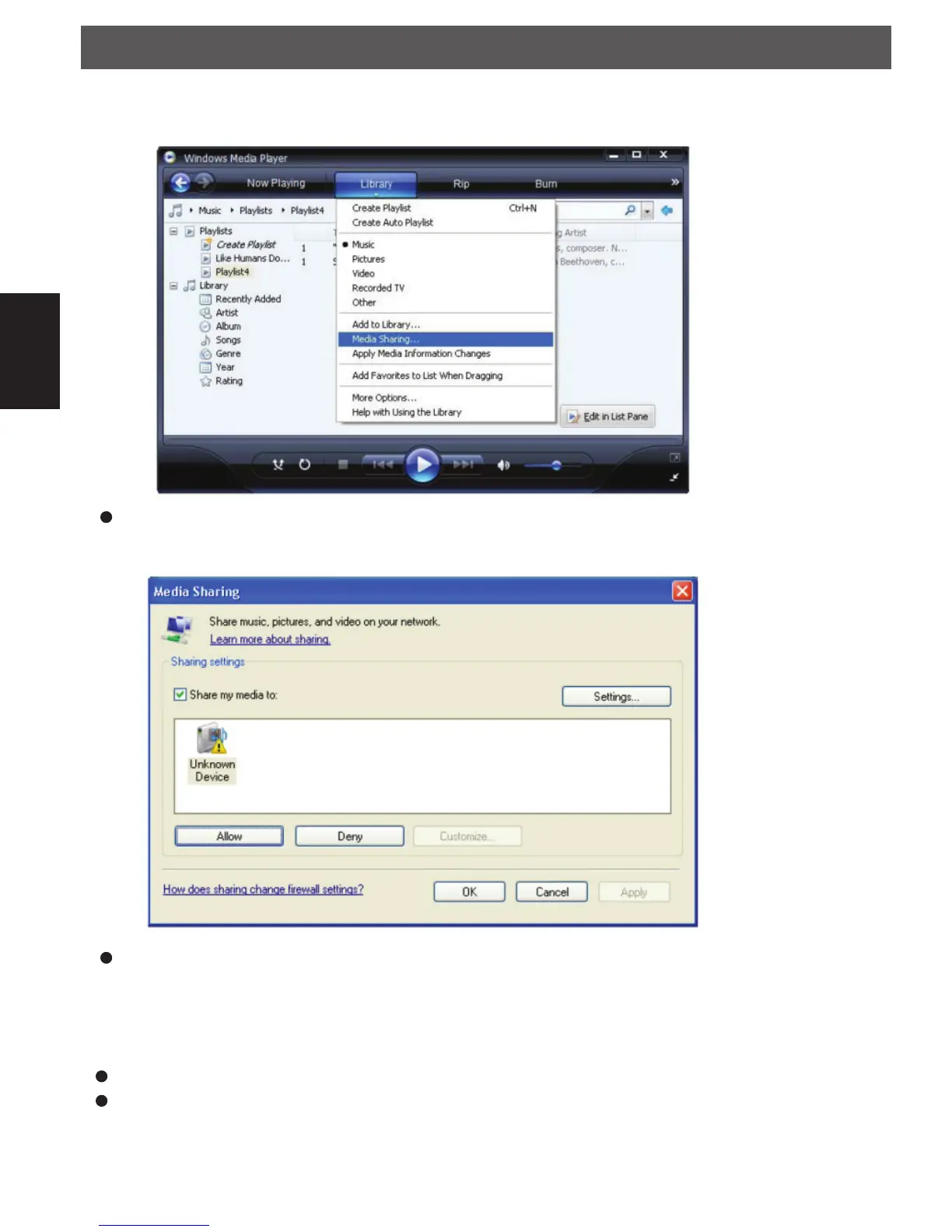
Player 11 and select the ‘Media Sharing…’ item to open the ‘Media Sharing’ window.
Selecting ‘Media Sharing…’ for Windows Media Player11 :
From the ‘Media Sharing’ windows , the radio will be listed as an unknown device. Click on the unknown
device listed, then click the ‘Allow’ button and then click ‘OK’.
Allowing the Radio to Connect:
When you were playing, you were able to change the mode of playback via selecting Media Player/Play-
back Mode.
Confi gure Menu
Choosing the option you want from the Confi gure Menu
Press the SELECT button.
Rotate the dial until Confi gure is displayed
UPnP
IPdiominiDEFV1.indd 32IPdiominiDEFV1.indd 32 23.12.2013 15:24:1623.12.2013 15:24:16


 To Next Page