4 5
USB charger (powerbank)
AUX input
Charging input
Micro USB service port
TURNING ON
PAIRING
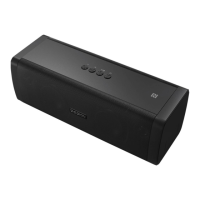
Press the button on the top side of your D FINE + and hold for 3
seconds. It will automatically connect with the last Bluetooth device
(blue LED stays lit) or changes into pairing mode (blue LED ashes
rapidly).
Bluetooth:
1. Activate Bluetooth on your device (Bluetooth settings).
2. Go to your Bluetooth settings and scan for discoverable devices.
3. Select “DOCKIN D FINE +“ from the Bluetooth device list.
4. After successful pairing the blue LED on the D FINE + stays lit
and you will hear a conrmation sound.
NFC:
This function is only available if your device supports NFC.
1. Activate Bluetooth on your device (Bluetooth settings).
2. Activate NFC on your device.
3. Hold your device close to the NFC logo on top (rst time con-
nection via NFC needs to be conrmed on your device).
4. After successful NFC pairing the blue LED on the D FINE + stays
lit and you will hear a conrmation sound.
To select a new device while still paired the current Bluetooth
connection needs to be disengaged. This can be achieved by
disconnecting your device in its Bluetooth settings or by pressing
and holding the multifunction button on your D FINE +.
EN
EN


 To Next Page