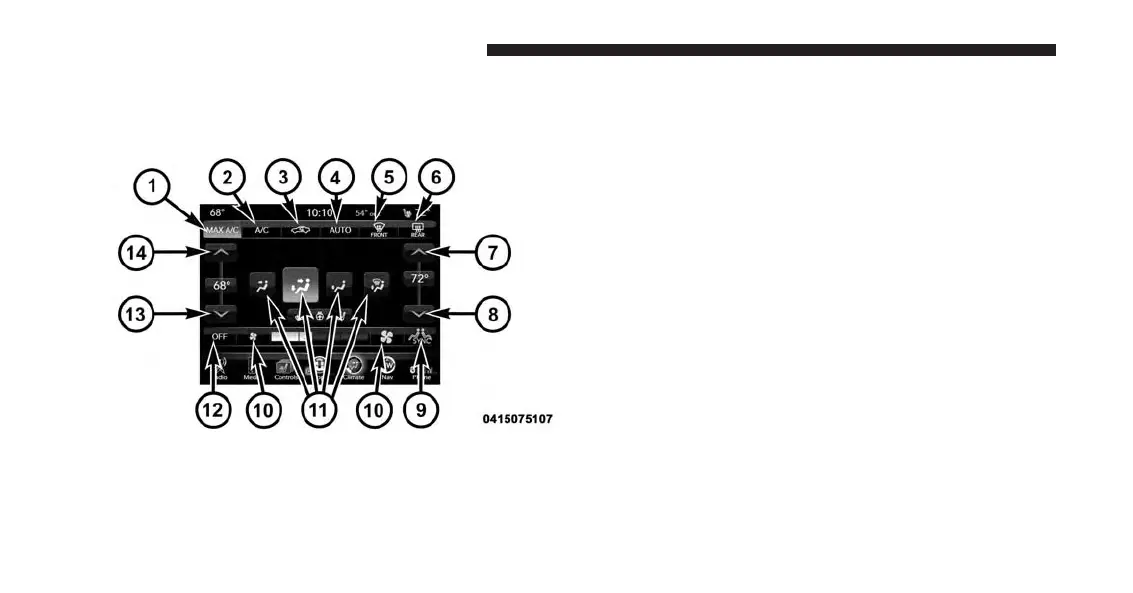
Buttons On The Touchscreen
Buttons on the touchscreen are accessible on the Uconnect
system screen.
Button Descriptions (Applies To Both Buttons On The
Faceplate And Buttons On The Touchscreen)
1. MAX A/C Button
Press and release to change the current setting, the
indicator illuminates when MAX A/C is ON. Performing
this function again will cause the MAX A/C operation to
switch into manual mode and the MAX A/C indicator
will turn off.
2. A/C Button
Press and release to change the current setting, the
indicator illuminates when A/C is ON. Performing this
function again will cause the A/C operation to switch
into manual mode and the A/C indicator will turn off.
3. Recirculation Button
Press and release to change the current setting, the
indicator illuminates when ON.
Uconnect 8.4 Automatic Temperature Controls — Buttons
On The Touchscreen
338 UNDERSTANDING YOUR INSTRUMENT PANEL











 To Next Page