Using Uconnect® Access
Getting Started With Apps
Applications (Apps) and features in your Uconnect® Access system deliver ser vices that are
customized for the driver and are certified by Chrysler Group, LLC. Two different types are:
1. Built-In Features — use the built-in 3G Cellular Network on your Uconnect® 8.4A or 8.4AN
radio.
2. Uconnect® Access via Mobile (if equipped) — uses the Uconnect Access app and your
smartphone's data plan to access your personal Pandora®, iHeartRadio, Aha™ and
Slacker accounts from the vehicle and control them using the vehicle touchscreen.
Customer's data plan charges will apply.
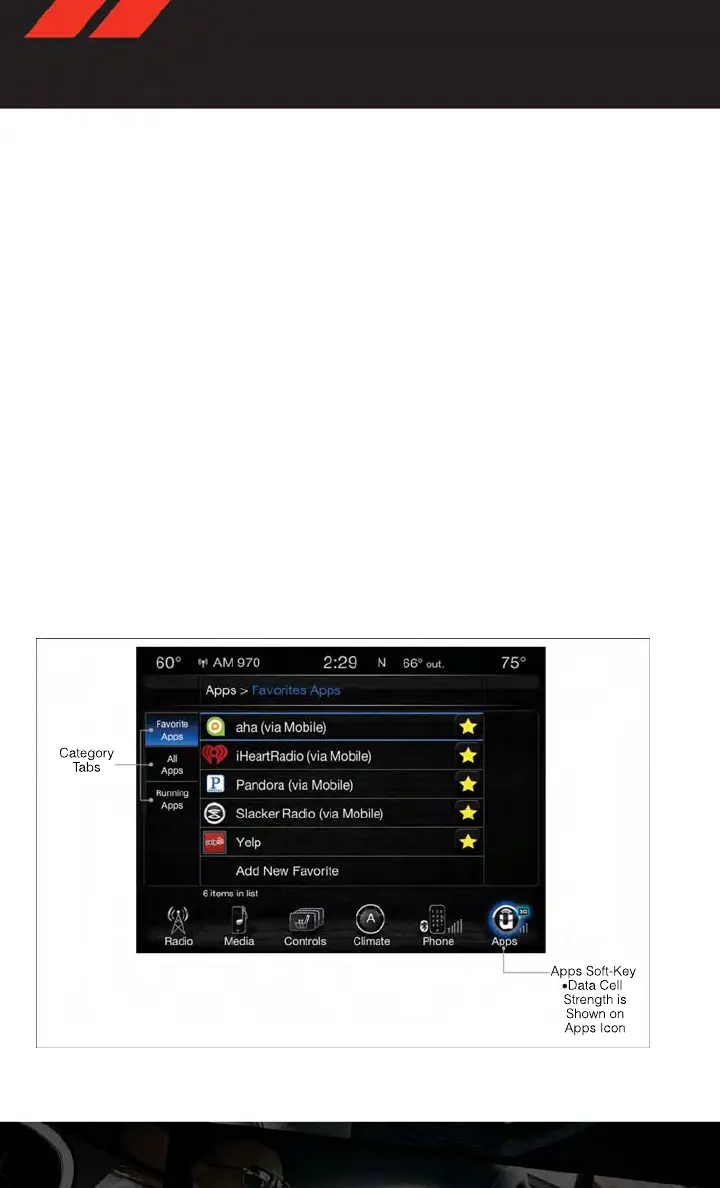
Get started with your Uconnect® Access apps by pressing the Uconnect® “Apps” button on
the menu bar at the bottom right corner of the radio touchscreen. Available apps and
features are organized by the tabs on the left of the screen:
Favorite Apps — This is the default screen when you first press the “Apps” button on the
touchscreen, and is a good place to put the apps you use most frequently. To make an
App a “favorite”, press the “settings” button on the touchscreen to the right of the app,
and select “Make a favorite.”
All Apps — Organizes your Uconnect® Access apps (when available).
Running Apps — Press this tab to see which apps are currently running.
Favorite Apps
ELECTRONICS
56















 To Next Page