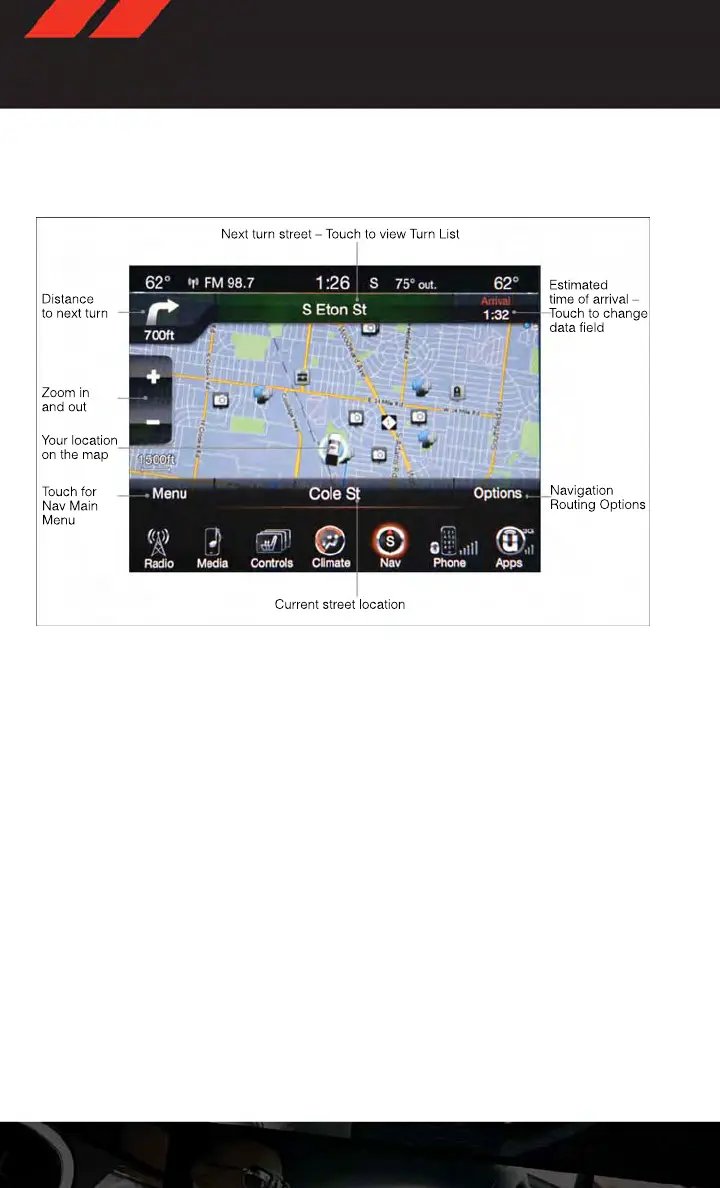
Go Home
• A Home location must be saved in the system. From the Main Navigation menu, touch
the “Where To?” soft-key, then touch the “Go Home” soft-key.
•
Your route is marked with a blue line on the map. If you depart from the original route, your
route is recalculated. A speed limit icon could appear as you travel on major roadways.
Adding A Stop
• To add a stop you must be navigating a route.
• Touch the “Menu” soft-key to return to the Main Navigation menu.
• Touch the “Where To?” soft-key, then search for the extra stop. When another location
has been selected, you can choose to cancel your previous route, add as the first
destination or add as the last destination.
• Touch the desired selection and touch the “Yes” soft-key.
Taking A Detour
• To take a detour you must be navigating a route.
• Touch the “Detour” soft-key.
NOTE:
If the route you are currently taking is the only reasonable option, the device might not
calculate a detour.
• For more information, see your Uconnect® Supplement Manual.
Navigation
ELECTRONICS
84















 To Next Page