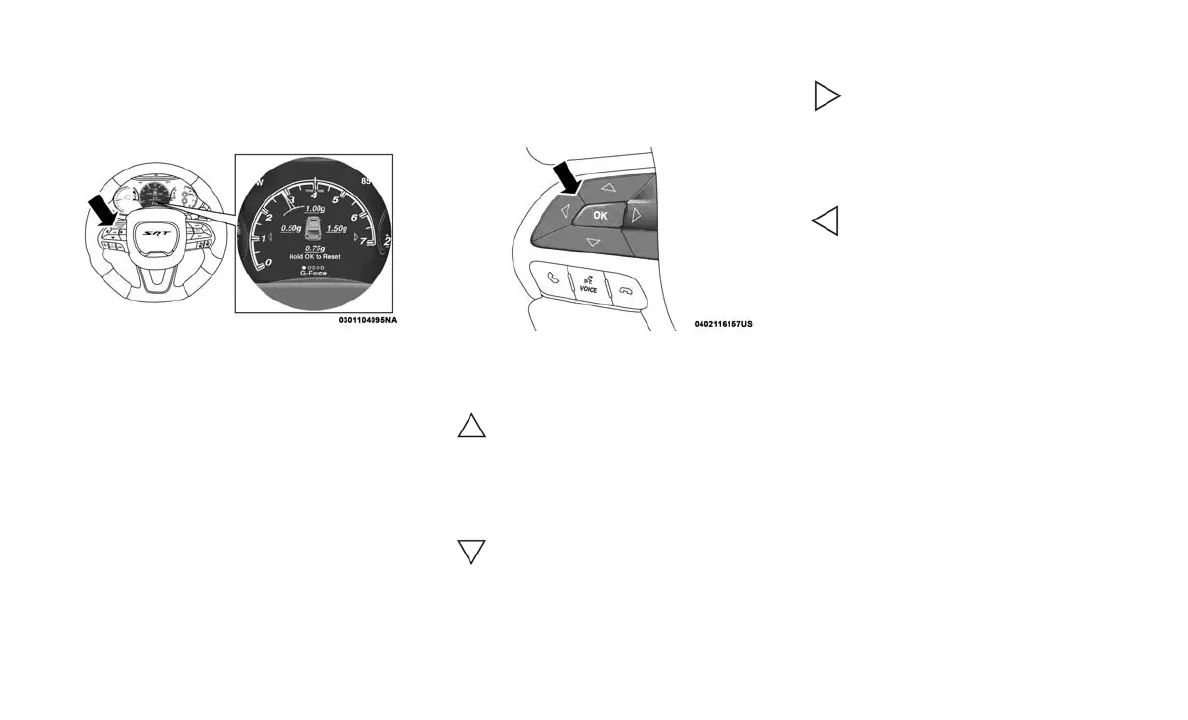
INSTRUMENT CLUSTER
DISPLAY
Location And Controls
The Main Menu items consists of the following:
• Speedometer Main Gauge
• Vehicle Info
• Performance
• Driver Assist — If Equipped
• Fuel Economy
• Trip
• Audio
• Stored Messages
• Screen Setup
• Diagnostic
• Speed Warning
The system allows the driver to select informa-
tion by pushing the following buttons mounted
on the steering wheel:
• Up Arrow Button
Push and release the up arrow
button to scroll upward through the
main menu.
• Down Arrow Button
Push and release the down arrow
button to scroll downward through
the main menu.
• Right Arrow Button
Push and release the right arrow
button to access the information
screens or submenu screens of a
main menu item.
• Left Arrow Button
Push the left arrow button to return
to the main menu from an info
screen or submenu item.
• OK Button
Push the OK button to access/select the infor-
mation screens or submenu screens of a main
menu item. Push and hold the OK button for one
second to reset displayed/selected features that
can be reset.
The instrument cluster display is located in the
center portion of the cluster and consist of
multiple sections:
• Main Screen — The inner ring of the display
will illuminate in grey under normal condi-
tions, yellow for non critical warnings, red for
critical warnings, and white for on demand
information.
• Submenu Dots — Whenever there are sub-
menus available, the position within the sub-
menus is shown here.
• Reconfigurable Telltales/Information
Instrument Cluster Display Location
Instrument Cluster Display Control Buttons
82















 To Next Page