OVERVIEW
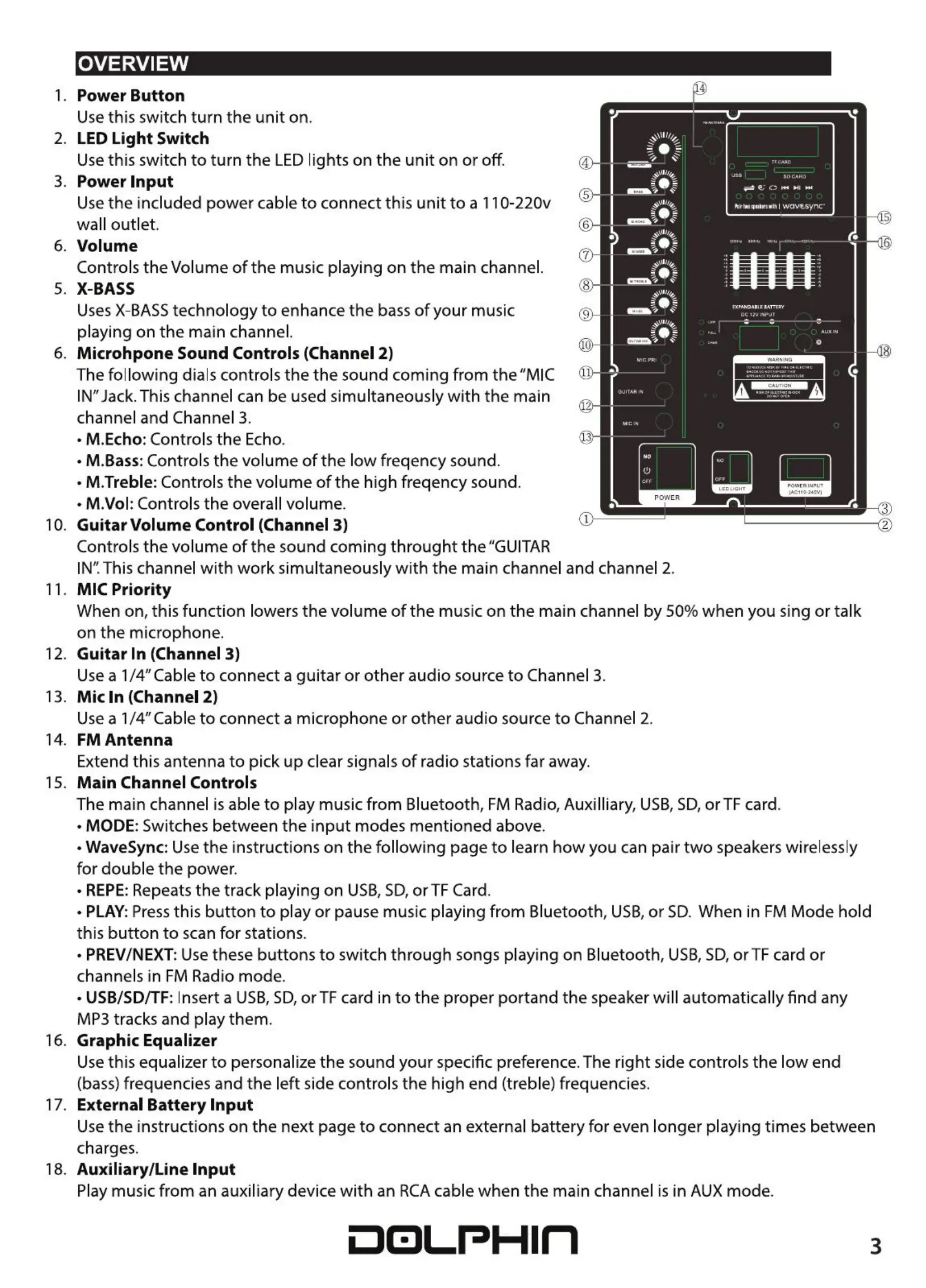
1. Power Button
Use this switch turn the unit on.
2. LED Light Switch
Use this switch to turn the LED lights on the unit on or off.
3. Power Input
Use the included power cable to connect this unit to a 110-220v
wall outlet.
6. Volume
Controls the Volume of the music playing on the main channel.
5. X-BASS
UsesX-BASStechnology to enhance the bass of your music
playing on the main channel
6. Microhpone Sound Controls (Channel 2)
The following dials controls the the sound coming from the "MIC
IN"Jack.This channel can be used simultaneously with the main
channel and Channel 3.
• M.Echo: Controls the Echo.
• M.Bass: Controls the volume of the low freqency sound.
• M.Treble: Controls the volume of the high freqency sound
• M.Vol: Controls the overall volume.
10. Guitar Volume Control (Channel 3)
Controls the volume of the sound coming throught the "GUITAR
5
6
7
8
9
0
1
Iwave-Sy'hC"
rowcn
2
IN".This channel with work simultaneously with the main channel and channel 2.
11. MIC Priority
When on, this function lowers the volume of the music on the main channel by 50% when you sing or talk
on the microphone.
12. Guitar In (Channel 3)
Use a 1/4" Cable to connect a guitar or other audio source to Channel 3.
13. Mic In (Channel 2)
Use a 114"Cable to connect a microphone or other audio source to Channel 2.
14. FM Antenna
Extend this antenna to pick up clear signals of radio stations far away.
15. Main Channel Controls
The main channel is able to play music from Bluetooth, FM Radio, Auxilliary, USB,SD,or TF card.
• MODE: Switches between the input modes mentioned above.
• WaveSync: Use the instructions on the following page to learn how you can pair two speakers wirelessly
for double the power.
• REPE:Repeats the track playing on USB,SD,or TF Card.
• PLAY: Press this button to play or pause music playing from Bluetooth, USBaor SD When in FM Mode hold
this button to scan for stations.
• PREV/NEXT: Use these buttons to switch through songs playing on Bluetooth, USB, SD, or TF card or
channels in FM Radio mode.
• USB/SD/TF: Insert a USB, SD,or TF card in to the proper portand the speaker will automatically find any
MP3 tracks and play them.
16. Graphic Equalizer
Usethis equalizer to personalize the sound your specific preference. The right side controls the low end
(bass) frequencies and the left side controls the high end (treble) frequencies.
17. External Battery Input
Use the instructions on the next page to connect an external battery for even longer playing times between
charges.
18. Auxiliary/Line Input
Play music from an auxiliary device with an RCAcable when the main channel is in AUX mode.
001..-PHln
3


 To Next Page
 Loading...