18
EN
System check Rooop Air Conditioner (Air Distribution Box, Electronic Controls)
4. Tighten all four mounting bolts evenly at 22.2 in. lbs
(2.5 N·m).
5. Plug the 4-pin communication cable and the 2-pin
lighting cable (if equipped) into the display located
on the ceiling template.
q
w
17 Attaching the center cover
q
Center cover
w
Clip
6. Clip the center cover to the ADB.
7. Turn on the power supply.
8. Verify that all the unit features work.
I
Read the following operating instructions before
attempting to run the unit.
9 System check
This section describes how to reset and/or complete a
final check of the system.
1. Verify the system features function properly.
2. Verify the operation of all applicable modes,
including: auto, cooling, fan, and heating.
3. If a feature does not work correctly:
a. Disconnect the 120 VAC and 12 VDC power
supplies.
b. Verify all the wiring is correct.
10 Operation
This section describes the AC’s operating controls and
settings.
10.1 Locating the control panel
q
18 Control panel location
q
Control panel
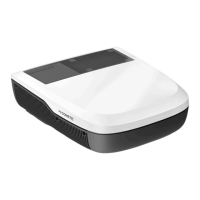
The control panel is located on the air outlet of the AC
cover.


 To Next Page
 Loading...