19
EN
Rooop Air Conditioner (Air Distribution Box, Electronic Controls) Operation
10.2 Understanding the control panel
This section explains the electronic controls on the
control panel.
10.2.1 Electronic controls
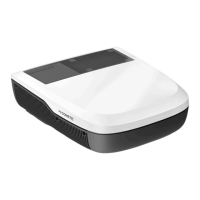
19 Electronic control panel icons
Icon Name Function
On/Standby
Turns the AC On or puts the AC
in Standby.
+ / –
Raises or lowers the temperature
setpoint.
LED display
Displays the setpoint
temperatures and selection
indicators during mode
selection.
Turbo mode
Provides maximum cooling for
rapid pull-down and/or spot
cooling.
Cool mode
Uses cooling-only to
maintain the desired setpoint
temperature.
Auto mode
If the rooop component is
equipped with heat pump
operation, the unit cycles
between heating and cooling
to maintain the desired setpoint
temperature.
Exterior light
Illuminates the exterior of the
AC. The exterior light cannot be
illuminated when the vehicle is
in motion.
Interior light
Illuminates the interior light on
the ADB.
Special
mode
Toggles between the available
special mode settings: Sleep,
Eco, and Dry.
Icon Name Function
Fan speed
Toggles between the available
fan speed settings.
Ventilation
speed
Uses only the ventilation fan
to maintain air circulation or a
desired temperature within the
vehicle.
Auxiliary heat
mode
(if equipped)
Uses heating to maintain the
desired setpoint temperature.
10.3 Using the control panel
This section explains how to use the control panel.
10.3.1 Powering on
Press and release the On/Standby icon.
• When the power is on, the On/Standby icon (and
the last selected icon) illuminates at 100% brightness
(steady, no blinking) during the entire time the AC is on.
• All unselected icons illuminate at 50% brightness.
10.3.2 Reading the LED display
The LED display shows the current set point temperature.
• If available, the default mode is Auto mode (with the
Auto Fan Speed). The default temperature setting is
70°F(21°C).
• If Auto mode is not available, the default mode
is Cool. The default temperature setting is
72°F(22°C).
10.3.3 Adjusting the temperature
Press (+/–) icon to increase or decrease the
temperature.
When adjusting the temperature:
• The (+/–) icon illuminates at 100% during
selection.
• Modify the temperature aer selecting the function.
• Modify the mode aer the function and temperature
are set.


 To Next Page
 Loading...