&
(
)
*
;
+
2
3
4 5
6
1
1
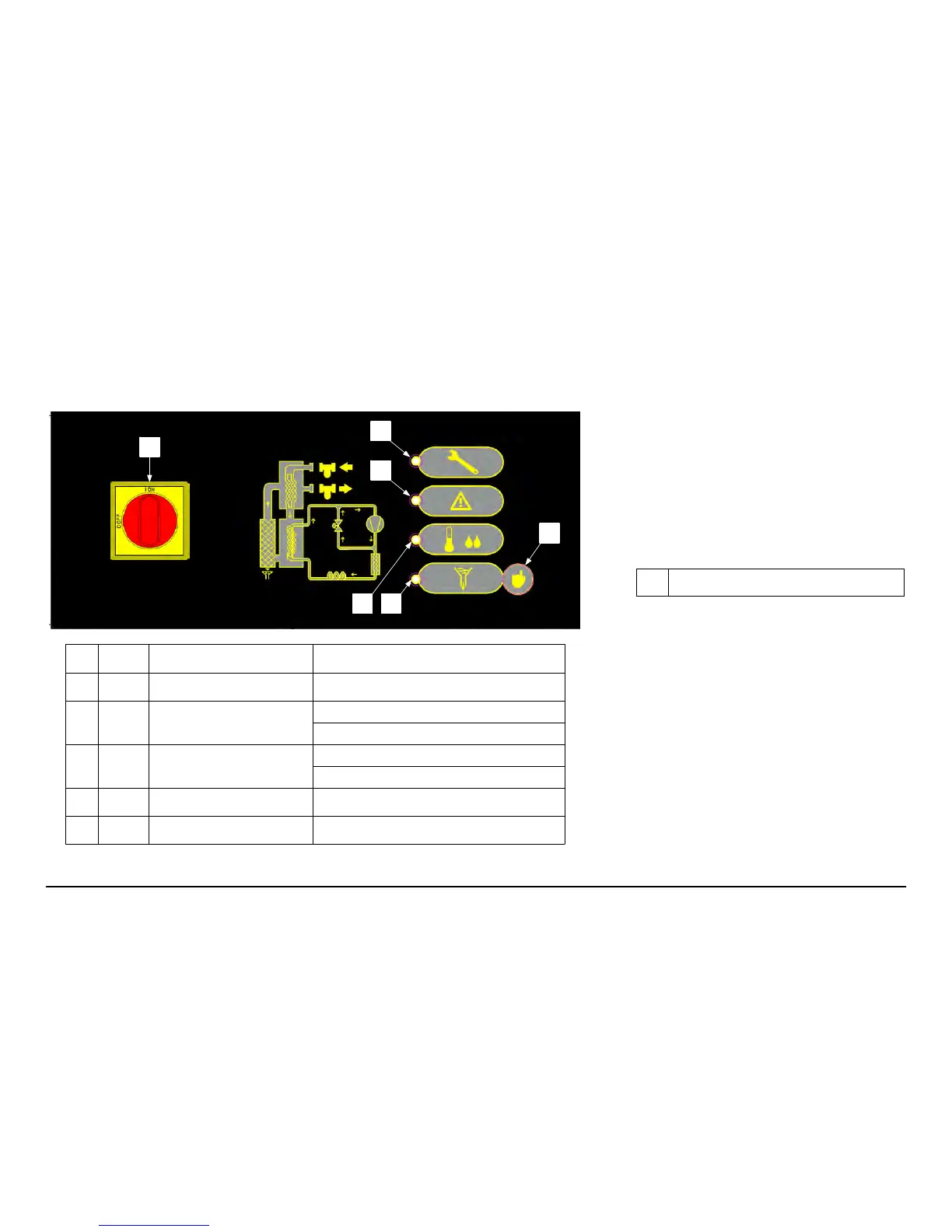
MAIN SWITCH
I ON = dryer operating; O OFF = dryer off
2 MAINTENANCE LED Scheduled maintenance
3
WARNING LED
Flashing: Dew point too low
4
DEW POINT LED
5
DRAIN LED Drain open
6 DRAIN BUTTON Drain opening control
Fixed = Dew point too high
Flashing: Dew point slightly high
Fixed = Dew point correct
23
CRD0245---0570
English
5 Control
5.1 Control panel
5.2 Operation
Scheduled maintenance
! When ; comes on, contact authorized assistance per-
sonnel for carrying out scheduled maintenance!
Press
+so that ; switches off for 24 hours.
Condensate drain
There are two operating modes:
a) TIMED --- with draining at fixed intervals (2 minutes) and
settable time (1---10 seconds);
b) EXTERNAL: --- if there is an external drain.
To changeoperating mode, switch the unit off, keep pressed
+
and switch the machine on at the same time.
In EXTERNAL mode
* is always on.
!
Set mode b) only in absence of the solenoid valve:
otherwise the relative coil could become damaged.
In TIMED mode, during draining *flashes for a number of
seconds equal to the set time.
For manual opening of the drain, press
+.
To change the draining time, keep pressed
+until ;
comes on .
Release
+and press again only once within 2 seconds. *
will flash once every second for 10 seconds. During flashing,
press
+once to stop and store the count of seconds equal to
the required draining time.
Remote alarm kit
See the instruction sheet supplied with the kit.



 To Next Page