DO7248S / DO7249S
40
1. Switch off and unplug the vacuum cleaner.
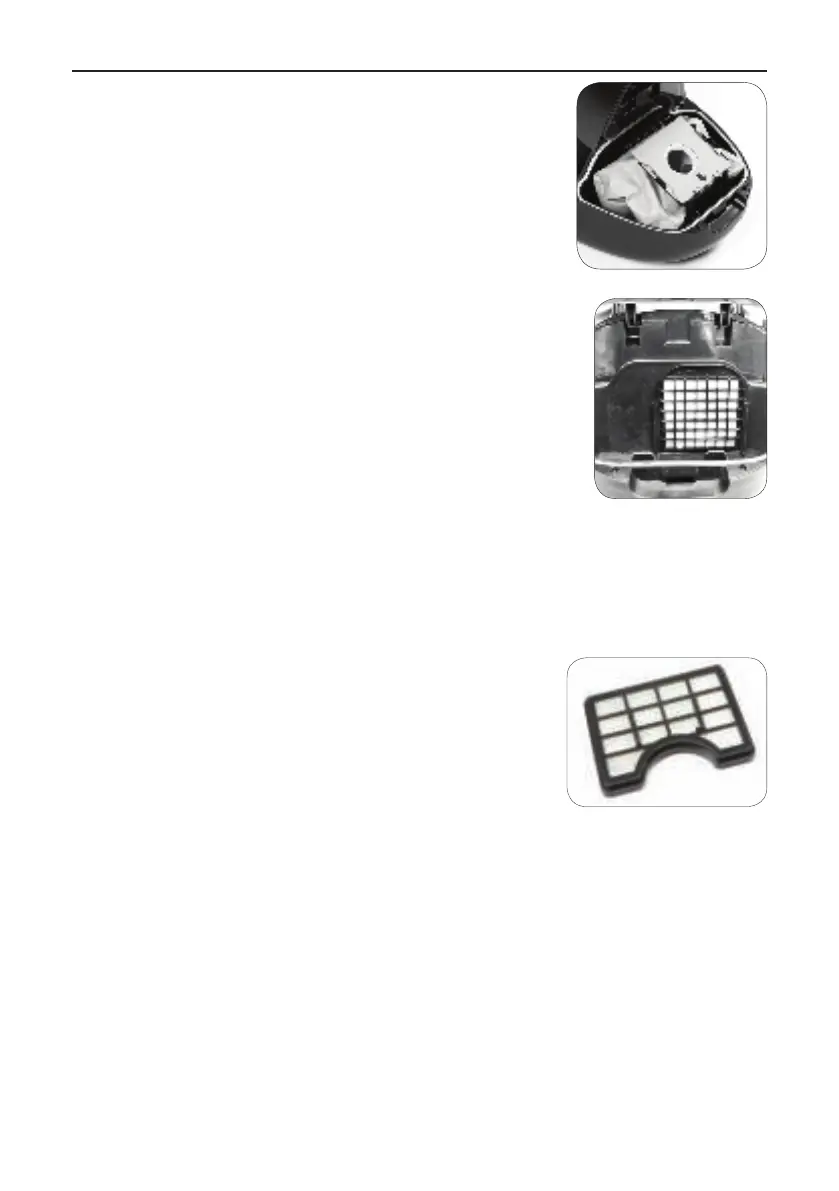
2. Open the dust bag compartment by pushing the latch
upwards with your ngers and lifting the lid.
3. Take the dust bag frame and lift the dust bag out of the
compartment by taking the dust bag frame out of its slot.
4. Remove the dust bag from the frame and slide in a new
dust bag (2l) into the frame.
5. Take out the motor lter and clean it if it is dirty by
rinsing it under warm water. Let the lter dry before
reinstalling it.
6. Put the dust bag frame back into the dust bag
compartment by sliding the frame into its slot at the front
of the compartment.
7. Close the dust bag compartment and push the lid back into place.
Cleaning the exhaust air lter or HEPA lter
The exhaust air lter or HEPA lter cleans the air a nal time before it leaves the
vacuum cleaner. You can clean the lter as follows:
1. Switch off and unplug the vacuum cleaner. Always pull
the plug itself, never pull the cord.
2. Open the grill of the lter. The lter is visible when the
grill has been removed.
3. Rinse the lter under cold running water and let it dry.
4. Put the lter back into place or replace the lter by a
new one.
5. Close the grill to seal.



 To Next Page