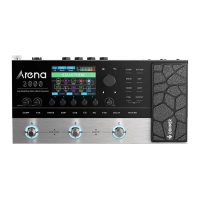
Amp Modeling/MuIti-effect Processor
Quick Start Guide - English
Thank you for choosing Donner Arena2000Amp Modeling / Multi-effects Processor!
This quick start guide will give you information on how to use your Arena 2000.
Pleaseread this instruction manual carefully before usingthis product.
Safety Precautions and Electrical Requirements
* Please read the following in detail first before operation.
Caution! Readthis safety guide before you begin installation or operation. Failure to comply with safety instructions could result in bodily injury or
equipment damage.
Hazardous voltages: Contact may causeelectric shock or burn.
Warning: DOnot expose this appliance to rain or Other moisture to reduce the risk Offire or electrical shock.
Caution: Do not remove the cover to reducethe riskof electricalshock. No user-serviceableparts inside. Referservicing to qualified servicepersonnel.
Warning: Do not permit fingers to touch the terminals of plugs when installing or removing the plug to or from the outlet.
Warning: f not properly grounded the donner product could cause an electrical shock.
Readthese instructions. All the safety and operating instructions should be read before operating the product.
l.
Keep these instructions. Thesesafety instructions and the product owner's manual should be retained for future reference.
2.
Heed all warnings. All warnings on the product and in the user manual should beadhered to.
3.
Follow all Instructions. All operating and use instructions should be followed.
4.
DOnot use the product near water.
5.
Cleaning - Unplug the product from the computer and clean only with a dry cloth. Do not use liquid or aerosol cleaners.
6.
7. Ventilation Do not block any ventilation openings. nstall in accordance with the manufacturer's instructions.
Heat DOnot install the product near any heat sources such as radiators, heat registers,stoves, or another apparatus (including an amplifier) that
8.
produces heat.
Overloading Do not overload wall outlets and extension cords as this can result in a risk of fire or electrical shock.
9.
Disconnect - The main plug is considered to be the disconnect device for the product and shall remain readily operable.
10.
11. Accessories Only use attachments/accessories specified by the manufacturer.
Placement Useonly with the cart, stand,tripod, bracket or table specified by the manufacturer, or sold with the product. Whena cart is used, use
12.
caution when moving the cart/apparatus combination to avoid injury from tip-over.
Surgeprotection - Unplug the product during lightning storms or when unused for long periods of time.
13.
Servicing Referall servicing to qualified service personnel. Servicing is required when the product has been damaged in anyway, such aswhen a
14.
power-supply cord or plug is damaged, liqu'd has been spilled or Objectshavefallen into the product, the product hasbeen exposed to rain or
moisture, does not operate normally, or hasbeen dropped.
Power Sources Referto the manufacturer's operating instructions for power requirements. Be advised that different operating voltages may require
15.
the useOfa different line cord and/or attachment plug.
Power amplifiers Never attach audio power amplifier outputs directly to anyof the unit's connectors.
16.
Replacement Parts - When replacement parts are required, besure the service technician hasused replacement parts specified by the manufacturer
17.
or have the same characteristics asthe original part. Unauthorized substitutions may result in fire, electric shock, or Other hazards.
Safety Check Upon completion of anyservice or repairs to this DONNERproduct, askthe service technician to perform safety checksto determine
18.
that the product is in safe operating conditions.
Donner is not responsible for damage caused by improper use or modifications to the device.
Introduction
The Arena200()is a professional guitar multi-effects processorthat boasts portable size,powerful tones, and flexible operation. The advanced FVACM
technology, which was developed by Donner' s teams, greatly restoresthe characteristics of classicgu 'tar effects and amplifiers and achieves dramatic
changes in sound. This processor includes 80 Hi-res models covering from classicto modern guitar amplifiers, 50 built-in cab IRmodels (and50 Slots for
loading 3rd Part Rs),and 10mic simulators, for a total Of278 effects. Optional effects blocks in the effect chain for flexible signal routing and multi-function
Ctrl & EXPpedals ensure unlimited control possibilities during your performance! he built-in 40 styles drum machine and upto 60slooper allow you to
achieve a one man band! Extensiveinterfaces support MIDI IN,PCcode preset switching, come with USB-Cfor supporting both computer and mobile
phone tone ed'ting. Start with Arena2000to enjoy and find out the happiness Of music!
Features
• FVACM(Forward Analog Virtual Circuit Modeling) Technology
• 150 Presets(50 Banksx 3 Presets)
• 80Hi-res Amp Models
• 50Built-in Cab IRModels+ 50 Slots for Loading 3rd Part Rs
• R Length: 23.2ms
• A Total of 278 Effects
• Moveable EffectsBlocks for Flexible Signal Routing
• Multi-function Ctrl and ExpressionPedals Ensure Unlimited Control Possibilities
• Built-in Drum Machine with 40 Patterns,and 60sLooper with Reversed/Double Speed/Half Speed
• USBAudio/Recording Supports Recording Dry and EffectSignal Simultaneously
MIDIIN for External Switching Devices
• Computer Software for Tone Editing, Backup,and Firmware Update
• Mobile App for Bluetooth WirelessTone Editing
Getting Started
The Arena 2000 has a single LISB2.0 Type C port (on the rear panel): connect it to your computer using the USBcable provided. Note that Arena 2000 is a
USB2.0device, thus the USBconnection requires a USB2.0+ compliant port on your computer. Toexperience more Arena 2000related features, please
download and install [Donner Control] for PC and [Arena Control] for mobile.
Installing [Donner Control] on Your Computer
System Requirements: Supported operating systemsonly for Windows 7 or later, macOS 10.0or later. Other systems are not currently supported.
1. Software Installation
1.1 For Windows
O) Download [Donner Control Setup xxx.exe]installation package from the
website https://www.donnermusic.com/support/downloads/list, where xxx is a
software version number.
@ Runningyour [Donner Control Setup_xxx.exe]and note that change the default
installation path. Do not install it on the computer system disk (disk drive C),
otherwise, abnormal usagemay occur becauseof operation permission issues.
@ nstallation is complete.
1.2 For Mac
(j) Download [Donner Control_xxx.dmg] installation packagefrom the website
https://wvwv.donnermusic.com/support/downloads/list, where xxx is a software
version number.
@ Runningyour [Donner Control_xxx.dmg], then add your Donner Control App to
Applications.
2. Add Device
(j) Makesure your internet connection is available because adding a device needs
downloading device components from the server.
@ Runningthe Donner Control and click "+" to enter device management.
b]
At 83-5
Control
Dormer Control
Our Products
@ Selectthe device to be added. After successfully adding the device, it is removed from the device management list.
Out Products
@Then return to the home screen, now your new device has been added
successfully, and start to operate it!
Note:
n the Windows system, if the device is not displayed on the home screenafter the
device is added, the reason may be that software is installed on the computer
system disk resulting in failure to download and write device components.
3. Device Connection
O) Makesure your Arena 2000 is connected to the computer via USB.For a stable
connection, we recommend using the USBcable provided with the product you
have purchased.
@ Open [Donner Control], and then click Donner Arena200().
@ he connection is successful if "Connected" is displayed at the top right corner.
TYPE C
Arena
000000
FAQ:
Qi) f Arena2000cannot be recognized as an input or output device in your DAWsoftware on Windows, please install the latest AS 04ALL driver and use it.
Pleasedownload the latest version from https://www.asi04all.org/.
@ Makesure that your USBdocking station can output a current Of1000mAor more if your computer with only a IJSB-Cport. Becausewhen multiple
devices are connected to a USBdocking station, the Arena200ffs USBport may not haveenough allocated current and the device will stop functioning
correctly.
@ If your device is not displayed as connected on the [Donner Control] after connecting to the computer via USB,please try to reinsert the CJSB.
Installing [Arena Control] on Your Mobile Phone
For OS
1. Device Connection
For Android
(j) Makesure your Bluetooth has enabled on your phone. (Android will also need to turn on GPSaccording to App Store regulations)
@Turn on [ArenaControl] on your phone.
@ Clickthe Bluetooth button at the top right corner.
Arena
00 000000
@ Select Arena 2000 with the device code.
@ Connected successfully.
Note:
Different device codes may appear when the same device is connected multiple times. If more than one Arena 2000devices are available within the range,
please ensure that you are connected to your own device.
Common Application Scenarios and Connection
The controls are also available in the "Arena Control" app
Home Practice
Small Size Rehearsal
• Medium and Large Scale Performance
Audio Interface Mixer
Usedfor PAsystem to amplify sound
Recording
Headset Guitar
Guitar Amp Guitar Amp
Guitar
Guitar Amp Guitar Amp
Guitar
Guitar Amp Guitar Amp
Usedfor stage instrument monitoring
Guitar
Guitar Arnp Guitar Arnp
(L/L+Ravailable)
500m
o
o
o
o
Audio Interface Mixer
(L/L+Ravailable)
Troubleshooting
Problems
After connection, noise occurs when no playing
Ground noisefrom your preset effect
No sound output
Howto quickly enable the tuner
Output sharp sound, or low-frequency sound
Machinecrashes or other bugs
DONNER
Email:service@donnermusic.com
Website: www.donnermusic.com
Copyright0 2023 DonnerLLC.All rights reserved.
Made in China
pc/vac
Solutions
Togge GRN/LIFTswitch can effectively reduce the noise caused by the loop
Enablethe NGeffect and adjust the noise gate as required
CheckwhethertheOutput/Headphone/XLRvolumeknobsareturnedonand adjustedto theappropriateposition
ong pressthe current preset footswitch (light up white)
L
Check whether the Cab effect is disabled on the Output interface
Restorefactory defaults or upgrade firmware
SERVICE LANGUAGE
ENGLISH
UNITED STATES
Tel: 001 571 3705977
UNITED KINGDOM
Tel: 0044 2080 895 663
CANADA
Tel: 001 613 4168166
AUSTRALIA
Tel: 0061 384004871
UK
Get in touch with our customer service at local time (hotline hours are listed on the Donner
official website)
@210-183710


 To Next Page
 Need help?
 General