05
Using Presets
ARENA2000 provides a total of 150 presets (50 Banks, 3 presets per bank). All presets can be selected by rotating the Value Knob.
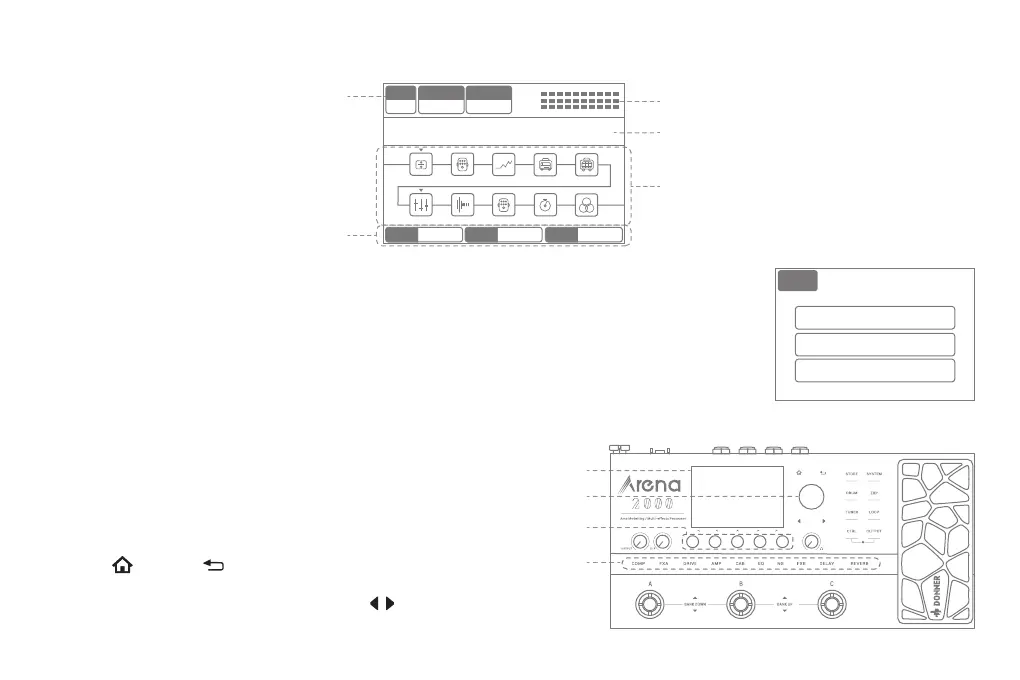
Effects Blocks On/Off and Adjustment
① Press the name of the Effect Block on the panel can turn on/off or enter the
adjustment interface of this block.
② Rotating the Value Knob can select the effects under the present block, and
the Knobs 1-5 below the screen can adjust the effect parameters on the
corresponding screen.
③ Pressing or pressing continuously can return to the main interface
of the effect chain.
④ If an effect has more than one adjustment page, touching can turn
pages.
Screen
Value Knob
Knob 1-5
Effects Blocks
1. Selecting Presets
① By pressing the Footswitch A/B/C can switch three presets in the same bank, the footswitch of the selected preset will light
up in white.
② Press the Footswitch A/B or B/C simultaneously can switch between banks or connect an external dual-footswitch pedal to
switch banks.
2. Adjusting The Volume
Use the OUTPUT, XLR, and PHONE Volume Knobs to adjust the output volume.
Bank
01A ROCK DRIVE
01B TEXAS BLUES
01C TWIN CLEAN
BPM
120
Ctrl A
REVERB
Ctrl B
FX A
IN
OUT
01A ARENA2000
COMP FX A DRIVE AMP CAB
REVERBDELAY
FX BNGEQ
EXP OFF Volume EXP ON Position EXP2 Time
Value of the TAP TEMPO
Input/Output Level
Preset Name
Effects Blocks/Signal Chain
EXP and EXP2 functions
and parameters



 To Next Page
 Loading...