12
3. Select the mode
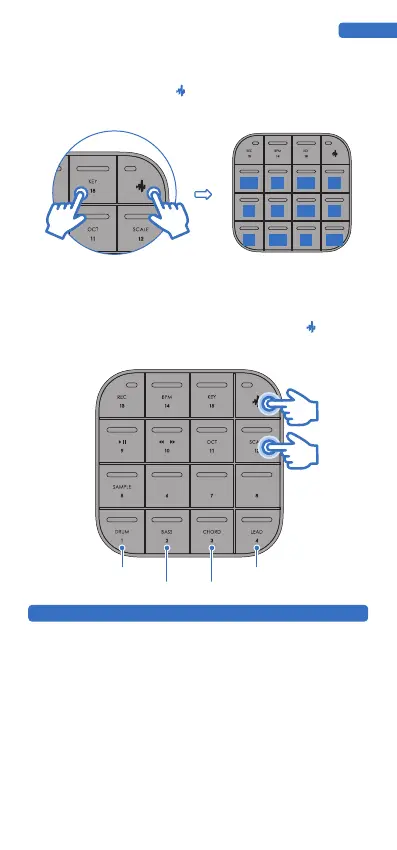
In the LEAD mode, MEDO can quickly switch between the natural major scale, natural minor
scale, pentatonic major scale, and pentatonic minor scale by combining keys. After switching
the scale in LEAD mode, the BASS, CHORD, and SAMPLE modes also distinguish the
corresponding major and minor arrangements. In lead mode, press and hold +PAD12
which defaults to C natural major. Also, you can quickly choose between PAD1 and PAD4.
MEDO can connect to other devices via Bluetooth. This means you can connect MEDO to
Bluetooth devices such as your smartphone, tablet, or computer. The main application
scenarios are as follows:
1. Data Transmission: MEDO’s accompanying application can be connected for timbre
switching, visual creation, etc.
2. Bluetooth MIDI: You can use MEDO to wirelessly interact with music production software,
taking MEDO as a controller or MIDI device that emits MIDI signals. This way, you can easily
connect MEDO to your DAWs and use it to play virtual instruments, trigger notes, record
music, and more.
3. Bluetooth Audio: MEDO can receive audio information from external devices after
connection. Once connected you will be able to play audio from MEDO’s speaker.
Note: When MEDO uses Bluetooth MIDI, it will automatically disconnect the Bluetooth audio.
To ensure stable transmission between Bluetooth and the app, Bluetooth MIDI has the highest
priority.
WIRELESS BLUETOOTH
ENGLISH
2. Rapid transposing
In creation or performance, you may want to be able to quickly transpose notes and easily
select from PAD1-PAD 12.
bA
bD
bB
#F
bE
A B
E F G
C D
Natural Major Scale
Natural Minor Scale Pentatonic Major Scale
Pentatonic Minor Scale


 To Next Page
 Loading...


