3
09:55
21°C
09:55
21°C
09:55
21°C
09:55
21°C
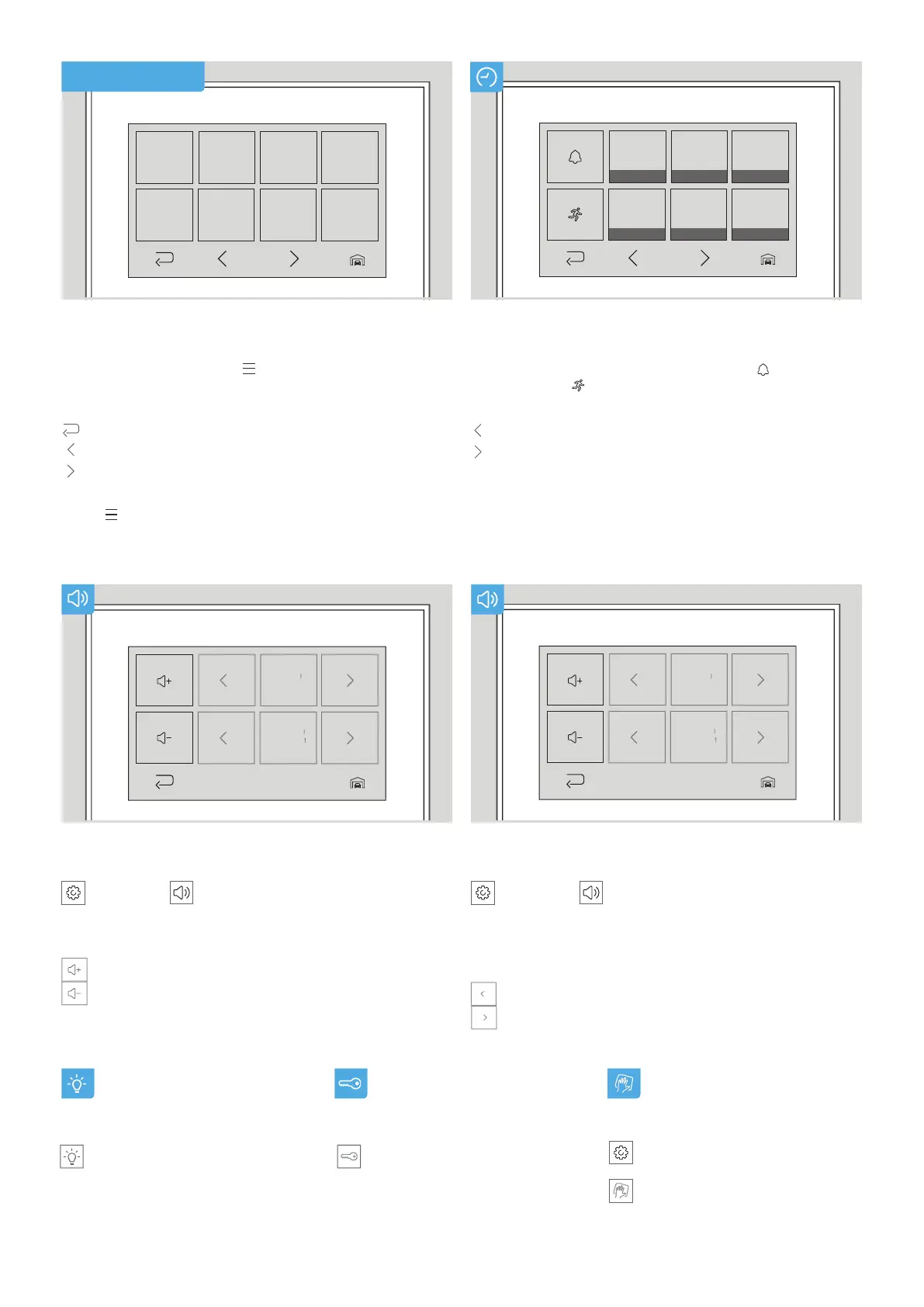
Tap:
to navigate to previous events.
to navigate to next events.
Touch the image to display it in full-screen mode.
To view the history of another door station, tap the
”Door Station selection” icon in the bottom right corner.
View History
In the history, you can review past doorbell (
) and
motion events (
) with date and time.
Volume up / down
”Settings”→
”Sound”
Tap:
to turn the volume up.
to turn the volume down.
Light on/off
Tap ”Light” to switch the infrared
light of your door
station on/off.
Relais switch
Tap ”Relay” to get to the
relay overview.
Here you can trigger all connected
relays.
Cleaning mode
Tap ”Settings” →
Tap ”Cleaning Mode” to deactivate
the touch function for 30 seconds.
Tap:
to select the previous sound.
to select the next sound.
Select sound
”Settings”→
”Sound”
Select the sound for the doorbell.
Select the sound for the storey call if available.
Menu navigation
Tap the live video or press
to enter the menu.
Tap:
to go back.
to navigate to the left side of the menu.
to navigate to the right side of the menu.
Press
to return to the live screen.
MENU FEATURES


 To Previous Page
 Loading...