3510003- 3 -
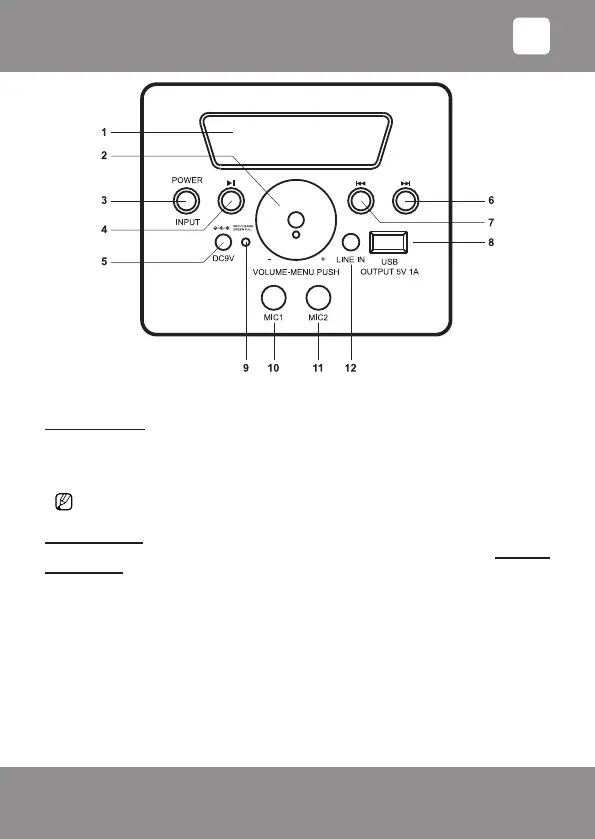
Control panel
PREPARATION
Battery charging:
Insert the pin of the included charger cable into the sound system socket DC-9V (5), red charging
mode indicator RED CHARGE - GREEN FULL (9) will light up on the display.
Battery must be charged for approximately 7 hours. When the battery is full, green indicator (9)
will light up.
If the sound system is on during the charging, the battery charging duration takes longer.
USE
Switching on/off:
You can turn the sound system on or off by pressing the button [POWER] (3) and holding it
for 3 seconds.
All the sound system modes can be turned on/toggled between with the button [INPUT]
(3) and changed with the multifunction rotary controller in the middle of the control panel
[VOLUME-MENU PUSH] (2), but it is often more convenient to use your mobile device as
a remote control.
Adjusting volume and timbre:
The sound system has two volume controllers:
a) multifunction rotary controller [VOLUME-MENU PUSH] (2), which also adjusts volume.
b) digital controller ʺVOLUMEʺ in the mobile device app Doping Musick.
• Press the button [VOLUME-MENU PUSH] (2) until one of the desired adjustment options
appears on the screen:
bA (-9 to +9): bass adjustment,
EN



 To Next Page