54
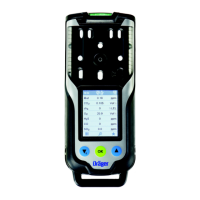
Switch on the instrument and insert it
into the calibration cradle.
Press the key and keep it pressed
for 5 seconds to call the calibration
menu.
Enter the password with the key
and confirm with the key.
Use the button to select the single
gas calibration/adjustment function
and confirm with the button.
— The display flashes the gas of the first
measuring channel, e.g. » ch
4
%LEL« (see example 1, page 54).
Press the key to carry out the calibration/adjustment of this measuring channel,
or use the key to select another measuring channel (e. g. O
2
vol. %, H
2
S - ppm,
CO - ppm or another toxic sensor).
There are two examples for the calibration of individual measuring channels below.
Example 1: Span calibration for Dräger Sensor IR Ex.
Press the key to carry out the calibration/adjustment of the selected measuring
channel.
— The calibration gas concentration is displayed
Press the key to confirm the calibration gas concentration or use the key to
change the calibration gas concentration and complete the process by pressing the
key.
— The measurement value flashes.
Open the test gas cylinder valve to let test gas flow over the sensor.
— The displayed, flashing measurement value changes to the value according to the
supplied test gas.
NOTICE
The CO
2
channel accepts a special setting during the calibration routine, since the
calibration menu can also be used to adjust the zero point (see example 2, page 56).
03533072_01_en.eps
ch4
%LEL
OK
OK
OK



 To Next Page
 Loading...