EasyManua.ls Logo

Dreadbox Darkness - User Manual

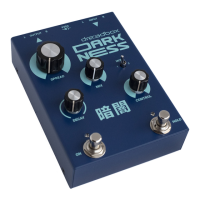
Dreadbox Darkness
3 pages
Print Icon
To Next Page IconTo Next Page
Loading...
ON
F
M
DECAY
MIX
CONTROL
SPREAD
9VDCR RINPUTLL OUTPUT
HOLD
ON/OFF footswitch
or Page 2
While holding this footswitch down,
allows you to access Page 2,
where you can control some
additional parameters
(for more info check the next page)
Hold footswitch / or Page 3
Pressing this, will loop 150ms of your input signal.
While holding it down allows you
to access Page 3- the Gate parameters
( for more info check the next page)
Decay amount
Also known as feedback
Effect Mix
Dry/wet balance. A 50/50
setting is achieved at 3 ‘oclock.
At max, the dry signal is off
Reverb Spread
Also known as size
Change what the Control knob affects
This allows you change what the
control knob affects, but can also engage some
different playing modes (depending on your Page)
Control knob
This affects a different parameter,
depending on the Mode switch and Page
(for more info check the next page)
Stereo OutputStereo Input
9VDC center pin negative
standard effect pedals power
Darkness, is the polar opposite of brightness and understood as a lack of illumination
or an absence of visible light. Also Scotus (σκότος), primordial Greek god of darkness.
Question and Answer IconNeed help?

Do you have a question about the Dreadbox Darkness and is the answer not in the manual?

Summary

Getting Started with Dreadbox Dark Ness

Operating the Dreadbox Dark Ness Pedal

Main Controls Page Overview

Details the primary controls on the pedal, including Spread, Mix, Decay, and Control.

Secondary Controls Page Functionality

Access via ON footswitch; offers Filter, LFO Depth, LFO Rate, and Tails On/Off.

Gate Controls Page Parameters

Access via HOLD footswitch; controls Threshold, Attack Time, Release Time, and Gate On/Off.

Dreadbox Dark Ness Specifications

Overview

The Dreadbox Darkness is a stereo reverb pedal designed to create a wide range of atmospheric and spatial effects, from subtle echoes to vast, dark soundscapes. Its name, "Darkness," alludes to its ability to generate deep, immersive reverb, drawing a parallel to the absence of visible light or the primordial Greek god of darkness, Scotus.

Function Description:

At its core, the Darkness is a stereo reverb unit. It processes incoming audio signals, adding a reverberant tail that can be extensively shaped and controlled. The pedal offers three distinct control pages: Main, Secondary, and Gate, each providing access to different parameters and functionalities, allowing for a high degree of sound customization.

Main Page Controls:

The Main Page provides the primary controls for the reverb effect:

  • Spread (Reverb Size): This knob adjusts the overall size of the reverb, ranging from smaller, tighter spaces to expansive, cavernous environments.
  • Mix (Dry/Wet Balance): This control blends the original (dry) signal with the processed (wet) reverb signal. A 50/50 mix is achieved at the 3 o'clock position, while turning the knob to its maximum setting completely removes the dry signal, leaving only the reverb.
  • Decay (Reverb Decay Time/Feedback): This knob determines how long the reverb tail sustains. Higher settings result in longer, more lingering decays.
  • Control (Mode-Dependent Parameter): The function of this knob changes based on the position of the Mode switch.
    • Mode Switch Position 1 (Shifter Semitone): In this mode, the Control knob adjusts the pitch of a shimmer effect by +/-12 semitones. A 50% setting results in no pitch shift.
    • Mode Switch Position 2 (Shifter Mix): When the Mode switch is in this position, the Control knob adjusts the amount or intensity of the shimmer effect.

Secondary Controls Page:

Accessed by holding down the ON/OFF footswitch, the Secondary Controls Page offers advanced modulation and filtering options:

  • Spread (No Function): On this page, the Spread knob has no active function.
  • Mix (Reverb Filter): This knob acts as a filter for the reverb tail. Turning it to the left engages a low-pass filter, while turning it to the right engages a high-pass filter.
  • Decay (LFO Depth): This control adjusts the depth of a Low-Frequency Oscillator (LFO). At the 50% position, there is no LFO. Turning it to the left engages a Sample and Hold LFO, while turning it to the right engages a Triangle LFO.
  • Control (LFO Rate): This knob sets the speed of the LFO, which always targets the Reverb Spread parameter.
  • Mode Switch (Tails On/Off): This switch determines whether the reverb tail continues to be audible after the effect is disengaged.
    • Left (Off): When the effect is turned off via the ON/OFF footswitch, the reverb tail immediately cuts off.
    • Right (On): With "Tails On," the reverb tail will naturally decay even after the effect is bypassed, creating a smoother transition.

Gate Controls Page:

Accessed by holding down the HOLD footswitch, the Gate Controls Page provides parameters for shaping the dynamics of the reverb through a gate effect:

  • Spread (No Function): On this page, the Spread knob has no active function.
  • Mix (Threshold): This knob controls the sensitivity of the gate, determining how easily it closes.
  • Decay (Attack Time): After the gate opens, this control sets the time it takes for the effect to reach its maximum programmed volume.
  • Control (Release Time): After the gate closes, this knob controls the time it takes for the effect to completely fade out.
  • Mode Switch (Gate On/Off): This switch enables or disables the gate effect.
    • Left (Off): When the gate is off, the other knobs on this page have no effect.
    • Right (On): When the gate is on, the threshold, attack, and release time controls become active.

Usage Features:

  • Stereo Input and Output: The Darkness supports true stereo operation, allowing for immersive stereo soundscapes. Connect your instrument or audio source to the L and R INPUTS, and connect the L and R OUTPUTS to your amplifier, monitors, or mixer. For mono instruments (like a guitar), simply connect to either input. For mono output, either output jack can be used.
  • 9VDC Center Pin Negative Power: The pedal requires a standard 9VDC center pin negative power supply with at least 150mA.
  • Not True Bypass: The Darkness is not a true bypass effect, meaning it requires power to pass any sound through it, even when the effect is disengaged.
  • Memory Function: Upon power-up, the pedal recalls the last settings used, ensuring consistency in your sound.
  • JUMP Mode Controls: The controls operate in a "JUMP" mode. This means that the value of a knob will not change until you physically move it past its previously stored position. This prevents sudden jumps in sound when switching between pages or recalling settings.
  • ON/OFF Footswitch: A swift press of this footswitch activates or deactivates the main reverb effect. Holding it down provides access to the Secondary Controls Page.
  • HOLD Footswitch (Loop Input / Page 3 Access):
    • A swift press of this footswitch will loop the next 150ms of your input signal. If no signal is present, the switch will effectively kill the effect.
    • While the input is looped, no new input is processed, but you can still manipulate the looped sound using the pedal's controls.
    • Holding down the HOLD footswitch provides access to the Gate Controls Page.

Maintenance Features:

The manual does not explicitly detail maintenance features beyond the power requirements and general usage. However, as with most electronic pedals, it is advisable to:

  • Use the specified power supply to prevent damage.
  • Keep the pedal in a clean, dry environment to avoid dust and moisture ingress.
  • Handle the footswitches and knobs with care to ensure their longevity.
  • Avoid exposing the pedal to extreme temperatures.

The Dreadbox Darkness is a versatile and powerful stereo reverb pedal, offering a deep level of control over its sound. Its multi-page control system, combined with its unique shimmer and gating capabilities, allows users to craft everything from subtle spatial enhancements to complex, evolving ambient textures.

Dreadbox Darkness Specifications

General IconGeneral
MIDINo
Form FactorDesktop
Number of Voices1
LFO1 LFO
Inputs1 x 1/4" TS (instrument/line)
Outputs1 x 1/4" TS
Power Source9V DC

Related product manuals