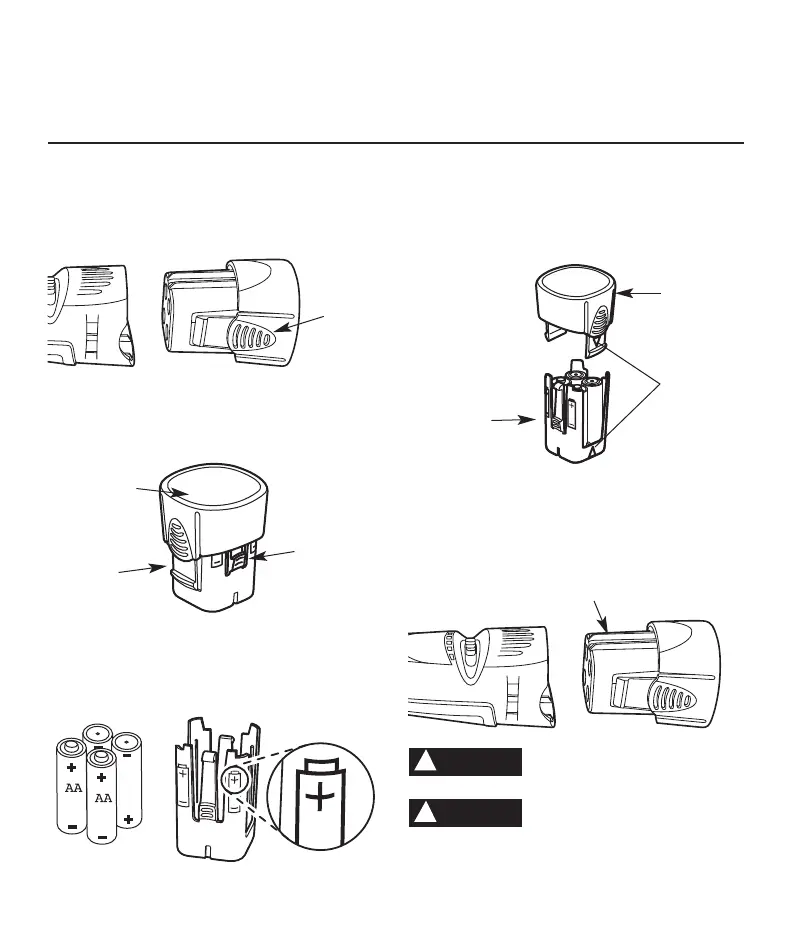
Inserting batteries
1. Remove the battery pack from the tool by squeez-
ing the two tabs on the battery pack together and
slide the battery pack out of the tool.
2. Remove battery pack cover from the battery
holder by squeezing the two tabs and remove the
battery cover from the battery holder.
3. Paying special attention to the orientation of the
batteries, insert four AA batteries into the battery
holder. Note diagram on the battery holder show-
ing correct battery direction.
4. Align arrow in battery pack cover with arrow in
the battery holder and press together. The two
parts will only fit together when the arrows are
aligned. The two parts will join together with a
click.
5. Insert the battery pack into the tool by aligning
the guide ribs on the battery with the guide track
on the tool. The two parts will only fit together
when the two arrows align. The two parts will join
together with a click.
RISK OF FIRE USE ONLY 1.5V
ALKALINE BATTERIES ONLY.
Do not install backwards,
charge or put in fire.
Batteries
may explode or leak.
Page 11
Remember, your new Dremel Cordless Rotary Tool
is the finest power tool of its kind. But its perfor-
mance is only as good as the accessories with
which it is used. We recommend only Dremel
accessories be used. Use of any other accessories
may create a hazard. We hope you’ll enjoy many
years of trouble free pleasure from your Dremel
Cordless Rotary Tool.
WARNING
!
WARNING
!
BATTERY
PACK
RELEASE
TAB
BATTERY PACK
COVER
BATTERY
HOLDER
BATTERY
PACK
COVER
RELEASE
TABS
BATTERY
PACK
COVER
ALIGN
ARROWS
BATTERY
HOLDER
GUIDE TRACK


 To Next Page