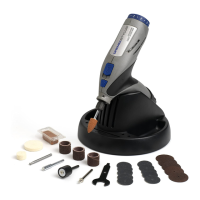
The Dremel Lite™ (models 7760-N/10, 7760-N/10B, 7760-N/10W) is a versatile handheld rotary tool designed for a variety of tasks requiring high-speed and low-torque precision. It supports applications such as cutting, carving, engraving, grinding, sharpening, cleaning, polishing, sanding, and routing, depending on the accessory used.
Function Description:
The Dremel Lite™ operates by rotating various accessories at high speeds, allowing users to perform detailed work on different materials. Its primary function is to provide precision and control for tasks that would be difficult or impossible with larger, slower tools. The tool is powered by a rechargeable battery, indicated by an LED Battery Life Indicator, and can be charged via a USB port.
Important Technical Specifications:
- Speed Settings: The tool features an On/Off Slide Switch with a Variable Speed Dial, offering four distinct speed settings:
- Setting 1: 8,000 RPM
- Setting 2: 14,000 RPM
- Setting 3: 21,000 RPM
- Setting 4: 25,000 RPM
- Charging: The Dremel Lite™ charges via a USB Charging Port + Dust Cap and requires a 5V/1A minimum power adapter. A full charge takes approximately 2 hours and 45 minutes.
- Collet System: The tool uses a collet and collet nut system to secure accessories. The kit includes a 1/8" shank size collet, which is the most precise way to hold accessories.
- Battery Indicator: An LED light indicates battery status: green for charging (turns off when fully charged) and red for low battery or when the tool stalls.
Usage Features:
- Variable Speed Control: The slide switch and dial allow users to select the appropriate speed for different materials and tasks, optimizing performance and preventing premature wear of accessories or damage to the workpiece.
- EZ Twist Nosecap: This feature serves as a wrench for tightening or loosening the collet nut when changing Dremel accessories, simplifying accessory changes.
- Shaft Lock Button: Used in conjunction with the EZ Twist Nosecap, the shaft lock button holds the shaft in place to facilitate accessory changes.
- Ergonomic Grips: The Dremel Lite™ supports two primary grip styles:
- Pencil Grip: Ideal for close or detailed work, providing fine control.
- Golf Grip: Suitable for more aggressive operations like sanding or grinding.
- Accessory Compatibility: The tool is compatible with a wide range of Dremel accessories, including:
- Carving/Engraving: #106 - 1/16" Engraving Cutter (for soft & hard woods, metals, plastics, laminates) at speeds 3 or 4.
- Grinding/Sharpening: #952 - 3/8" Grinding Stone (for soft & hard metals, stone, glass) at speeds 3 (soft materials) or 4 (hard materials).
- Sanding: #407 - 1/2" 60 Grit Sanding Mandrel + Band (for soft & hard woods, metals, stone, ceramic, laminates, plastic) at speeds 3 (soft materials) or 4 (hard materials).
- Cleaning/Polishing:
- #414 - 1/2" Felt Wheel and #429 - 1" Felt Wheel (for soft & hard metals, stone, shell, glass, ceramic) at speeds 1 or 2.
- #403 - Nylon Bristle Brush (for soft & hard woods, metals, plastics) at speed 2.
- #421 - Polishing Compound (for soft & hard metals, stone, shell, glass, ceramic) at speed 1.
- Best Practices for Operation:
- Always start at the lowest recommended speed and gradually increase to the desired speed.
- Turn off the tool before making any adjustments or changing accessories.
- Wear personal protective equipment (dust mask, safety glasses, gloves) depending on the application.
- Apply minimal pressure and let the tool's speed do the work to maximize run time and prevent stalling.
- Avoid gripping the tool where it blocks ventilation openings to prevent overheating.
- Do not engage the shaft lock button while the tool is in operation to prevent severe internal damage.
Maintenance Features:
- Charging Indicator: The LED light provides clear feedback on charging status, ensuring the tool is ready for use.
- Stall Indicator: A red LED light flashes if the tool stalls, prompting the user to remove it from the material, turn it off, and resume use without excessive pressure. This helps prevent damage to the tool and accessory.
- Accessory Installation: The manual provides clear instructions for installing and securing accessories, emphasizing the importance of inserting them as far as possible to minimize runout and unbalance, and avoiding excessive tightening without a bit. It also offers a tip for loosening a stuck collet.
- Cleaning/Polishing Accessories: Specific accessories like the #403 Nylon Bristle Brush and felt wheels are designed for cleaning and polishing, helping to maintain the appearance and functionality of workpieces. The #421 Polishing Compound is used with these accessories to achieve smooth and shiny surfaces.

 Need help?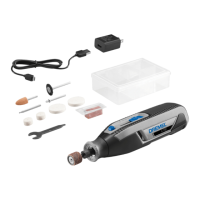

 To Next Page
 General