20
510 2 HOUR CHARGER
Your Dremel Versa does not come completely
charged from the factory. Be sure to charge tool
prior to initial use.
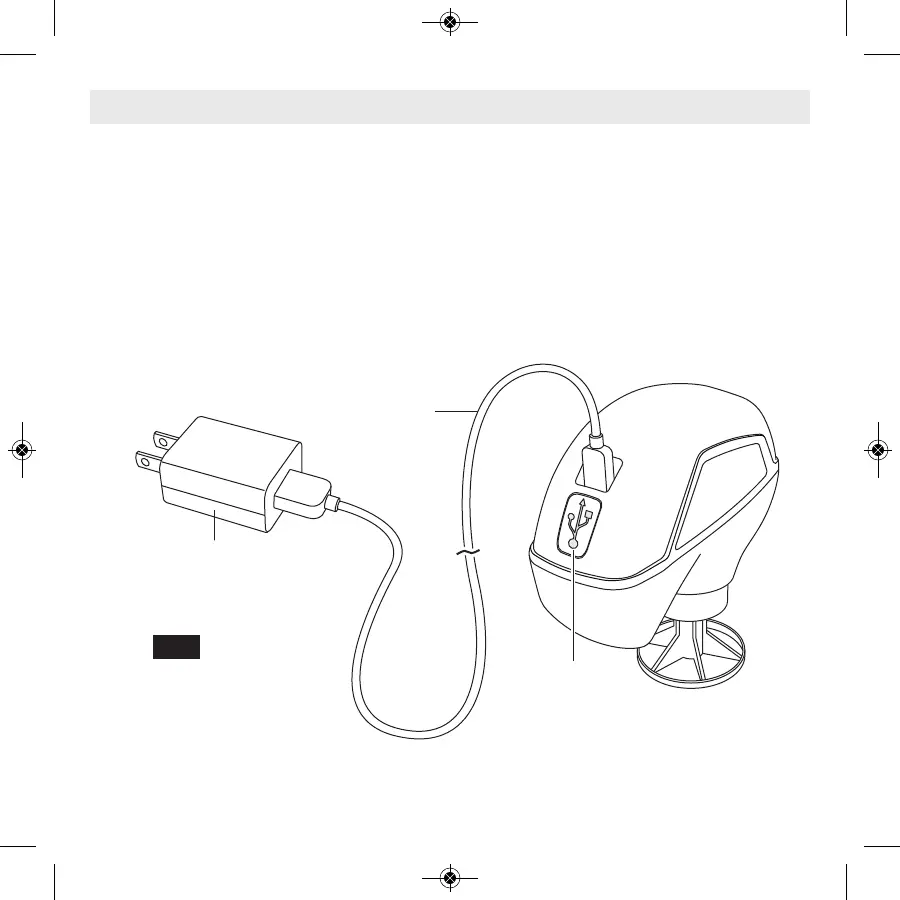
To charge: plug the USB cord into the tool and
power adapter, then insert the power adapter
plug into a standard power outlet. The blue LED
light located on the tool housing below the USB
outlet will turn on to signal the battery is receiv-
ing a charge. When the tool is fully charged (ap-
prox 2 Hrs.), charging will automatically stop
and the blue LED light will turn off.
When the battery is dead, the tool will automat-
ically turn off. This will be a sudden stop as op-
posed to a gradual winding down of the tool.
Simply recharge the tool and reuse.
Charging Tool
Power
Adapter
FIG. 4
Charging
Light
USB
Cord



 To Next Page