www.vtop.shop
1
USB AUDIO
GRABBER
Download the latest operating
instructions from our website
https://www.vtop.shop/ or scan the
printed QR code.
1. Install the software and follow the on-screen
instructions.
2. You can find further information of the software
functions in the help menu.
These are available at the following links:
*Online English manual:
https://manual.audacityteam.org/#tutorials
https://www.audacityteam.org/help/faq/
1. Connect the audio grabber to an audio device.
Depending on the device type, use the 3.5 mm stereo
jack or the 2-channel R / L jacks.
2. With the USB cable, connect the audio grabber to
a computer and wait until the product is recognized
automatically. Should it not be recognized
automatically, set the audio grabber as an audio input
source using the control panel.
3. Start the software. Start playback of the audio source
and digitize audio files.
4. After use, disconnect the audio grabber from the
computer and audio device.
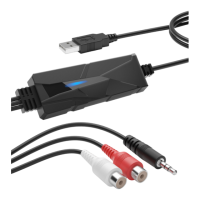
• USB Audio Capture
• Operating instructions
The audio grabber digitizes analogue audio signals.
Using a 3.5 mm stereo jack or an RCA adaptor, the
product can be connected to a record player or
cassette tape recorder.
EN
UP-TO-DATE OPERATING INSTRUCTIONS
INSTALLING THE SOFTWARE
OPERATION
DELIVERY CONTENT
Operating Instructions
DriverGenius AV202-B is a Audio-Grabber
for common usage. The maximum audio
sampling rate is 48Khz.
DriverGenius is a trademark of Vtop Industry
Limited, registered in the EU and other countries.
All other trademarks and trade names are the
property of their respective owners.
COPYRIGHT AND TRADEMARKS


 To Next Page
 Loading...