Need help?
Do you have a question about the DS18 DDX10.5ML and is the answer not in the manual?
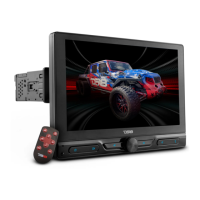
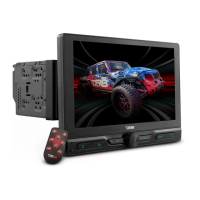
The DS18 DDX10.5ML is a 10.5" floating display multimedia receiver designed for in-dash installation in vehicles. It features a double DIN modular mounting system, allowing for adjustable angle, tilt, and height positioning of the screen. The unit supports various media files including RMVB, MPG4, DivX, AVI, MP3, WMA, and JPEG, and can read USB and SD cards up to 64GB. It also includes an AM/FM radio with 30 memory stations and RDS functionality to display radio station information.
The DDX10.5ML boasts a Full HD 10.5" IPS display with a resolution of 1280x720 pixels. It features a capacitive touch screen and supports 1080P video playback. The display also has a dynamic multi-color LED backlight.
The receiver delivers a maximum power output of 40W x 4 channels at 4 ohms, with a continuous power output of 15W x 4 channels at 4 ohms. It offers a 16-band graphic equalizer and controls for volume, bass, treble, balance, and fader. Pre-output levels are 4.5 Volts for front and rear channels, and 7 Volts for the subwoofer. Audio control includes volume, balance, fader, and loudness adjustments.
A key feature of this unit is its Mirror-Link functionality, compatible with both iOS (iPhone 5 and up) and Android (5.0 and up) phones. This allows users to mirror their smartphone screen onto the receiver's display. An app remote is also available to control the receiver using a smartphone. The unit supports Bluetooth V5.1 for audio streaming and hands-free calling. It includes a wired remote input for steering wheel control interfaces, a front USB port with a 1.5 Amp charger, a front audio jack input, and RCA video and audio inputs. It also offers dual mirror-type video outputs and inputs for both rear and front cameras, supporting AHD 720P cameras.
The FM frequency range is 87.5 ~ 107.9 KHz, and the AM frequency range is 530 ~ 1710 KHz. It has 30 preset memory stations (18 FM/12 AM) and allows for region selection (USA, Latin, Japan, Asia, Europe, OIRT, Australia, Mid-East). Sensitivity adjustment includes LOC (On/Off) and ST (On/Off) modes.
The USB/SD player supports V1.1/V2.0/MSC/MTP/FAT16/FAT32/NTFS file systems. It can play RMVB, MPG4, AVI, MP3, WMA, JPEG, and DivX formats, with support for 1080P video resolution. The memory size reader supports up to 64GB. It has two USB ports: one front and one rear, with a maximum current supply of 1.5 Amp (USB).
Installation requires careful attention to wiring connections. The unit should be mounted in a location that does not interfere with normal driving functions. Temporary wiring connections are recommended to ensure proper functionality before final installation. The screen is removable for easier installation, securing into its holder with locking pins.
The main unit features an IPS touch screen for various operations. Physical controls include a microphone for BT operation, an IR sensor for remote control, and buttons for HOME (main menu/current mode), BACK (previous mode), BACKWARD/FORWARD (radio tuning, track shifting, fast forward/rewind), MODE (select operation mode), and PHONE CALL (BT phone call mode, answer/hang up). A VOL/POWER knob adjusts sound output and turns the unit on/off.
The control panel on the main body includes an AUX input, a micro SD card slot, a RESET button (to restore default settings), and a front USB port for digital files or mirror-link function.
The main menu provides access to various functions such as Radio, BT, Phone Link (mirror-link), USB1 (front USB), USB2 (rear USB), Card (SD card), AV in (auxiliary input), F-CAM (front camera), Setup (system settings), EQ (audio/visual settings), and SWC (steering wheel control).
Users can tune radio frequencies upward or downward, store preset stations, and search for the strongest signals. It supports stereo (ST) and mono modes and allows for local (LOC) or distant reception settings.
To link with a mobile phone, users set their phone to BT mode, search for "DDX10.5ML," confirm the search, and input "0000" or "8888" if needed. Once connected, BT functions like call, phonebook, call log, and music streaming can be used.
This function requires connecting the mobile device to the front USB port. For iOS devices, mirror-linking starts automatically. For Android devices, users scan a QR code, download the "AUTOLINK" app, and then control their phone through the receiver's touch screen. Important notes include iOS compatibility from iPhone 5 up and Android from 5.0 up, the necessity of a USB cable, and potential variations in phone setup (e.g., USB debugging in developer options).
Playback starts automatically. On-screen controls allow for starting/pausing playback, shifting tracks, and activating fast forward/rewind. Users can also access playlists and folder playlists.
When an auxiliary video device is connected, users can switch to auxiliary input mode and activate the AV INPUT MENU.
The steering wheel control learning function allows users to map their car's steering wheel controls to the receiver. This involves touching a control key on the screen, pressing and holding the corresponding steering wheel control, and then saving the setting.
When a front camera is connected, users can view the front camera feed and activate the FRONT CAMERA INPUT MENU.
The DS18 DDXRC app is available for Android devices on Google Play. After installation, ensure the radio is on, open the app, and connect to "DDX10.5ML_APP" from the list. The app provides controls for EQ, audio, source selection, volume, radio mode, track seeking, play/pause, and access to the setup menu. The EQ and Audio Control Menu within the app allows adjustment of bass, treble, balance, and fader, with a reset button to return controls to the center position.
The manual provides basic troubleshooting for common issues such as no power (check wires, fuse), no sound (check speaker wires), no picture (check video wire), unit hang-up (press RESET), no function when pressing buttons/TFT screen (press RESET), poor radio reception (check antenna, grounding), stereo not received in radio mode (tune frequency, set to MONO), remote handset not working (replace battery, point directly, clean sensor), and Bluetooth not operated (check linked devices).
Users are warned against watching multimedia content while driving to avoid traffic violations. The unit should not come into contact with water or metallic objects to prevent short-circuiting. Professional repair is recommended for malfunctions. Extended use with the engine off can deplete the car battery. Objects should not be inserted into ventilation slots, and sharp objects should be kept away from the screen. The product is designed and engineered in the USA.
For warranty information, users are directed to the DS18.com website. DS18 reserves the right to change products and specifications without notice. The manual also includes a California Proposition 65 warning regarding cancer and reproductive harm. The device complies with FCC rules, stating it may not cause harmful interference and must accept any interference received.

 To Next Page
 General