THIS
FUMC?7ON
ALLOWS
TO
CREATE
OR
MQDIFY
ONE
QF
BB
SHOW
The
graphic display indicates the show [highlighted) currently active
[Fig.
38
par
8.1)
for create/modify it press the
EDlT
key
EDlT
[Fig.
41).
-
I
he
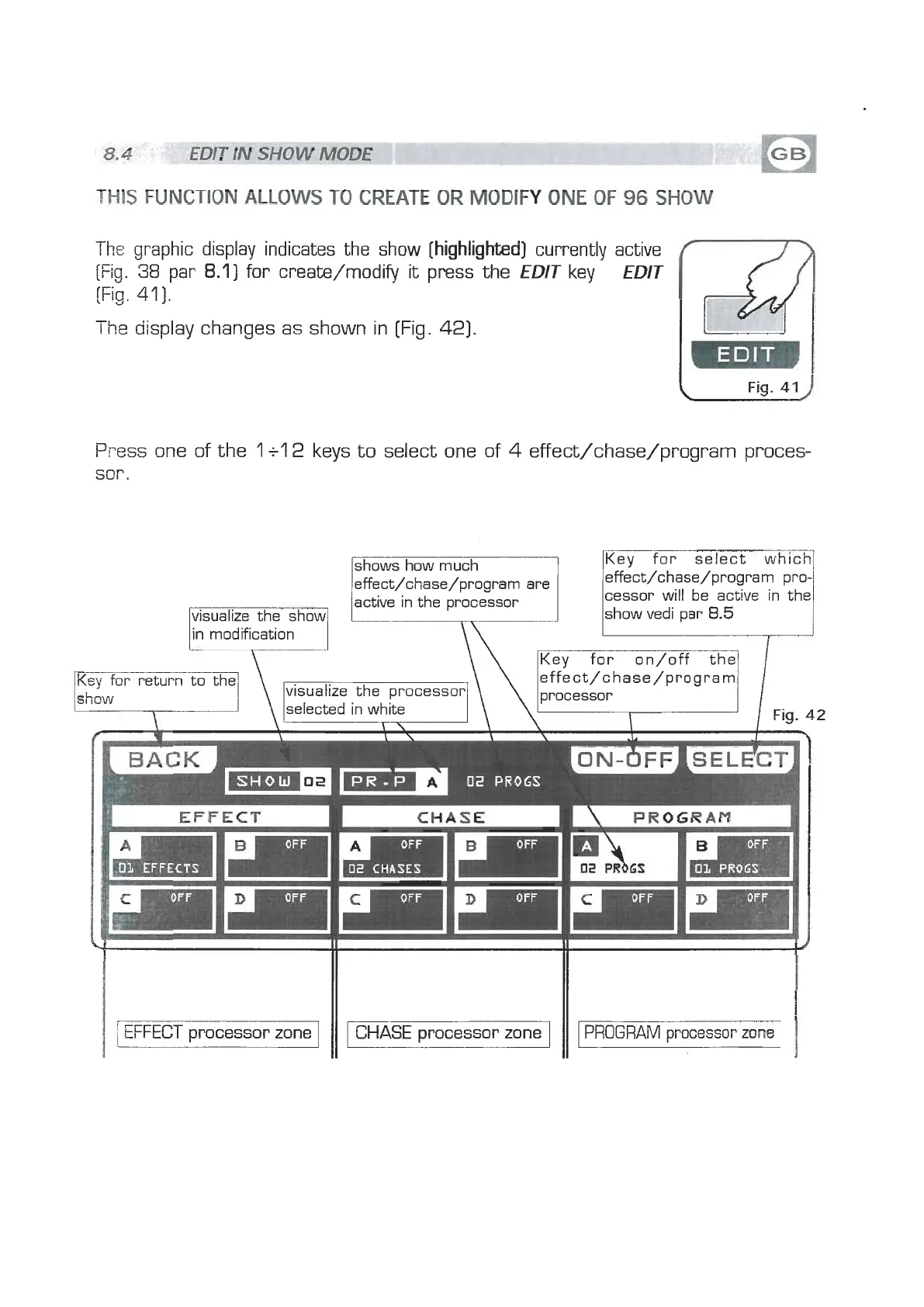
display changes as shown in [Fig. 42).
Fig.
41
C
Press one of the
1
+l
2
keys to select one of
4
effect/chase/program proces-
scr
.
[
[
EFFECT
processor zone
1
shows how much
effect/chase/program are
I
CHASE
Key for select which
effect/chase/program pro-
I
CHASE
processor zone
I
active in the processor
cessor will be ective in the
visualize the show
show vedi par
8.5
in modification
Key for return to the
effect/chase/program
visualize the processor processor
selected in white
Fig.
42
1
PROGRAM
processor
zone
I


 To Next Page
 Loading...