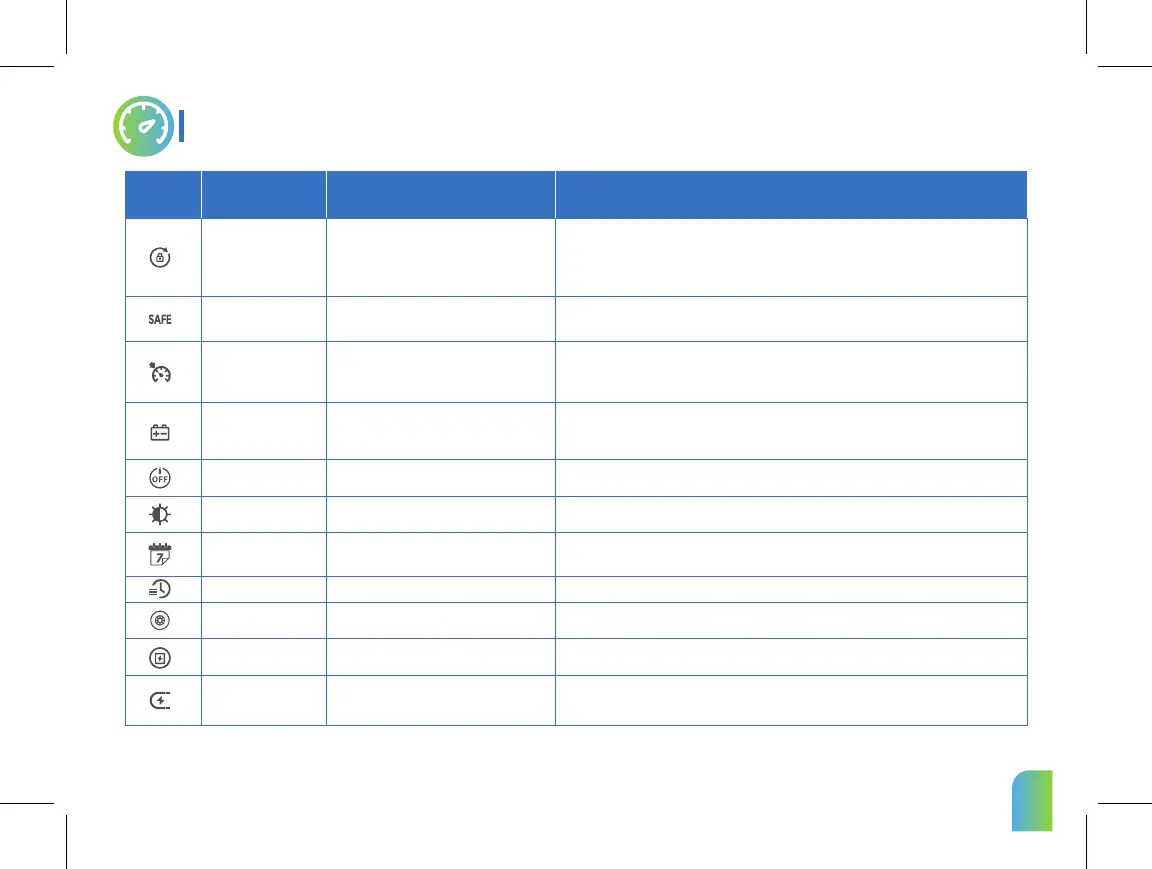
Symbol Name Meaning Description
Change Password
Safe Mode
CCS
Prevent BMS CUT
Auto Power-off
LCD Brightness
Time Setting
Imperial/Metric
Wheel Diameter
Battery Voltage
Pole Pairs
Motor pole pair number of the scooter.
Reset a password.
Drive at a constant speed without stepping
on the accelerator or brake.
Set in P10. Turn on/off the cruise control mode. Default OFF. (The scooter maintains a fixed
speed for more than 8s ,speed cruise work automatically)
Dashboard
Prevent the scooter from starting when the
accelerator is accidentally touched.
Set in P9.When the scooter is turned on and stays in the static state for N seconds (no operation, no
speed), it will switch to the safe mode automatically. In SAFE mode, this symble will appear on the
screen. (N seconds ranges from 0 to 300 seconds. 0 seconds means SAFE mode is not enabled.)
Set in P8. Press the POWER to change the password. When the display shows 1, enter the initial
password, press the POWER to confirm. And when the display shows 2, please enter the new
password, and press the POWER to confirm.At this moment, the display will show 3, please enter the
new password again and press the POWER. Then the Password is changed successfully.
Note:The owner can connect to the APP directly without entering the password to unlock the scooter
and reset the password on the mobile.
03
Set in P11. Turn on/off Prevent BMS CUT mode. The default is off. When scooter enter the ECO in
this mode, the ECO can not be manually closed; if you want to manually close the ECO in the
current mode, you need to close the Prevent BMS CUT mode first.
Auto shutdown when the EY4 is not operated.
Set in P12. Automatic shutdown time Settings adjustable range from 1-30 minutes. The default is 5
mins. Note: When the scooter has no operation and no speed, the timing starts.
Set in P13. Adjust from 0 to 5, the default is 5.
Set in P15. "0" means metric,it is km/h; "1" means imperial,it is mp/h.The default is 0.
Different scooters have different default diameters. They are set at the factory.
Any modification is forbidden.
Different scooters have different default voltages. They are set at the factory.
Any modification is forbidden.
Set in P14. Short press the POWER to set, short press the MODE to select the hour/minute setting
(the corresponding setting item will flash), and short press the SET to adjust the number.
After the time is modified, short press the POWEER to make the modification take effect.
Set the time on the EY4.
Speed unit selection.
Wheel diameter of the scooter.
Voltage of the scooter.
Different scooters have different motor pole pair numbers. They are set at the factory.
Any modification is forbidden.
Adjust the LCD backlight brightness.
When battery capacity less than 20%, scooter
enters ECO mode automatically.



 To Next Page