7
L1023004-D – User manual for Duco's ventilation systems
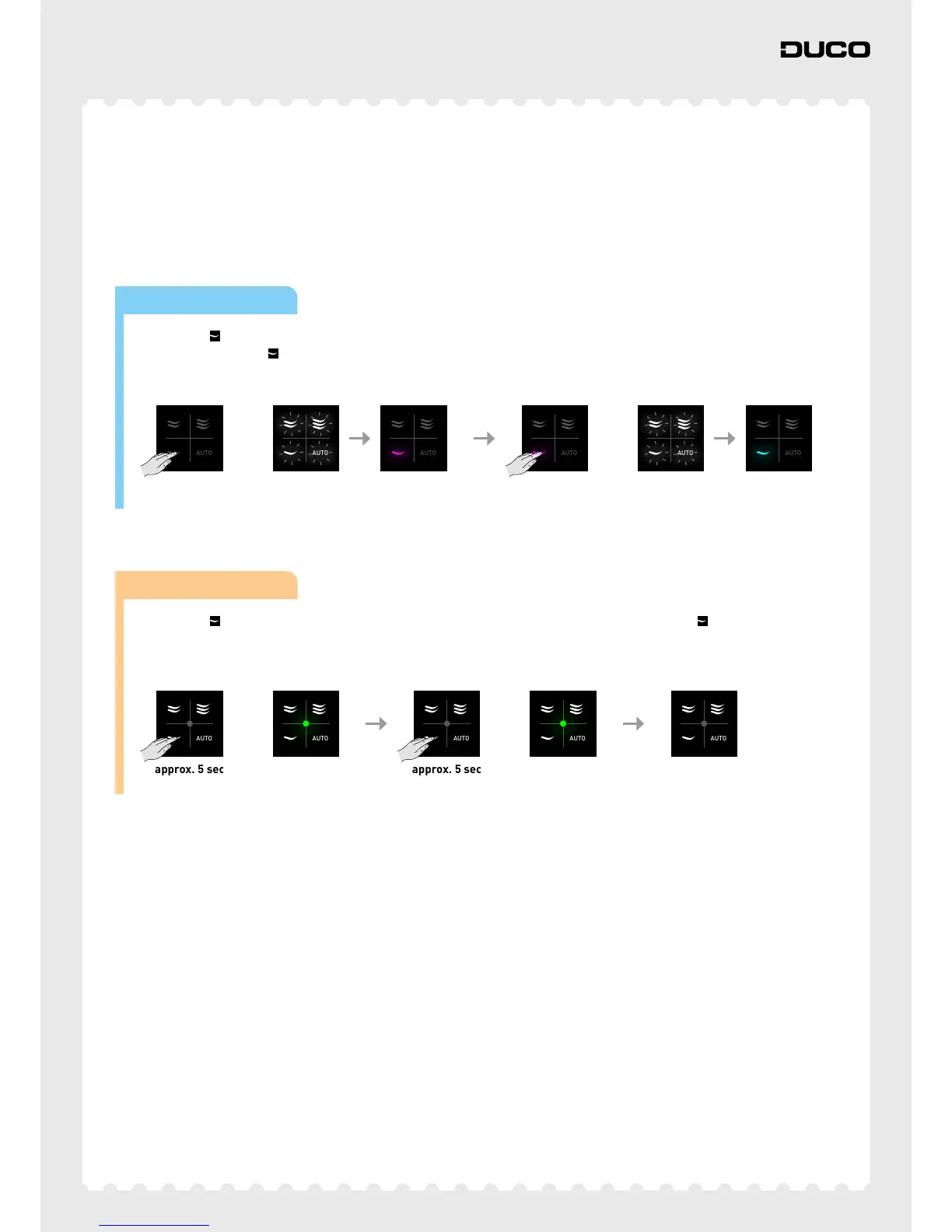
Unoccupied setting
The unoccupied setting puts the whole system in the most energy-saving setting. This setting is suitable for when you are
on holiday, for example. The unoccupied setting remains active until the user deactivates it again.
Note: in a non-zonal system, this setting is the same as a permanent low setting.
AUTO
to
AUTO AUTO
Wired power supply
Long-press until the 4 LEDs light up briefly to activate permanent low setting. The low setting will light up magenta.
After that, long-press
until the 4 LEDs light up briefly to activate unoccupied setting. The low setting will light up
cyan. Tap any button (at random) to deactivate unoccupied setting.
AUTO
to
AUTO AUTO
Battery powered
Long-press until the LED lights up green for 5 seconds as confirmation. After that long-press again until the LED
lights up green for 5 seconds as confirmation. The unoccupied setting is now activated. Press any button (at random) to
deactivate unoccupied setting.



 To Next Page