7
4. Programming the individual dosing pumps
Every one of the four dosing pumps can be controlled separately.
Note: the dosing volume of 1,000 ml for each dosing unit should not be exceeded because this significantly reduces the
pump‘s service life. Having delivered the maximum volume of 1,000 ml a delay of at least 30 min should be maintained before
the next dosing unit.
· minimum flow rate of 1 ml can be set
· recommended max. flow rate 9,999 ml/day
· adjustable dosing time
· 1
–
24 dosing units/day can be set
· Interval days 0
–
30 can be set
· Output: approx. 60 ml/min
Press the Menu button to access the programming level.
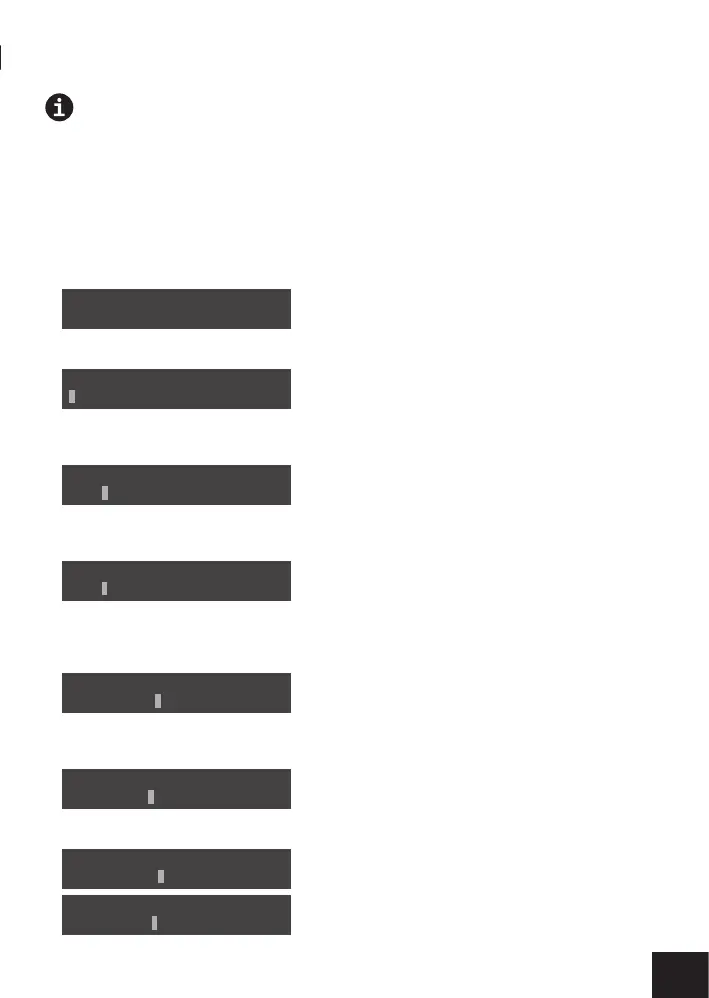
The < symbol indicates which programming level you have currently selected. Use the
or
button to navigate between the
programming levels. Confirm Set Program by pressing the Menu button.
You can now use the
and
buttons to select the pump to be programmed.
By pressing the Menu button again you confirm the selected pump and can use the
or
button to set the desired number of
dosing units per day (1 – 24).
P1 represents pump 1 to be programmed, P2 pump 2 etc.
By pressing the Menu button you set the interval days.
The
and
buttons are used to enter the number of day intervals. With a day interval of 01, a dose will be dispensed ever day,
with 02 every two days etc. The setting 00 defines a daily dose as of today.
Then you can press the Menu button to set the dosing volume.
Use the
and
buttons as well as the
and
buttons to set the desired dosing volume.
By pressing the Menu button you can use the
and
buttons as well as the
and
buttons to set the dosing times.
If several dosing units are desired, press the Menu button again and use the
and
buttons as well as the
and
buttons to
define more dosing volumes and dosing times.
Set Date & Time
Set Program
<
Select Pump-set:
1 2 3 4
P1 Time Per Day:
For: 01 (1 – 24)
P1 Interval Day:
For: 00 (0 – 30)
P1 Dosing Volume:
Num: 01 -- : 0010ml
Dosing Time:
Num: 01 -- : 12:00
P1 Dosing Volume:
Num: 02 -- : 0010ml
P1 Dosing Time:
Num: 02 -- : 13:00


 To Next Page
 Loading...