59
3
2
1
Printing With Various Functions
○○○○○○○○○○○○○○○○○○○○○○○○○○○○○○○○○
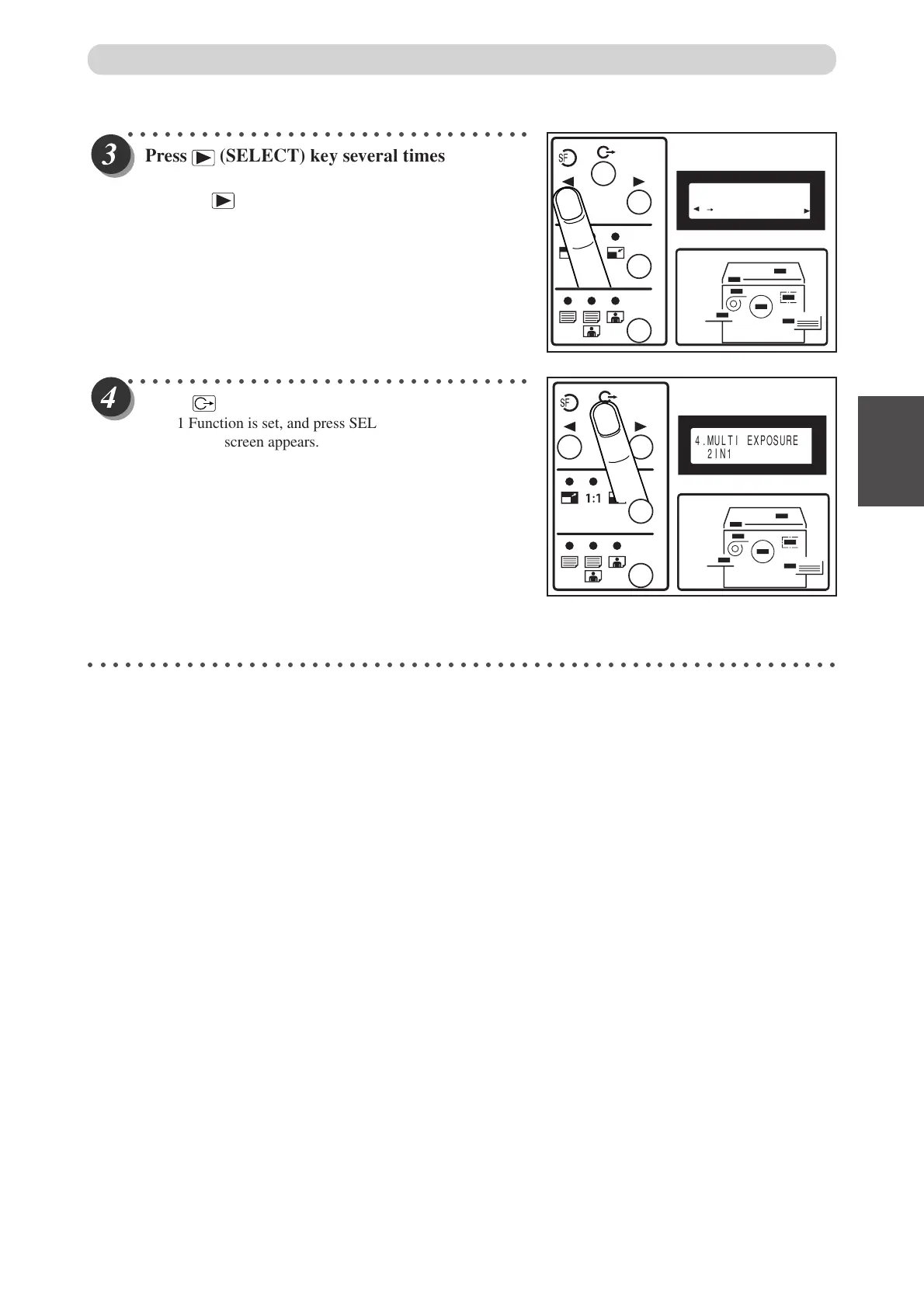
Press
(SELECT) ke
y several times to select
“2IN1”.
Each time (SELECT) key is pressed, the display of the
LCD panel changes as follows.
“OFF” → “2-UP” → “4-UP” → “8-UP” → “2IN1”
○○○○○○○○○○○○○○○○○○○○○○○○○○○○○○○○○
Press
(FUNCTION SWITCH) ke
y.
2 IN 1 Function is set, and press SELECT key several times
○○○○○○○○○○○○○○○○○○○○○○○○○○○○○○○○○○○○○○○○○○○○○○○○○○○○○○○○○○○○○
Multiple Printing on One Page
4.MULTI EXPOSURE
2IN1
the standard screen appears.
4.MULTI EXPOSURE
2IN1



 To Next Page
 Loading...