7
Operating Instructions
Maintenance And Storage
To tilt the fan head, loosen the thumbscrew, tilt the fan head in the desired
position and then tighten the thumbscrew rmly. The fan can also turn 360°.
1.
U
nplug the fan
and store the fan in a cool, dry location when not in use.
2.
N
ever submerge the fan in water. To keep the fan clean, the outer shell
may be cleaned with a soft, damp cloth. You may use a mild detergent
i
f necessary. After cleaning, wipe the unit dry by using a soft dry cloth.
3.
Do not use alcohol, gasoline, abrasive powders, furniture polish, or
brushes to clean the fan as this may cause damage and deterioration
to the surface of the fan.
4. A
lways ensure the fan is completely dry after cleaning before operating
again.
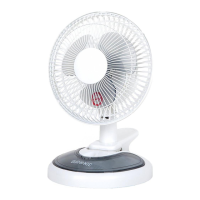
The FN15 can be used in 3 ways: standing flat on a desk top, clipped onto the
edge of a table/desk/shelf, or it can also be mounted onto a wall using a screw
and raw plug.
1. Decide on a location to place your fan. If you want to use it standing on a
a table, ensure the surface is even and stable.
2. Plug the power cable into the mains socket and switch on.
3. Turn on the fan using the switch on the back of the fan. Flip the switch to
the "1" position and it will produce a low-speed breeze. Flip the switch to the
"2" position and the fan will provide a high-speed breeze.
4. To turn off the fan, flip the switch back to the "0" position.
The tray in the base of the fan can be used to store stationery and other small
items.
Adjusting the Tilt and Swivel


 To Next Page