EasyManua.ls Logo

Dutypoint ScubaTANK WX - User Manual

Dutypoint ScubaTANK WX
68 pages
Print Icon
To Next Page IconTo Next Page
Loading...
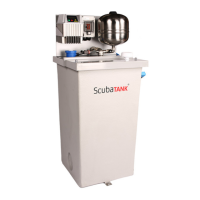
ScubaTANK WX
Operation and Maintenance Manual
Document Reference: DOC-WX1702

Questions and Answers

  • C
    Caitlyn FloresAug 16, 2025
    Why is my Dutypoint Water Pump vibrating or noisy?
    • H
      haydenmarkAug 16, 2025
      A vibrating or noisy Dutypoint Water Pump can be attributed to a few potential causes. One reason could be pump cavitation. Try increasing the discharge back pressure slightly by progressively closing a manual isolating valve on the discharge side until the cavitation stops. Alternatively, the rotating parts of the pump might be obstructed, for example, the impeller obstructed by foreign matter. In this case, strip the pump to inspect and rectify. Lastly, worn motor bearings can also cause these symptoms; check and rectify as needed.
  • H
    Helen ClarkAug 20, 2025
    What to do if my Dutypoint Water Pump won't start?
    • M
      Mrs. Stephanie HarrisAug 21, 2025
      If your Dutypoint Water Pump isn't starting, there are a few things you can check. First, ensure that there is electrical power reaching the pump; if not, check and rectify. Next, inspect the fuse, as a blown fuse could be the culprit; check and replace if necessary. Lastly, examine the overload trip/MCB and reset it if it has tripped.
  • T
    Taylor RodgersAug 25, 2025
    What causes an overload trip on my Dutypoint Water Pump?
    • P
      Patrick WrightAug 25, 2025
      An overload trip on your Dutypoint Water Pump can stem from several issues. It could be due to a partial blockage in the pipework or pump chamber; check and rectify any obstructions. A momentary loss of one phase of the power supply can also trigger it; check the power supply and try again. Additionally, a discharge flow rate that's too high can cause an overload; reduce the flow rate by increasing the discharge back pressure slightly by progressively closing a manual isolating valve on the discharge side, then try again. Finally, the overload trip setting might be too low for the rated duty; check and, if necessary, reset the overload trip value.
  • A
    ashley46Aug 28, 2025
    What to do if my Dutypoint Water Pump has low or zero output discharge rate?
    • L
      Linda BennettAug 28, 2025
      If your Dutypoint Water Pump has a low or zero output discharge rate, consider these possible causes. The rotating parts of the pump could be obstructed; strip the pump to inspect and rectify. The pump may not be primed; prime and air-bleed the pump, after checking the mechanical seal for damage. A valve in the suction pipework might be closed or partially closed; check that all appropriate valves are fully open. Finally, the pump rotation could be incorrect; check and rectify.
  • G
    gjohnsonAug 31, 2025
    Why is my Dutypoint ScubaTANK WX Water Pump break tank overflowing?
    • M
      Maria HughesAug 31, 2025
      If your Dutypoint ScubaTANK WX Water Pump's break tank is overflowing, one potential cause is a solenoid valve jammed open due to debris. To resolve this, clean the solenoid valve diaphragm: 1. Press the red STOP button(s) on the inverter control panel(s). 2. Close the incoming isolation valve. 3. Isolate the electrical supply. 4. Loosen the 4 screws as shown in Cleaning Solenoid Valve Diaphragm. 5. Remove the diaphragm and spring shown in Cleaning Solenoid Valve Diaphragm. 6. Remove all dirt from the diaphragm and housing. 7. Replace all parts. Another possible cause is that the probe relay settings have been adjusted. Check the probe relay settings according to Correct Probe Relay Settings in the control panel. Finally, a loss of power to the probe relays can cause overflowing.
  • S
    Sarah HuertaSep 4, 2025
    What does ACTIVE DIG. IN. 3 mean on my Dutypoint Water Pump?
    • D
      daniel95Sep 4, 2025
      If your Dutypoint Water Pump displays 'ACTIVE DIG. IN. 3', it means that Digital input 3 contact is opened, indicating a 'Low Water Level' condition. First, check that the incoming mains pressure is as expected. Second, check the water level in the tank. The error should reset automatically when Digital Input 3 contact is closed.
  • B
    Brian Wright MDSep 8, 2025
    What does ACTIVE DIG. IN. 1 mean on my Dutypoint Water Pump?
    • J
      Jane HarrisonSep 8, 2025
      If your Dutypoint Water Pump displays 'ACTIVE DIG. IN. 1', it indicates that Digital input 1 contact is opened, which the system interprets as ‘External On/Off’. To resolve this, first verify that any external signal (e.g., BMS) is set to deactivate the pump set. The error should reset automatically when Digital Input 1 contact is closed.
  • S
    Stephanie ParkerNov 12, 2025
    What to do if my Dutypoint Water Pump has no water and shows a DRY RUN COSPHI error?
    • M
      Molly JenningsNov 12, 2025
      If your Dutypoint Water Pump displays a 'NO WATER- (DRY RUN COSPHI)' error, it could be due to several reasons. First, the minimum pressure requirement might not be reached within the set period. To solve this: 1. Turn off the main electrical isolator. 2. Close the discharge isolation valve. 3. Vent the pumps. 4. Turn on the main electrical isolator. 5. Check the unit runs up to the set pressure and pump motors shut down. 6. Open the discharge valve slowly, ensuring the set pressure is maintained. Another cause might be an air lock in the pump. To resolve this: 1. Press the red STOP button on the inverter drive(s) to stop the unit. 2. Disconnect the pump(s) by loosening the union directly underneath the lid, above the pump discharge pipeline. 3. Lean/tilt the pump(s) over as fa...

Summary

Important Safety Information

Health & Safety at Work Act 1974

Manufacturers' advice on safety precautions for installation, operation, maintenance, and servicing.

Mechanical Device Servicing

Safety procedures for mechanical servicing, including lockout, cooling, and draining.

Pump Hand Control Mode

Safe usage guidelines for manual pump control mode to prevent system damage.

Electrical Safety - High Voltages

Critical safety warnings regarding high voltages in the power unit and inverter drive.

Specifications

Identifying ScubaTANK Models

Explains the model coding system for identifying ScubaTANK units and their configurations.

Installation Sequence

Position and Secure the Tank

Step-by-step guide for positioning and securing the ScubaTANK unit, including clearance notes.

Cleaning the Filter

Instructions for periodic filter cleaning to maintain system performance and prevent sediment buildup.

Hydraulic Connection

Guidelines for hydraulic connections, ensuring compliance with regulations and proper pipework support.

Electrical Supply

Critical safety and procedural information for electrical supply connections, earthing, and bonding.

How to Seal a Horizontal Split Tank

Detailed instructions and warnings for sealing horizontal split tanks using sealant, ensuring a proper seal.

Bolt Tightening Sequence for Split Tank Flange Assembly

Step-by-step procedure for tightening bolts on split tank flanges to ensure a proper seal.

Level Probe Details

Information regarding the terminals and connections for level probes within the system.

Commissioning

Installation and Commissioning Overview

Overview of pre-commissioning checks and the process for site commissioning of the pump set.

Pipework and mechanical components

Checks to ensure proper installation of pipework and mechanical components before commissioning.

Electrical

Critical electrical checks to be performed by a qualified electrician before powering up the system.

Low Level Float Switch Wiring

Wiring instructions for optional low-level float switches, including parallel connections.

Final Checks Before Commissioning

Final checks and verification procedures to be carried out before commencing commissioning tests.

Pressure Vessel Pre-Charging

Detailed instructions for checking and setting the pre-charge pressure of the pressure vessels.

Venting Pumps

Importance of bleeding all air from the pump body before initial start-up.

Procedure for flooded suction

Definition and context for flooded suction systems, where inlet pressure is positive.

Procedure for Lift Suction

Specific venting procedures required for lift suction operation where tank is below pump.

Programming the Controller

Guidance on programming the inverter/controller according to manufacturer specifications.

Operation and Performance Tests

Procedures for conducting operational and performance tests after installation and before handover.

Duty;Standby Twin Pump Sets

Checks and procedures for verifying correct duty/standby operation in twin pump sets.

Duty;Assist Twin Pump Sets

Procedures for testing duty/assist operation in twin pump sets to ensure proper function.

Commissioning;Handover Check

Final checks and handover procedures to ensure the pump set is fully operational and ready for use.

Operating the Pump Set

VASCO Display

Description of the VASCO control panel display, its indicators, and basic functions.

Pressure Vessel

Installation Safety Notes

Critical safety notes to be observed during the installation of the pressure vessel.

Periodic Maintenance

Recommendations for periodic maintenance of the pressure vessel to ensure its longevity.

General Maintenance and Repair

General guidelines for carrying out maintenance and repair work on the pressure vessel.

Pressure Vessel Pre-Charge Instructions

Detailed step-by-step instructions for the pre-charging process of the pressure vessel.

Diaphragm Replacement

Step-by-step procedure for safely replacing the diaphragm in the pressure vessel.

Installing a Replacement Vessel

Instructions for installing a replacement pressure vessel, ensuring proper connection and safety.

User Maintenance

Periodic User Checks for Pump Sets

Schedule and details of periodic checks to be performed by the user for pump set maintenance.

DANGER: DO NOT COMMENCE ANY MAINTENANCE WORK UNTIL:

Essential safety prerequisites that must be met before starting any maintenance work on the pump set.

XPW Pump Maintenance

Routine Maintenance

Routine maintenance tasks for the XPW pump, focusing on suction grates and electrical connections.

Pump Replacement

Safety warnings and step-by-step procedures for replacing an XPW pump unit.

Replacement Procedure

Detailed guide for the correct procedure to replace an XPW pump, including checks.

Checking the Direction of Rotation

Method for verifying the correct direction of rotation for the pump motor to ensure proper operation.

Pressure Set Point Adjustment

Adjusting Pressure Set Point

Step-by-step guide for adjusting the pressure set point using the VASCO controller interface.

Troubleshooting

Initial Fault Response

Initial steps to take when a fault is detected and important warnings regarding system behavior.

Common Error Messages

Table of common error messages, their possible causes, and recommended solutions.

Fault Finding Chart

Comprehensive chart for diagnosing and resolving various pump and system faults based on symptoms.

Advanced Fault Codes

Information on advanced fault codes and important warnings for improper settings that could affect system integrity.

VASCO Inverter O&M Manual

Technical Characteristics

Weight and dimensions

Table and diagrams showing weight and physical dimensions of VASCO units categorized by size.

Electric wiring

Wiring diagrams and instructions for the power board of VASCO 209, 214 models.

Power board VASCO 218, 225

Wiring diagrams and instructions for the power board of VASCO 218, 225 models.

Power board VASCO 306,309,406,409

Wiring diagrams and instructions for the power board of VASCO 306, 309, 406, 409 models.

Power board VASCO 314,318,325,330,414,418,425,430

Wiring diagrams and instructions for the power board of VASCO 314, 318, 325, 330, 414, 418, 425, 430 models.

Power board VASCO 338,348,365,375,385,438,448,465,475,485

Wiring diagrams and instructions for the power board of VASCO 338, 348, 365, 375, 385, 438, 448, 465, 475, 485 models.

Control board

Detailed explanation of the VASCO control board connections, terminal functions, and digital/analog inputs.

Protections

Recommended upstream protections for VASCO units based on installation type and local regulations.

Electromagnetic compliance

Measures to ensure electromagnetic compatibility (EMC) of the system, including grounding and cable shielding.

Installation with long motor cables

Recommendations for installing VASCO with long motor cables, including commutation frequency adjustments.

VASCO installation

Guidelines for installing VASCO units, covering direct motor mounting and wall mounting kits.

VASCO SIZE 3

Details of the motor mounting kit components and assembly for VASCO SIZE 3 units.

Wall mounting kit

Components and instructions for the wall mounting kit for VASCO units, ensuring proper cooling.

VASCO Installation for constant pressure control

Pressure tank

Recommendation for pressure tank installation, volume selection, and pre-charge pressure for stable control.

Pressure sensor

Requirements for pressure sensors and their connection to VASCO for accurate pressure readings.

VASCO installation for differential constant pressure applications

Installation of VASCO for differential pressure control using two sensors, one for discharge and one for suction.

Sensors wiring

Wiring details for differential pressure sensors and dual sensor setups, including analog input connections.

Programming

Recommended parameters for circulation systems using VASCO for constant differential pressure control.

VASCO Use and Programming

VASCO display

Description of the VASCO display and its interactive elements for monitoring and control.

Initial configuration

Procedure for initial setup and configuration of VASCO parameters, including pump and sensor settings.

Initial view

Display information shown when VASCO is first powered on, including status messages and software versions.

Menu view

Overview of the menu structure and password access levels for VASCO configuration.

Control parameters

Detailed breakdown of control parameters and their default values for VASCO, covering various modes.

Motor parameters

Parameters related to motor specifications, voltage, current, and frequency for VASCO configuration.

IN;OUT parameters

Configuration of input/output parameters for VASCO, including sensor scaling and digital input logic.

Protections and alarms

Auxiliary pumps during constant pressure control

DOL pumps

Explanation of how DOL (Direct On Line) pumps are controlled by VASCO using digital outputs.

COMBO function

Configuration and operation of the COMBO function for serial communication and parallel operation of multiple VASCO units.

Trouble-shooting chart

Common Troubleshooting Scenarios

Addresses common issues like display, power, sensor errors, oscillations, and pump behavior with solutions.

Technical Assistance

DECLARATION OF CONFORMITY

Dutypoint ScubaTANK WX Specifications

General IconGeneral
TypePressure Vessel
OrientationVertical
ApprovalsWRAS approved
MaterialSteel
ColourBlue
WeightVaries by model
DimensionsVaries by model
MembraneButyl