31
CAUTION
CHANGES BEING MADE ARE APPLIED AFTER COMPLETE SETUP TO EXIT.
CAUTION
ONCE PORT NUMBERS ARE CHANGED, IT MUST BE CHANGED THE PORT NUMBERS OF CMS (Central Monitoring Station)
PROGRAM AS WELL.
Choose ‘OK’ to confirm the setting.
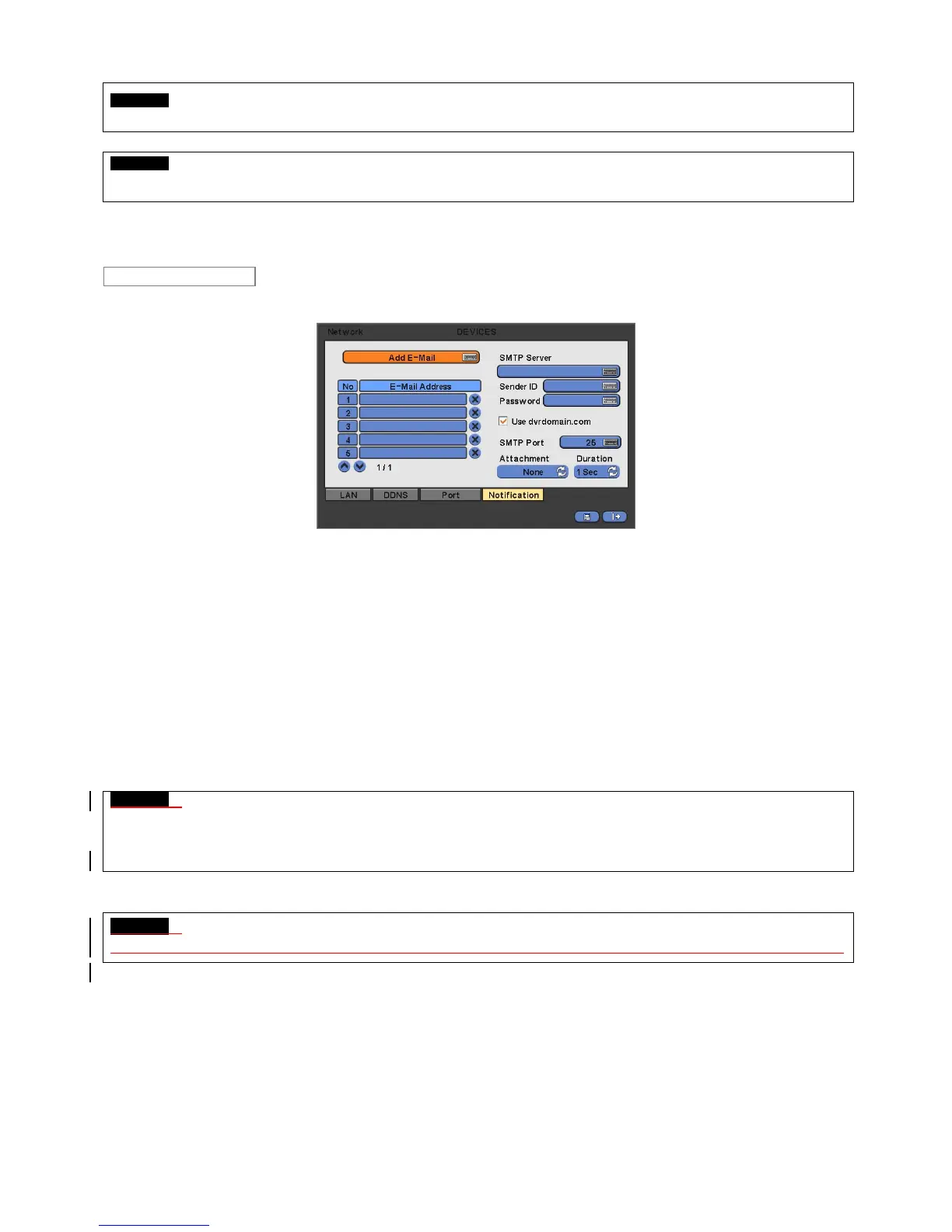
Please click ( ) Notification and the following screen will appear.
The Notification menu allows to send users the message of the Event occurred in DVR via E-Mail.
Click ( ) the keyboard icon on the right-hand side of Add E-Mail frame and the virtual keyboard will appear. Please register
E-Mail address. E-Mail address should contain @.
Click ( ) the keyboard icon on the right-hand side of SMTP Server frame and the virtual keyboard will appear. Please
register the SMTP Server. SMTP server can be set up by the users to have own SMTP server on their site.
Click ( ) the keyboard icon on the right-hand side of Sender ID frame and the virtual keyboard will appear. Please register an
ID to the sender mail server (e.g., tony123).
If users want to use dvrdomain.com which is offered by manufacturer instead of own SMTP server, please click on the check
box (use dvrdomain.com).
Default number of SMPT port is 25. Please note that some particular areas have restriction on the default port. If so, port
number 2525 and 587 can be replaceable.
When an event occurs, users can send an email to a designated mail address by clicking attach button and selecting data to
be transmitted. Users may select one of JPEG, VIDEO CLIP and None. In case of transmitting VIDEO CLIP data, set the
duration of time for recoded data in duration menu. (e.g., 1 sec, 3 sec, 5 sec).
CAUTION
ACCORDING TO THE VARIOUA LOCAL CONDITIONS; SSL EMAIL SERVERS MAY NOT WORK CORRECTLY WITH THISFUNCTION. IF
SO PLEASE INACTIVATE THE SSL FEATURE IN THE SERVER SETUP. NOTE THAT SOME SERVER MAY NOT HAVE THIS
INACTIVATE FEATURE
CAUTION
DEPENDING ON THE VARIOUS LOCAL CONDITIONS, SOME e-MAIL SERVERES MAY NOT WORK PROPERLY WITH THIS FUNCTION.
4.4.2 Camera / PTZ
Please click ( ) DEVICES>Camera/PTZ and the following screen will appear.
Notification


 To Next Page
 Loading...
