40
Choose ‘OK’ to confirm the setting.
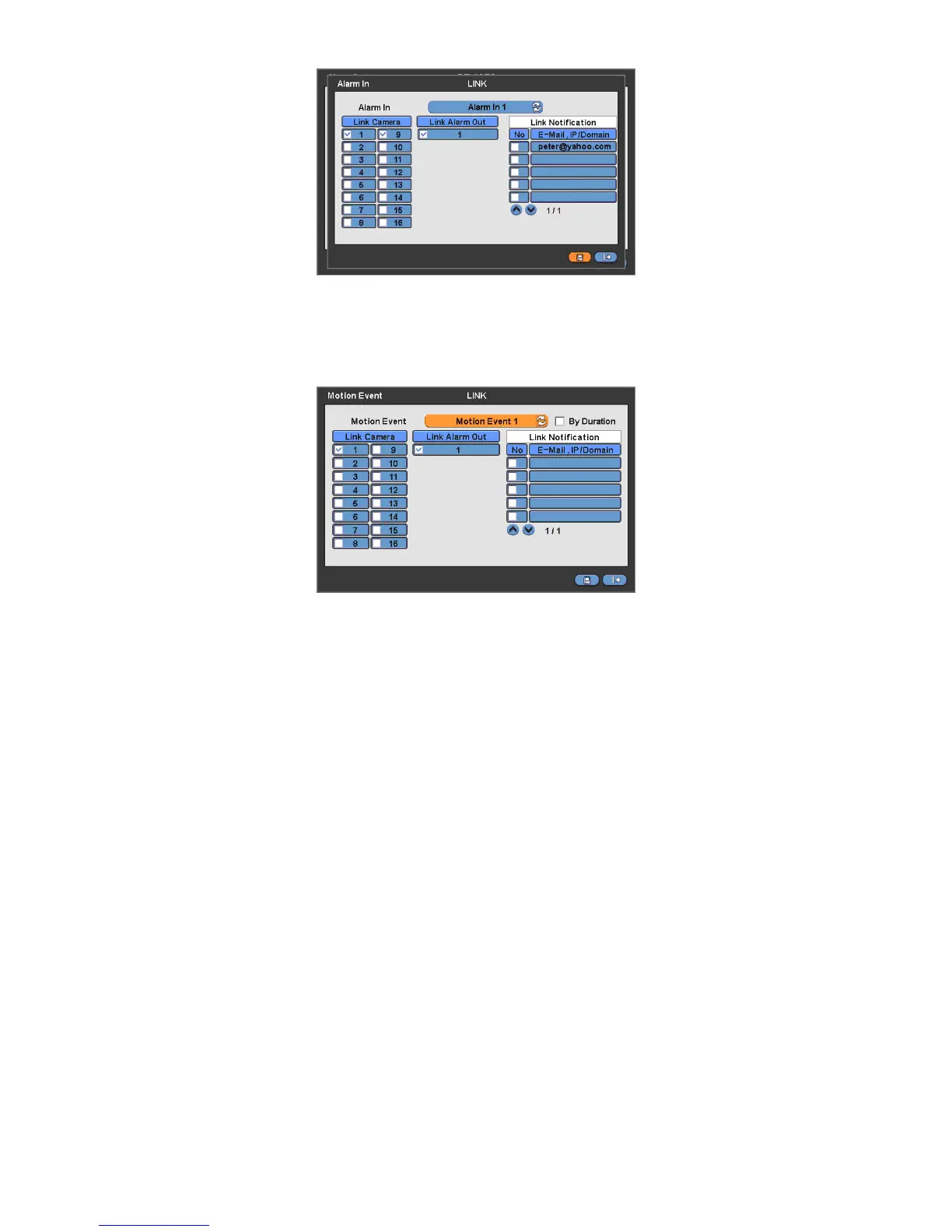
4.6.2 Motion Event
Please click ( ) LINK>Motion Event and the following screen will appear.
Select cameras for recording while the motion sensor is in operation and alarm outputs and set up E-mail addresses for
notification.
Link Notification displays E-mail addresses registered in DEVICES>Network>Notification.
Please follow the setup procedures below.
① Click ( ) Motion Event frame and select Motion Event 1.
② Select cameras for recording when Motion Event 1 is on. Please check a check box under Link Camera. More than
two cameras can be set.
③ Select alarm outputs to be worked when Motion Event 1 is on. Please check a check box under Link Alarm Out. More
than two alarm outputs can be set.
④ Select E-mail addresses for notification when Motion Event 1 is on. Please check a check box under Link Notification.
More than two E-mail addresses can be set.
⑤ Repeat the above procedure for Motion Event 2~ Motion Event 16.
Click( )By Duration box to set up the recording duration and prevent recording caused by event.
The duration time can be controlled by previous setting mode: RECORD>Settings>Event
Choose ‘OK’ to confirm the setting.
4.6.3 Video Loss
Please click ( ) LINK>Video Loss and the following screen will appear.


 To Next Page
 Loading...
