51
: Enter Calendar Search
: Date and Time Search
: Enter Event Search
: Showing current Date & Time
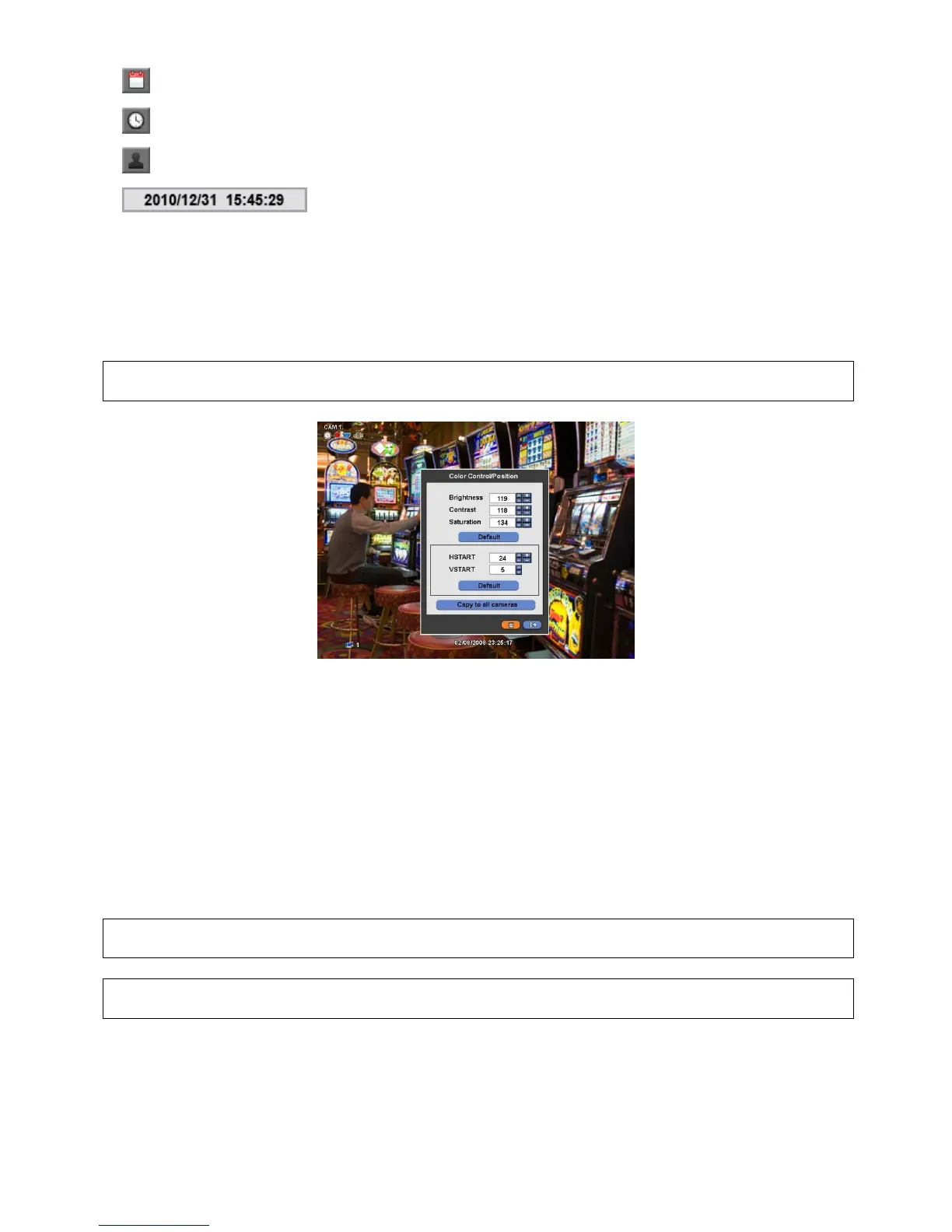
5.7 Color Control and Position
Please click ( ) Color /Alarm in SEARCH menu and the following input box will appear.
(NOTE)
THIS FUNCTION IS ENABLED ONLY WHEN LIVE MODE AND 1 CHANNEL MODE
If user clicks (Default), proper number of Color Control or HSTART/VSTART will appear automatically. Please choose ‘OK’
to confirm the setting.
Click ( ) ▲, ▼ direction buttons on the right-hand side of Brightness/Contrast/Saturation to set adjust color of the screen
(i.e. 0 ~ 255)
Click ( ) ▲, ▼ direction buttons on the right-hand side of HSTART / VSTART to set adjust display poison.
If user wants every camera to have the same mode, please click ( ) Copy to All Camera.
Choose ‘OK’ to confirm the setting.
5.8 Alarm Out Control
Please click ( ) Color / Alarm in SEARCH popup menu or in front panel and the following input box will appear.
(NOTE)
THIS FUNCTION IS ENABLED ONLY WHEN LIVE MODE AND 4 SPLIT SCREEN MODE OR HIGHER.
(NOTE)
ONLY 1 ALARM OUT IS AVAILABLE.


 To Next Page
 Loading...
