113
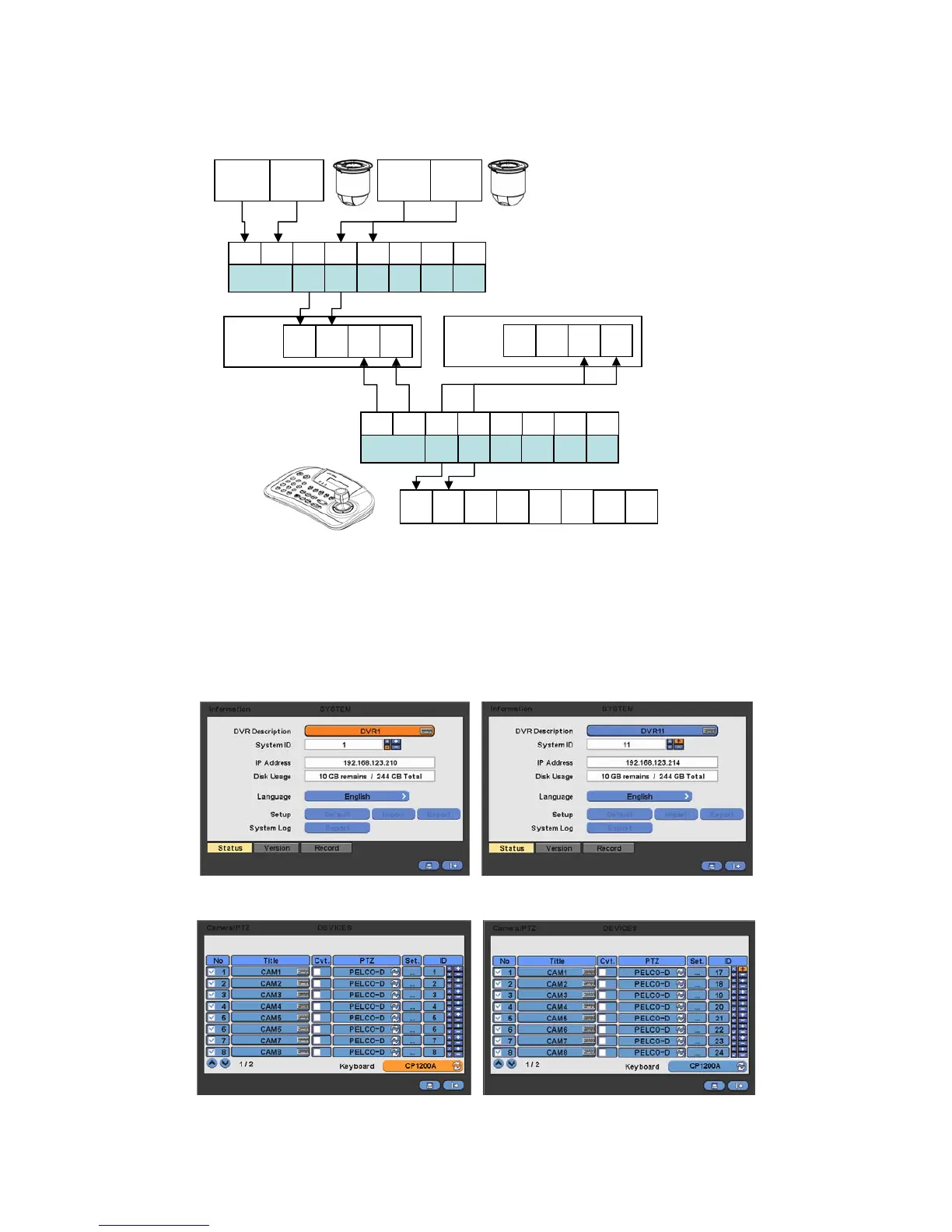
13.1.3 Configuration Diagram III
Multiple system configuration (Multi Cameras, Multi DVRs)
Please make sure to connect “Tx to Rx “or “Rx to Tx” with positive polarity. (+ to +) and (- to -).
13.2 Keyboard Setup in DVR
Enter “Setup>SYSTEM>Information: System ID” and define the ID of DVR.
When user connects more than two DVRs then each DVR has to have a different ID.
Then move to “Setup>Device>Camera/PTZ: Keyboard” and select CP1200A.
Then, choose PTZ protocol and Camera ID.
Tx+ Tx- Rx+ Rx-
DVR 1
RS485
+
RS485
-
Tx1 Tx1 Tx2 Tx2
Tx3 Tx3
TRx
TRx
Tx+ Tx- Rx+ Rx-
DVR 2
Tx+ Tx- Tx+ Tx-
Tx+ Tx- Tx+ Tx-
… …
Max 16 DVR
RS485
+
RS485
-
Tx+ Tx- Tx+ Tx- Tx+ Tx- Tx+ Tx-
Max 16 camera
… …
Multi port
… …
Rx+ Rx-Rx+ Rx-Rx+ Rx-
Multi port
Rx+ Rx-Rx+ Rx-Rx+ Rx-



 To Next Page