Dear Valued Customer,
We are pleased that you chose to buy one of our products and want you to
be just as pleased with it. To be sure that you are 100% satisfied with our
products, we provide toll-free technical and sales support Monday through
Friday, 8:00 am to 7:30 pm, eastern time, (800) 334-3666. You may also
reach us via email at info@emon.com.
Before installing your new E-Mon product, please read the information on the
following pages carefully.
Be sure to forward this manual to the owner after installation is complete so that
they may use it as a reference guide when reading the E-Mon D-Mon
®
meters.
Thank you.
w
i
E-Mon D-Mon
Metering Products & Systems
®
E-Mon
®
Chapter 3
Load Control Relay Programming
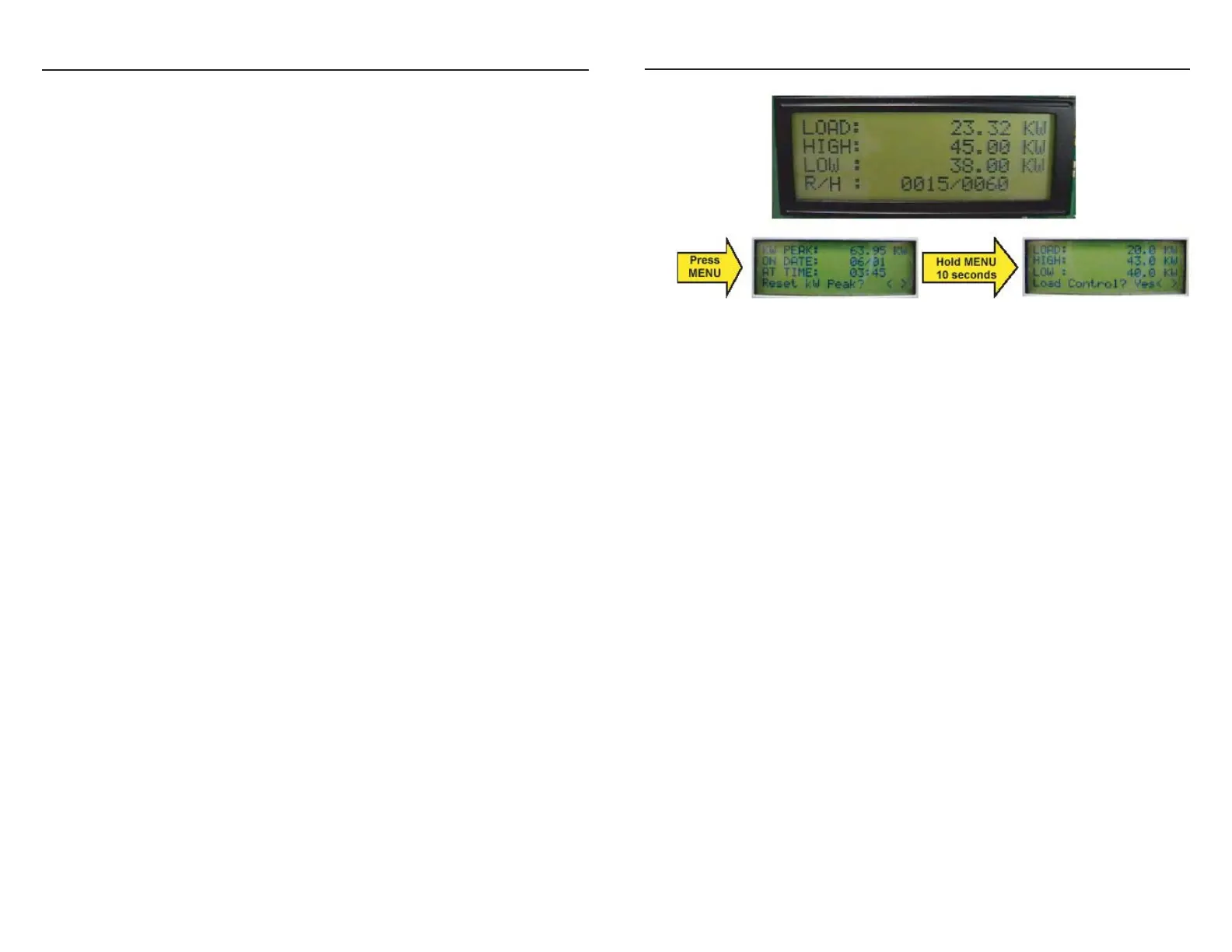
STEP 1: Press and hold the Menu button for 10 seconds to enter the pro-
gramming mode. When Menu is first pressed, the display will read
Reset kW peak?. After 10 seconds, the display will change to Load
Control? Yes. Toggle between the Up and Down buttons to choose
“Yes” or “No”. Choose “Yes” if load control is desired.
STEP 2: Press Select once. “HIGH” should now be blinking on the Class
3000 display. Use the Up and Down buttons to select a value in kW.
STEP 3: Press Select again. “LOW” should now be blinking on the meter
display. Use the Up and Down buttons to select a value in kW. This
number must be higher than “0”, but lower than the number selected
for the HIGH set point.
STEP 4: Press Select again. The first number on the bottom line of the display
should be blinking. This is the ramp setting, which controls the num-
ber of seconds that the load must exceed the set point before
activating the relay. Use the Up and Down buttons to select a time
between 15 and 240 seconds. (Default is 30 seconds.)
STEP 5: Press Select again. The second number on the bottom line of the dis-
play should now be blinking. This is the hold setting, which is the time
that the relay is held active after exceeding the high set point and the
ramp time has timed out. Use the Up and Down buttons to choose a
time from 60 to 2400 seconds. The default is 60 seconds.
STEP 6: Press Select to return to normal mode.
Note: If no buttons are pressed within a one-minute period, the Class 3000 display
will change to Hold mode. Press Menu again to set the load control, or press
Select multiple times to scroll through the hold modes and return to normal.
Note: To disable the relay function, select “No” in Step 1.
5
Test Equipment Depot - 800.517.8431 - 99 Washington Street Melrose, MA 02176
FAX 781.665.0780 - TestEquipmentDepot.com


 To Next Page
 Loading...