
 Need help?
Do you have a question about the Eagle Eye Networks EN-CCUC-002a and is the answer not in the manual?
Details the ports for network, power, and external device connections.
Explains the indicator lights and motion detection sensor.
Covers the SD card slot and built-in audio components.
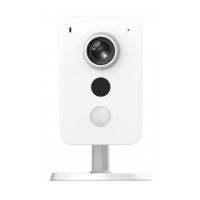
This document serves as a Quick Start Guide for the Eagle Eye Networks Digital IP Camera, Model ID: EN-CCUC-002a, providing essential information for its setup, operation, and maintenance.
The Eagle Eye Networks Digital IP Camera is designed for surveillance and monitoring purposes, primarily in indoor environments. It captures high-resolution video footage, making it suitable for security applications in various settings. The camera is equipped with features that enhance its performance in different lighting conditions and environments, ensuring clear and reliable video capture. Its compact and modern design allows for discreet placement while still providing comprehensive coverage. The camera integrates with the Eagle Eye Networks ecosystem, enabling cloud-based video management and remote access to live and recorded footage.
The camera offers a range of features designed for ease of use and effective surveillance. It supports multiple video resolutions, allowing users to select the optimal setting based on their specific needs and available storage. The inclusion of night vision capabilities, with IR LEDs providing illumination up to 14 meters (45.9 feet), ensures continuous monitoring even in complete darkness. This makes it ideal for 24/7 surveillance. The wide field of view (97° horizontal, 52° vertical, 115° diagonal) allows the camera to cover a significant area, reducing the need for multiple cameras in smaller spaces.
Dynamic Range features such as Wide Dynamic Range, Highlight Compensation, and Backlight Compensation are integrated to handle challenging lighting conditions, ensuring that both bright and dark areas of a scene are clearly visible. This is particularly useful in environments with strong backlighting or high contrast. The camera's image sensor is a 1/3" progressive scan CMOS, which contributes to sharp and detailed images. A fixed iris and a wide shutter speed range (1/3s to 1/100,000s) further enhance its adaptability to varying light levels. For low-light conditions, the camera can operate with a minimum illumination of 0.165 Lux in color mode, and 0 Lux when IR is active.
The camera supports various video compression standards, including H.265, H.264, and MJPEG, which helps in optimizing storage space and bandwidth usage without compromising video quality. Audio compression is also supported with AAC, G.711a, and G.711Mu codecs, enabling clear audio capture and transmission. Image settings such as rotation, saturation, brightness, contrast, and sharpness can be adjusted to fine-tune the video output according to specific preferences or environmental conditions.
Connectivity options include an RJ-45 Female 10/100 Base-T Ethernet port for wired network connections, ensuring stable data transmission. Additionally, the camera features Wi-Fi connectivity (IEEE802.11b/g/n), offering flexible placement options without the need for extensive cabling. Built-in microphone and speaker functionalities enable two-way audio communication, which can be useful for deterrence or direct interaction with individuals in the monitored area. The camera also includes a PIR detector for motion sensing, enhancing its ability to detect activity and trigger recordings or alerts.
For local storage, the camera is equipped with a Micro SD/SDHC/SDXC slot, supporting up to 265GB, which provides a backup or primary storage solution in case of network interruptions or for standalone operation. Digital Input/Output (I/O) ports are available for integrating the camera with external alarm systems or other devices, expanding its functionality within a broader security setup.
The camera's indicator light provides immediate visual feedback on its operational status. A red light indicates booting or a device malfunction, while a flashing green light signifies that booting is complete and the camera is awaiting Wi-Fi configuration. A solid green light indicates normal operation. A flashing red light suggests a network connection failure, and alternating green and red lights indicate a firmware upgrade in progress. This system of indicator lights helps users quickly diagnose and troubleshoot common issues.
Maintenance of the Eagle Eye Networks Digital IP Camera is designed to be straightforward. The quick start guide serves as a primary reference for initial setup and troubleshooting. Users are advised to consult the Eagle Eye Networks website or contact their local service engineer for further information and support.
The device includes a reset button, which can be pressed and held for 10 seconds until the indicator light turns off to perform a factory reset. This is a crucial feature for troubleshooting or reconfiguring the device. Firmware upgrades are indicated by alternating green and red lights, ensuring users are aware of ongoing maintenance processes that enhance performance and security.
The camera is designed for indoor use within a specified operating temperature range of -10°C to +45°C and an operating humidity range of 0%-95% RH, ensuring reliable performance under typical indoor conditions. Proper installation is emphasized, with a requirement that the installation environment can support at least three times the camera's weight (0.31 Kg or 0.68 lb) to ensure secure mounting. The packaging includes a positioning map and screws to facilitate correct installation.
The device complies with FCC radiation exposure limits for an uncontrolled environment and should be installed and operated with a minimum distance of 20cm between the radiator and the user's body. This highlights the importance of safe installation practices. Furthermore, the camera adheres to European Union directives regarding the collection and disposal of old equipment and batteries, emphasizing environmentally responsible end-of-life management. Users are instructed not to dispose of the device with household waste and to contact their dealer or local authorities for proper recycling information. This commitment to environmental responsibility is a key aspect of the device's maintenance and lifecycle.
 General
| Model | EN-CCUC-002a |
|---|---|
| Type | IP Camera |
| Max. Resolution | 1920 x 1080 |
| Weather Resistance | Yes |
| Connectivity | Ethernet |
| Night Vision | Yes |
| Compatibility | Eagle Eye Cloud VMS |
| Lens | 2.8mm |
| Field of View | H:112°, V:60°, D:135° |
| Video Compression | H.264 |
| Power Supply | PoE |
| Audio | Built-in microphone |
| Storage | MicroSD up to 256GB |

 To Next Page